Background:
Environment
- Dev environment, Venafi 25.3.0.2740
- Microsoft ADCS stand-alone CA
- Enrollment method: DCOM
- CA object uses a local account on the ADCS server
- No custom workflows
- No customizations
- No consumers/app installation tied to the cert object
- Simple certificate object created for testing
Problem
When a certificate is requested from Venafi against the stand-alone Microsoft CA, ADCS successfully issues the certificate, but the certificate is immediately revoked with revocation reason:
This is happening to the same certificate that was just issued, not a prior cert.
Expected behavior
Venafi should submit the CSR, obtain the issued certificate, and leave the newly issued certificate valid.
Actual behavior
Venafi submits the CSR, ADCS issues the certificate successfully, and then the same certificate is immediately revoked as Superseded.
Evidence gathered
1. ADCS database confirms issued cert is the same cert being revoked
Example request:
- Request ID: 41
- Requester Name: HOSTNAME\venafi
- Common Name: 20260331-withrevoke.example.com
- Serial Number: 55000000299749d000d299f5ae000100000029
- Disposition: Revoked
- Disposition Message: Revoked by HOSTNAME\venafi
- Revocation Reason: 0x4 — Superseded
This proves Venafi is revoking the cert it just obtained.
2. ADCS request contents are valid
For the same request, ADCS shows the CSR and issued certificate are normal and match expectations.
Request attributes
- CertificateTemplate: WebServer
- ccm: venafihost.servers.example.com
CSR / issued cert contents
- Subject: CN=20260331-withrevoke.example.com, O=”Example Company, Inc”, L=Temple Terrace, S=Florida,C=US
- SAN: DNS Name=20260331-withrevoke.example.com
- RSA 2048 key
- Certificate issued successfully before revoke
This suggests the CA is not returning malformed or obviously incorrect cert content.
3. Security event log confirms immediate issue then revoke
After enabling Certification Services auditing, Security log shows this sequence:
Event 4886
- Certificate Services received the request
Event 4887
- Certificate Services approved the request and issued the certificate
- Requester: HOSTNAME\venafi
- DCOM/RPC authentication path used
- Template shown as WebServer
Event 4870
- Certificate Services revoked the certificate
- Same serial number as the issued certificate
- Reason: 4 (Superseded)
This happens effectively immediately.
4. Pattern is repeatable
Querying the CA database for requests from HOSTNAME\venafi shows a repeated pattern where most requests are immediately revoked with:
- Disposition: Revoked
- Revocation Reason: Superseded
- Disposition Message: Revoked by HOSTNAME\venafi
The exceptions were tests where revoke capability had been intentionally removed from the Venafi CA account.
5. Permission test changed behavior but did not fix root cause
When Issue and Manage Certificates was removed from the Venafi CA account, the request no longer completed the revoke path and instead failed earlier with:
- PostCSR failed with error: CCertAdmin::SetCertificateExtension: Access is denied. 0x80070005
This indicates Venafi is performing CA administrative operations after CSR submission, and revocation happens later in that same general post-issuance path.
6. Procmon on the Venafi host shows VPlatform.exe using both CertRequest and CertAdmin
Procmon on CWWAPP1989D captured VPlatform.exe doing the following:
Cert enrollment path
VPlatform.exe queries and activates:
- HKCR\CLSID\{98AFF3F0-5524-11D0-8812-00A0C903B83C}
- CertRequest Class
- C:\Windows\System32\certcli.dll
CA admin path
VPlatform.exe then queries and activates:
- HKCR\CLSID\{37EABAF0-7FB6-11D0-8817-00A0C903B83C}
- CertAdmin Class
- %systemroot%\system32\certadm.dll
DCOM/RPC communication
Procmon also shows:
- endpoint mapper (135) traffic via svchost.exe
- VPlatform.exe connecting to the CA host on dynamic RPC port 50014
This strongly suggests:
- VPlatform.exe first issues via CertRequest
- then immediately performs CA admin operations via CertAdmin
Given the ADCS security logs, that admin path appears to be what revokes the newly issued cert.
Additional observations
Stand-alone CA
This is a stand-alone Microsoft CA, not enterprise template-based ADCS.
No special Venafi workflow/customization
This is a dev system with:
- no custom workflows
- no special consumers
- no installation/application integration
- minimal test object
That makes this look less like an environmental customization problem and more like:
- default Venafi behavior in this integration path, or
- a product defect in the stand-alone Microsoft CA DCOM path
Failed auth events also observed
We saw Security log 4625 failures from HOSTNAME for DOMAIN\USER
From the Security log:
- 11:53:34 — 4886 request received
- 11:53:36 — 4887 certificate issued
- 11:53:36 — 4870 certificate revoked
- 11:53:36 — multiple 4625 failures for DOMAIN\venafisystemuser
- 11:53:37 — another 4625
Since time resolution in the log is seconds, it is possible Venafi is requesting the cert under the configured credential (HOSTNAME\venafi), attempting to do something else under DOMAIN\venafisystemuser, getting an auth failure, and then revoking the certificate under the configured credential (DOMAIN\venafisystemuser). I would be surprised if this is the case because “superseded” is a very specific revocation reason. I would expect something like a generic “Unspecified” or “Cessation of Operation” to be used.
Summary conclusion
Current evidence indicates that:
- Venafi successfully enrolls the certificate from the stand-alone Microsoft CA using DCOM / CertRequest
- VPlatform.exe then immediately invokes the Microsoft CA admin COM interface (CertAdmin)
- the newly issued certificate is then revoked by the Venafi CA account with reason Superseded
At this point, this appears to be:
- Venafi-driven post-issuance behavior
- not spontaneous ADCS behavior
- and likely either:
- expected-but-unwanted default behavior in this integration mode, or
- a product defect in the stand-alone Microsoft CA DCOM workflow
Resolution
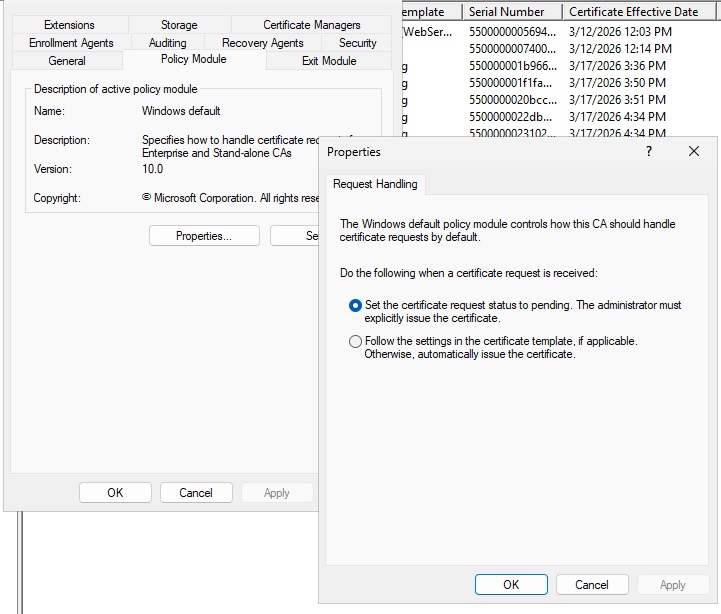
The issue was resolved by changing the policy module settings to set the cert request to pending instead of automatically issue. While I expected this to leave the cert in a pending state and require manual intervention (or a batch job to bulk approve whatever is pending), the cert was immediately issued.