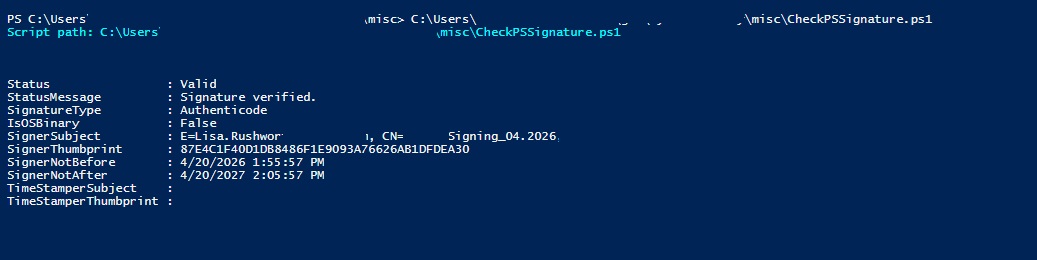
A quick PowerShell script to report on its own signature data:
$scriptPath = $PSCommandPath

if (-not $scriptPath) {
    throw 'This script must be run from a .ps1 file so $PSCommandPath is available.'
}

$sig = Get-AuthenticodeSignature -FilePath $scriptPath

Write-Host "Script path: $scriptPath`n" -ForegroundColor Cyan

[PSCustomObject]@{
    Status                  = $sig.Status
    StatusMessage           = $sig.StatusMessage
    SignatureType           = $sig.SignatureType
    IsOSBinary              = $sig.IsOSBinary
    SignerSubject           = $sig.SignerCertificate.Subject
    SignerThumbprint        = $sig.SignerCertificate.Thumbprint
    SignerNotBefore         = $sig.SignerCertificate.NotBefore
    SignerNotAfter          = $sig.SignerCertificate.NotAfter
    TimeStamperSubject      = $sig.TimeStamperCertificate.Subject
    TimeStamperThumbprint   = $sig.TimeStamperCertificate.Thumbprint
} | Format-List
To sign the script:
$thumb = '87E4C1F40D1DB8486F1E9093A76626AB1DFDEA30'
$scriptPath = "$env:USERPROFILE\git\CyberSecurity\misc\CheckPSSignature.ps1"

$cert = Get-ChildItem Cert:\CurrentUser\My, Cert:\LocalMachine\My |
    Where-Object {
        $_.Thumbprint -eq $thumb -and
        $_.HasPrivateKey -and
        ($_.EnhancedKeyUsageList | Where-Object {
            $_.ObjectId -eq '1.3.6.1.5.5.7.3.3' -or $_.FriendlyName -eq 'Code Signing'
        })
    } |
    Select-Object -First 1

if (-not $cert) {
    throw "Code signing certificate $thumb not found."
}

Set-AuthenticodeSignature -FilePath $scriptPath -Certificate $cert
Get-AuthenticodeSignature -FilePath $scriptPath | Format-List *
And now the script is signed: