Tag: bpy

Blender Script: Distance Between Two Points

We were having a lot of trouble using the measure tool in Blender — after discovering that you can hold the Ctrl key and “snap” your selection to a vertex, it actually worked in the way we wanted it to. But, before that discovery, my thought was to manually select two vertices and use a Python script to measure the distance between those points. That is “blender units” … and the metric or imperial units would be more meaningful. So I converted based on the scene configuration.

import bpy
import bmesh


def format_metric(meters: float) -> str:
    a = abs(meters)

    if a >= 1.0:
        return f"{meters:.6f} m"
    elif a >= 0.01:
        return f"{meters * 100.0:.3f} cm"
    else:
        return f"{meters * 1000.0:.3f} mm"


def format_imperial(meters: float) -> str:
    total_inches = meters / 0.0254
    sign = "-" if total_inches < 0 else ""
    total_inches = abs(total_inches)

    feet = int(total_inches // 12)
    inches = total_inches - (feet * 12)

    if feet > 0:
        return f"{sign}{feet} ft {inches:.3f} in"
    else:
        return f"{sign}{total_inches:.3f} in"


def measure_selected_vertices():
    ctx = bpy.context
    obj = ctx.edit_object

    if obj is None or obj.type != 'MESH':
        raise RuntimeError("Go into Edit Mode on a mesh and select exactly 2 vertices.")

    bm = bmesh.from_edit_mesh(obj.data)
    selected_verts = [v for v in bm.verts if v.select]

    if len(selected_verts) != 2:
        raise RuntimeError(f"Expected exactly 2 selected vertices, found {len(selected_verts)}.")

    v1, v2 = selected_verts

    # Convert local vertex coordinates to world-space coordinates
    p1 = obj.matrix_world @ v1.co
    p2 = obj.matrix_world @ v2.co

    # Raw world-space distance in Blender units
    raw_distance = (p2 - p1).length

    scene = ctx.scene
    units = scene.unit_settings
    scale_length = units.scale_length if units.scale_length != 0 else 1.0

    # Convert Blender units to meters according to the scene unit scale
    distance_meters = raw_distance * scale_length

    print("\n----- Vertex Distance -----")
    print(f"Object: {obj.name}")
    print(f"Raw distance (Blender units): {raw_distance:.6f}")
    print(f"Scene unit system: {units.system}")
    print(f"Scene unit scale: {scale_length}")

    if units.system == 'METRIC':
        print(f"Formatted distance: {format_metric(distance_meters)}")

    elif units.system == 'IMPERIAL':
        print(f"Formatted distance: {format_imperial(distance_meters)}")

    else:
        print("Formatted distance: Scene unit system is 'NONE'")
        print(f"Interpreted using current unit scale: {format_metric(distance_meters)}")


measure_selected_vertices()
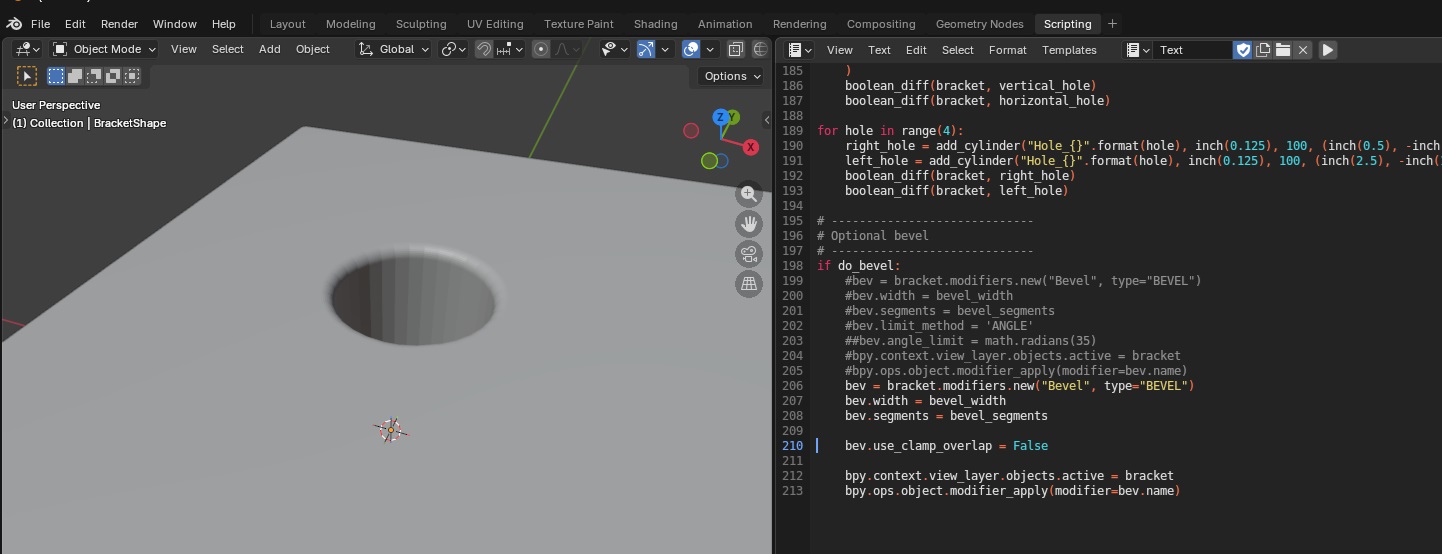
Blender Scripting Lesson of the Week: Beveling

We were playing around with bevels this week – it’s pretty straight forward, the API lets you set the parameters you set through the GUI in a bevel modifier.

import bpy

# Clear all existing objects
for obj in list(bpy.data.objects):
    bpy.data.objects.remove(obj, do_unlink=True)

# Set Units
scene = bpy.context.scene
scene.unit_settings.system = 'METRIC'
scene.unit_settings.scale_length = 0.001  # 1 BU = 1 mm

# Create rectangular cube
bpy.ops.mesh.primitive_cube_add(location=(0, 0, 0))
block = bpy.context.active_object
block.name = "Block"

# cube default size is 2x2x2, so set absolute dimensions
block.dimensions = (2.0, 20.0, 0.25)
bpy.context.view_layer.objects.active = block
block.select_set(True)

# Apply scale so booleans/bevel behave predictably
bpy.ops.object.transform_apply(location=False, rotation=False, scale=True)

# Create cylinder cutter
hole_diameter = 1.0
hole_radius = hole_diameter / 2.0

# Make it longer than the block thickness so it fully cuts through
cutter_depth = 5.0

bpy.ops.mesh.primitive_cylinder_add(
    vertices=64,
    radius=hole_radius,
    depth=cutter_depth,
    location=(0.0, 0.0, 0.0),   # center of the block
    rotation=(0.0, 0.0, 0.0)
)
cutter = bpy.context.active_object
cutter.name = "HoleCutter"

bpy.ops.object.transform_apply(location=False, rotation=False, scale=True)

# Boolean: cut hole
bpy.context.view_layer.objects.active = block
bool_mod = block.modifiers.new(name="Hole", type='BOOLEAN')
bool_mod.operation = 'DIFFERENCE'
bool_mod.solver = 'EXACT'
bool_mod.object = cutter

# Apply boolean
bpy.ops.object.modifier_apply(modifier=bool_mod.name)

# Hide cutter in viewport + renders
cutter.hide_set(True)
cutter.hide_render = True

# Bevel the block
bevel_width = 0.08 
bevel_segments = 5

bevel_mod = block.modifiers.new(name="Bevel", type='BEVEL')
bevel_mod.width = bevel_width
bevel_mod.segments = bevel_segments
bevel_mod.limit_method = 'ANGLE'
bevel_mod.angle_limit = 0.523599  # 30 degrees in radians

# Apply bevel
bpy.ops.object.modifier_apply(modifier=bevel_mod.name)

Blender Scripting Lesson of the Week: Cylinders

Quick script for creating a cylinder using bpy

import bpy

# Clear all existing objects
for obj in list(bpy.data.objects):
    bpy.data.objects.remove(obj, do_unlink=True)

# Set Units
scene = bpy.context.scene
scene.unit_settings.system = 'METRIC'
scene.unit_settings.scale_length = 0.001  # 1 BU = 1 mm

# Create cylinder
bpy.ops.mesh.primitive_cylinder_add(
    vertices=32, radius=10.0, depth=20.0,
    end_fill_type='NGON', calc_uvs=True,
    enter_editmode=False, align='WORLD',
    location=(0.0, 0.0, -2.0), rotation=(0.0, 0.0, 0.0),
    scale=(1, 1, 1)
)

# Name cylinder
obj = bpy.context.active_object
obj.name = "MyCylinder"

# Frame Selected 
for area in bpy.context.window.screen.areas:
    if area.type == 'VIEW_3D':
        for region in area.regions:
            if region.type == 'WINDOW':
                with bpy.context.temp_override(area=area, region=region):
                    bpy.ops.view3d.view_selected(use_all_regions=False)
                break
        break