Category: Blender

Blender – Making a Part Thicker

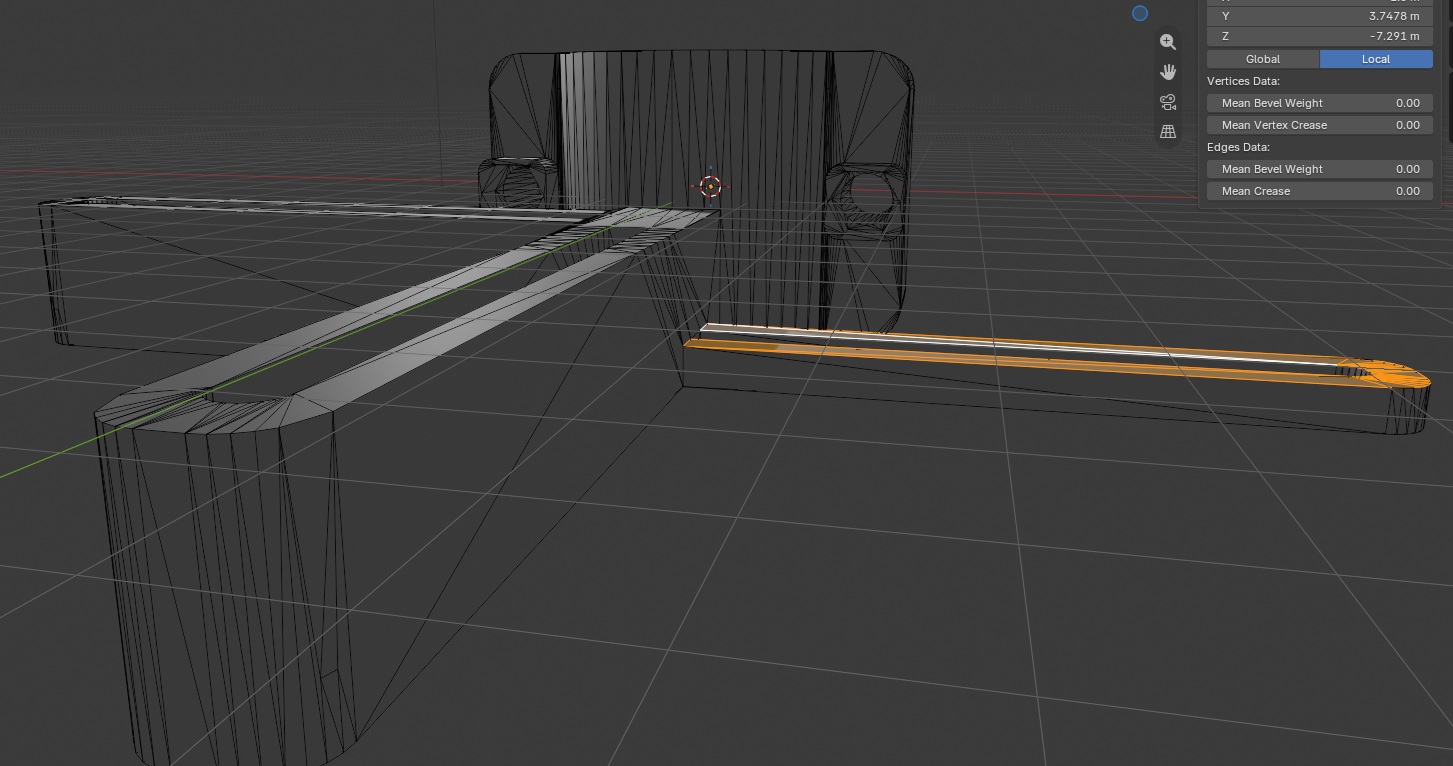
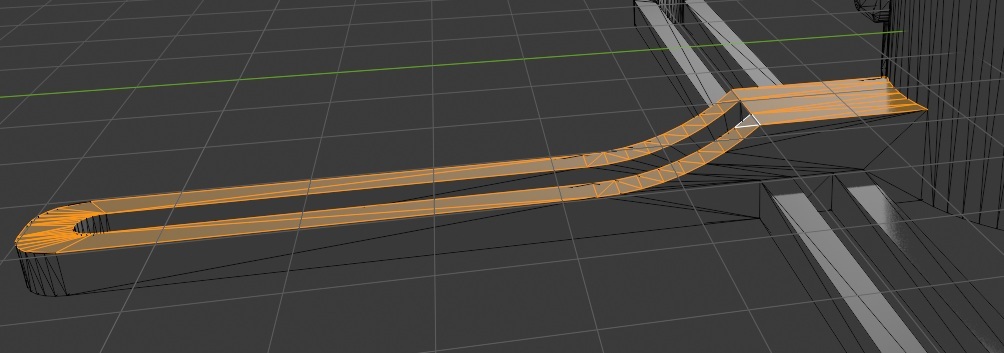
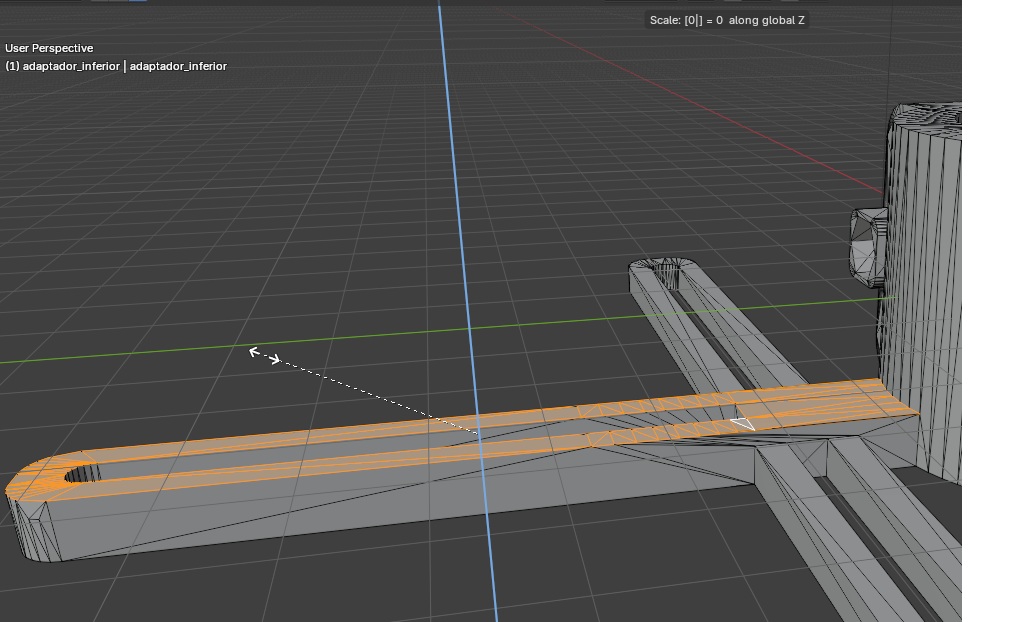
We are modifying a mount that lets you attach your cell phone to a microscope – one of the problems with the original design is that it’s not particularly sturdy. We lengthened the arms to accommodate larger cell phones, but that made the arms even flimsier. Anya showed us how to use s – z – 0 which flattens the selection to the average z height of the selected faces. Starting with a curved surface, I selected all of the faces. Then typed the letter s, the letter z, and 0

This flattens the object – the difference between the z location of all faces is zero. You can keep the curve but make it smaller by using a fractional number instead of zero. You can exaggerate the difference by using a number greater than 1. A negative number inverts the curve – the high part becomes low, and the low part becomes high.

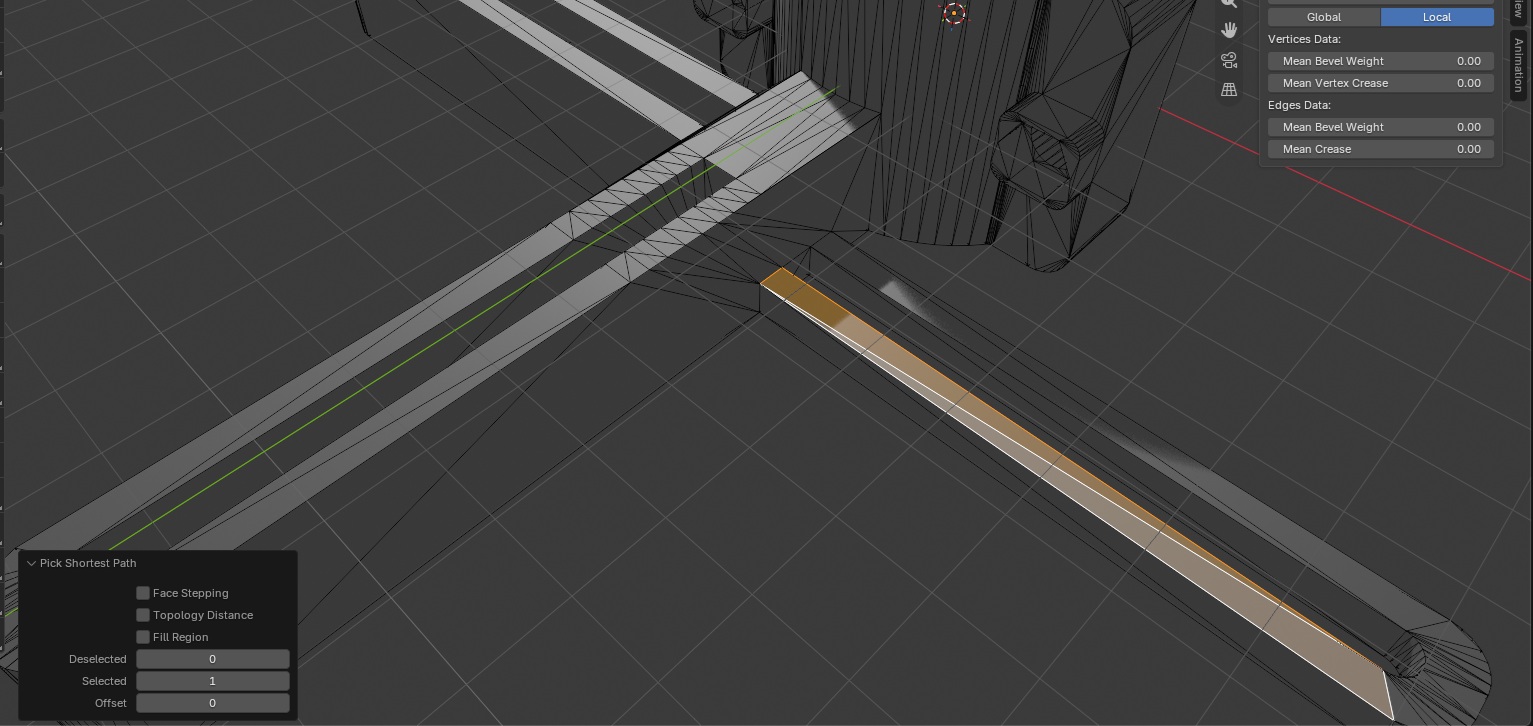
Once the faces were on a single plane, we used G Z {number} to move the selected faces. The number is an offset from the plane where the faces are currently – so if you are at 4 and want the object to be 5mm thick, you use G Z 1. Using G Z 5 (which makes sense to move them to z of 5) actually makes the object 9mm thick!

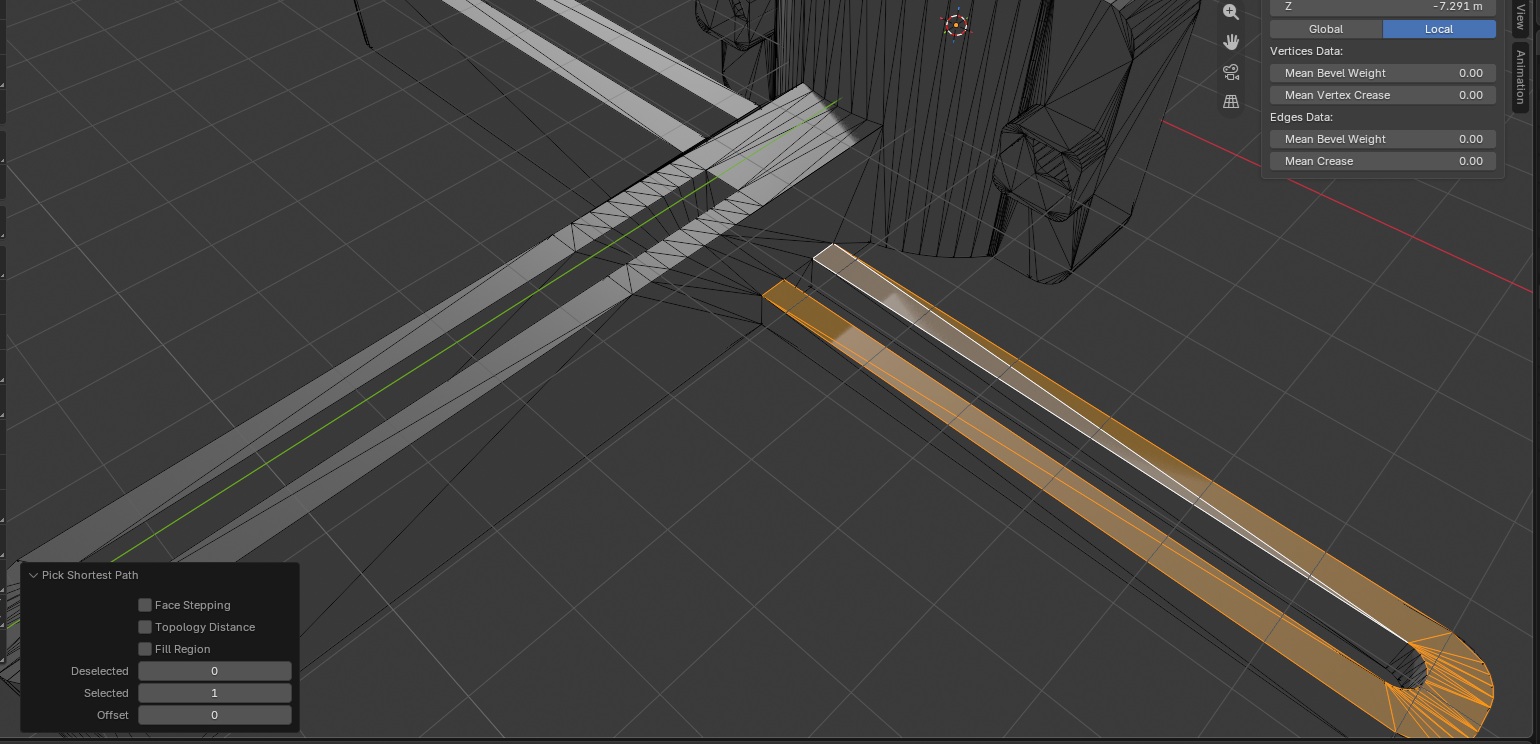
The perpendicular faces are magically extruded so the faces you moved are not floating out there in space. The two arms that have already been increased, you can see that the perpendicular faces have been extended to meet the new face height. Obviously, if you want all three arms to be the same height you should select all of the top faces and adjust them simultaneously.


One other thing we learned in this adventure is how to select a bunch of faces between the faces you’ve already got selected and where you want to be. Shift will let you individually click faces, but I don’t want to click all of those little triangles along the curved side.

Selecting a few faces and then holding ctrl will select everything along the shortest path from where you already selected to where you click — here, selecting all the faces on the top of this arm. You can also use alt for a loop select — Anya finds that very functional, but it didn’t work for me!

Blender Script: Moving Object

This script moves the selected object to be centered on the world origin but it sits on the z plane rather than half of it being below the z plane.


import bpy
from mathutils import Vector

# Put the origin at the center of volume
bpy.ops.object.origin_set(
type='ORIGIN_CENTER_OF_VOLUME',
center='MEDIAN',
)

for obj in bpy.context.selected_objects:
# The bounding-box corners are stored in object-local coordinates.
# Transform them to world coordinates before finding the lowest point.
lowest_z = min(
(obj.matrix_world @ Vector(corner)).z
for corner in obj.bound_box
)

world_matrix = obj.matrix_world.copy()
world_matrix.translation.x = 0.0
world_matrix.translation.y = 0.0
world_matrix.translation.z -= lowest_z
obj.matrix_world = world_matrix

Blender Script: Distance Between Two Points

We were having a lot of trouble using the measure tool in Blender — after discovering that you can hold the Ctrl key and “snap” your selection to a vertex, it actually worked in the way we wanted it to. But, before that discovery, my thought was to manually select two vertices and use a Python script to measure the distance between those points. That is “blender units” … and the metric or imperial units would be more meaningful. So I converted based on the scene configuration.

import bpy
import bmesh


def format_metric(meters: float) -> str:
    a = abs(meters)

    if a >= 1.0:
        return f"{meters:.6f} m"
    elif a >= 0.01:
        return f"{meters * 100.0:.3f} cm"
    else:
        return f"{meters * 1000.0:.3f} mm"


def format_imperial(meters: float) -> str:
    total_inches = meters / 0.0254
    sign = "-" if total_inches < 0 else ""
    total_inches = abs(total_inches)

    feet = int(total_inches // 12)
    inches = total_inches - (feet * 12)

    if feet > 0:
        return f"{sign}{feet} ft {inches:.3f} in"
    else:
        return f"{sign}{total_inches:.3f} in"


def measure_selected_vertices():
    ctx = bpy.context
    obj = ctx.edit_object

    if obj is None or obj.type != 'MESH':
        raise RuntimeError("Go into Edit Mode on a mesh and select exactly 2 vertices.")

    bm = bmesh.from_edit_mesh(obj.data)
    selected_verts = [v for v in bm.verts if v.select]

    if len(selected_verts) != 2:
        raise RuntimeError(f"Expected exactly 2 selected vertices, found {len(selected_verts)}.")

    v1, v2 = selected_verts

    # Convert local vertex coordinates to world-space coordinates
    p1 = obj.matrix_world @ v1.co
    p2 = obj.matrix_world @ v2.co

    # Raw world-space distance in Blender units
    raw_distance = (p2 - p1).length

    scene = ctx.scene
    units = scene.unit_settings
    scale_length = units.scale_length if units.scale_length != 0 else 1.0

    # Convert Blender units to meters according to the scene unit scale
    distance_meters = raw_distance * scale_length

    print("\n----- Vertex Distance -----")
    print(f"Object: {obj.name}")
    print(f"Raw distance (Blender units): {raw_distance:.6f}")
    print(f"Scene unit system: {units.system}")
    print(f"Scene unit scale: {scale_length}")

    if units.system == 'METRIC':
        print(f"Formatted distance: {format_metric(distance_meters)}")

    elif units.system == 'IMPERIAL':
        print(f"Formatted distance: {format_imperial(distance_meters)}")

    else:
        print("Formatted distance: Scene unit system is 'NONE'")
        print(f"Interpreted using current unit scale: {format_metric(distance_meters)}")


measure_selected_vertices()

Blender API: List All Items in a Collection

Instead of iterating through all objects, you can iterate through the items in a specific collection:

import bpy

# Name of the collection to inspect
collection_name = "TestCollection"

collection = bpy.data.collections.get(collection_name)

if collection is None:
    print(f"Collection '{collection_name}' not found.")
else:
    print(f"Objects in collection '{collection_name}':")
    for obj in collection.objects:
        print(f"- {obj.name}")

Printing to the console:

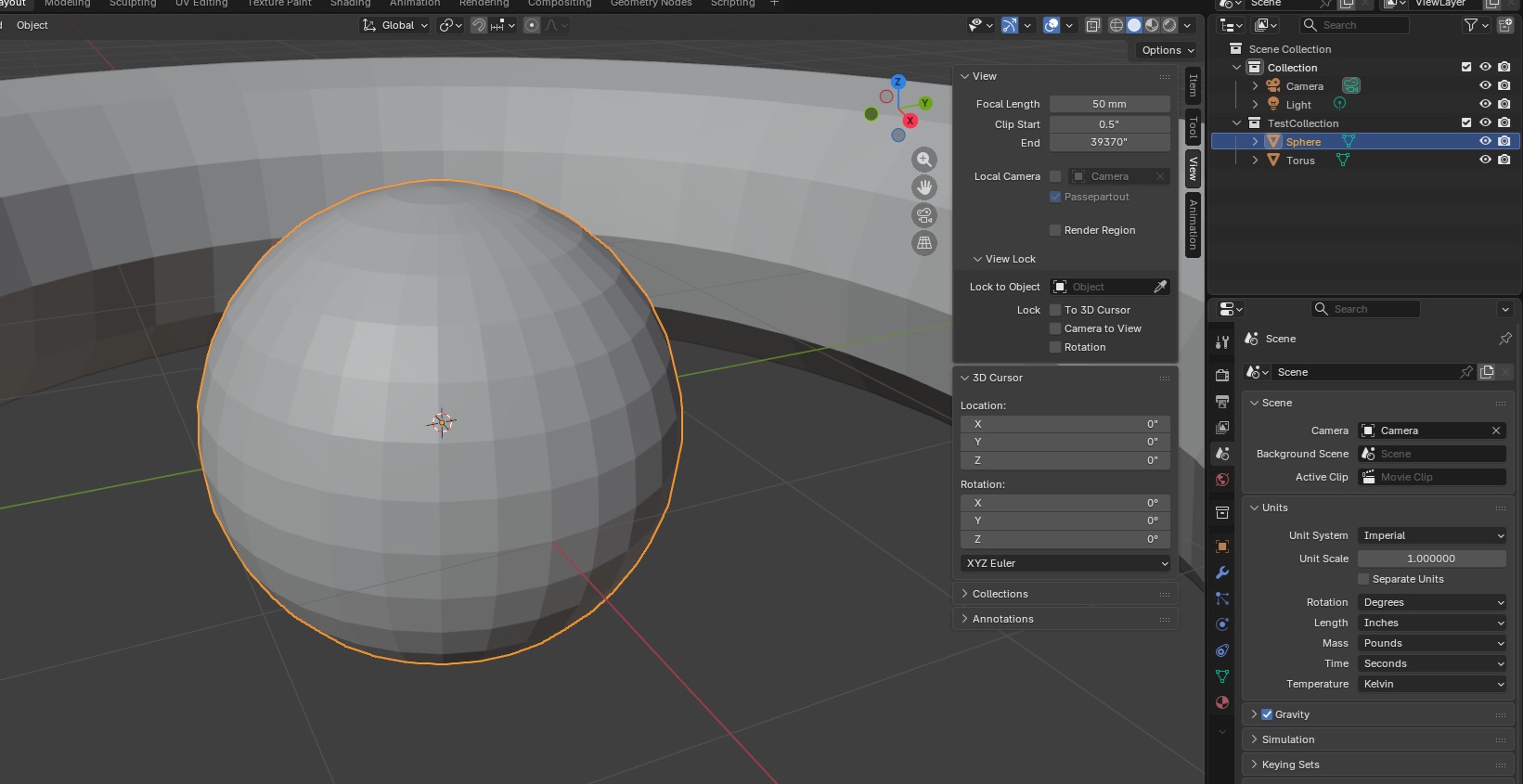
For this sample workspace that contains a torus and sphere with the default names

Blender API: Finding The Orange Dot

A quick script to get each object and the location of the “orange dot” … the origin of the object

# Get location of orange dot for each object in Blender
import bpy

scene = bpy.context.scene
us = scene.unit_settings

unit_system = getattr(us, "system", "NONE")  # 'NONE', 'METRIC', 'IMPERIAL'

meters_per_bu = us.scale_length if unit_system != 'NONE' else 1.0
mm_per_bu = meters_per_bu * 1000.0

for obj in bpy.data.objects:
    if obj.type != 'MESH':
        continue

    origin_world = obj.matrix_world.translation          # in BU
    origin_world_mm = origin_world * mm_per_bu           # in mm

    print(f"Object: {obj.name}")
    print(f"  origin_world (BU): {origin_world.x:.6f}, {origin_world.y:.6f}, {origin_world.z:.6f}")
    print(f"  origin_world (mm): {origin_world_mm.x:.3f}, {origin_world_mm.y:.3f}, {origin_world_mm.z:.3f}")
    print("-" * 30)

Blender API: Bending a 2D Rectangle

Another attempt to create a t-post bracket using a script. This creates a 2D rectangle, bends it, and then solidifies it into a 3d object.

import bpy
import bmesh
import math
from mathutils import Vector, Matrix

# -----------------------------
# Reset / clear scene
# -----------------------------
for obj in list(bpy.data.objects):
    bpy.data.objects.remove(obj, do_unlink=True)

# -----------------------------
# Scene units: mm (1 BU = 1 mm)
# -----------------------------
scene = bpy.context.scene
scene.unit_settings.system = 'METRIC'
scene.unit_settings.scale_length = 0.001

INCH_TO_MM = 25.4
def inch(x):  # returns mm (Blender units)
    return x * INCH_TO_MM

# -----------------------------
# Parameters
# -----------------------------
size_x_in = 3.0
size_y_in = 7.0
thickness_in = 0.25  # SOLIDIFY thickness

fold1_offset_in = 0.5   # from MIN-Y end
fold2_offset_in = 2.0   # from MIN-Y end

fold1_rad = math.radians(-80.0)
fold2_rad = math.radians(80.0)

subdivide_cuts = 60
EPS_Y = 1e-5  # mm tolerance for "on the fold line"

# -----------------------------
# Create flat sheet (plane)
# -----------------------------
bpy.ops.mesh.primitive_plane_add(size=1.0, location=(0.0, 0.0, 0.0))
obj = bpy.context.active_object
obj.name = "Bracket"
obj.dimensions = (inch(size_x_in), inch(size_y_in), 0.0)
bpy.ops.object.transform_apply(location=False, rotation=False, scale=True)

# Subdivide for clean fold lines
bpy.ops.object.mode_set(mode='EDIT')
bpy.ops.mesh.select_all(action='SELECT')
bpy.ops.mesh.subdivide(number_cuts=subdivide_cuts)
bpy.ops.object.mode_set(mode='OBJECT')

# Compute fold Y positions
half_y = inch(size_y_in) / 2.0
min_y = -half_y
y_fold1 = min_y + inch(fold1_offset_in)
y_fold2 = min_y + inch(fold2_offset_in)

# Add both fold lines
bm = bmesh.new()
bm.from_mesh(obj.data)

for y_fold in (y_fold1, y_fold2):
    geom = bm.verts[:] + bm.edges[:] + bm.faces[:]
    bmesh.ops.bisect_plane(
        bm,
        geom=geom,
        plane_co=Vector((0.0, y_fold, 0.0)),
        plane_no=Vector((0.0, 1.0, 0.0)),
        clear_inner=False,
        clear_outer=False
    )

bm.normal_update()
bm.to_mesh(obj.data)
bm.free()

# -----------------------------
# Re-open bmesh, store ORIGINAL Y per vertex
# -----------------------------
bm = bmesh.new()
bm.from_mesh(obj.data)
bm.verts.ensure_lookup_table()

orig_y_layer = bm.verts.layers.float.new("orig_y")
for v in bm.verts:
    v[orig_y_layer] = v.co.y

# ============================================================
# FOLD 1
# ============================================================
hinge_verts_1 = [v for v in bm.verts if abs(v[orig_y_layer] - y_fold1) < EPS_Y]
if not hinge_verts_1:
    raise RuntimeError("No hinge vertices found for fold 1. Increase subdivide_cuts or EPS_Y.")

hinge_point_1 = Vector((0.0, 0.0, 0.0))
for v in hinge_verts_1:
    hinge_point_1 += v.co
hinge_point_1 /= len(hinge_verts_1)

verts_to_rotate_1 = [v for v in bm.verts if v[orig_y_layer] > (y_fold1 + EPS_Y)]
rot1 = Matrix.Rotation(fold1_rad, 4, 'X')
bmesh.ops.rotate(bm, verts=verts_to_rotate_1, cent=hinge_point_1, matrix=rot1)

# ============================================================
# FOLD 2
# ============================================================
hinge_verts_2 = [v for v in bm.verts if abs(v[orig_y_layer] - y_fold2) < EPS_Y]
if not hinge_verts_2:
    raise RuntimeError("No hinge vertices found for fold 2. Increase subdivide_cuts or EPS_Y.")

hinge_point_2 = Vector((0.0, 0.0, 0.0))
for v in hinge_verts_2:
    hinge_point_2 += v.co
hinge_point_2 /= len(hinge_verts_2)

verts_to_rotate_2 = [v for v in bm.verts if v[orig_y_layer] > (y_fold2 + EPS_Y)]
rot2 = Matrix.Rotation(fold2_rad, 4, 'X')
bmesh.ops.rotate(bm, verts=verts_to_rotate_2, cent=hinge_point_2, matrix=rot2)

# Write back mesh
bm.normal_update()
bm.to_mesh(obj.data)
bm.free()

# -----------------------------
# Solidify AFTER folding
# -----------------------------
solid = obj.modifiers.new(name="Solidify_0p5in", type='SOLIDIFY')
solid.thickness = inch(thickness_in)  # 0.5"
solid.offset = 0.0                    # centered thickness (equal on both sides)
solid.use_even_offset = True
solid.use_rim = True

# Optional: keep object active
bpy.ops.object.select_all(action='DESELECT')
obj.select_set(True)
bpy.context.view_layer.objects.active = obj

Blender API: Playing with Cylinders

This script was mostly made to play around with rotation on cylinders.

import bpy
import math

# Delete all existing objects
for obj in list(bpy.data.objects):
    bpy.data.objects.remove(obj, do_unlink=True)

for i in range(4):
    bpy.ops.mesh.primitive_cylinder_add(
        radius=0.5,
        depth=10.0,
        location=(0, 0.0, 0.0),
        rotation=((i * 5.5), 0.0, 0.0)
    )

    cyl = bpy.context.active_object
    cyl.name = f"DemoCylinderX{i}"

for i in range(4):
    bpy.ops.mesh.primitive_cylinder_add(
        radius=0.5,
        depth=10.0,
        location=(0, 0.0, 0.0),
        rotation=(0.0, (i * 5.5), 0.0)
    )

    cyl = bpy.context.active_object
    cyl.name = f"DemoCylinderY{i}"

# cyl.rotation_euler = (15.0,13.0,12.0)

# Or single-axis rotation
# Rotate 45 degrees about X axis
#cyl.rotation_euler[0] = math.radians(45.0)


Blender Scripting Lesson of the Week: Beveling

We were playing around with bevels this week – it’s pretty straight forward, the API lets you set the parameters you set through the GUI in a bevel modifier.

import bpy

# Clear all existing objects
for obj in list(bpy.data.objects):
    bpy.data.objects.remove(obj, do_unlink=True)

# Set Units
scene = bpy.context.scene
scene.unit_settings.system = 'METRIC'
scene.unit_settings.scale_length = 0.001  # 1 BU = 1 mm

# Create rectangular cube
bpy.ops.mesh.primitive_cube_add(location=(0, 0, 0))
block = bpy.context.active_object
block.name = "Block"

# cube default size is 2x2x2, so set absolute dimensions
block.dimensions = (2.0, 20.0, 0.25)
bpy.context.view_layer.objects.active = block
block.select_set(True)

# Apply scale so booleans/bevel behave predictably
bpy.ops.object.transform_apply(location=False, rotation=False, scale=True)

# Create cylinder cutter
hole_diameter = 1.0
hole_radius = hole_diameter / 2.0

# Make it longer than the block thickness so it fully cuts through
cutter_depth = 5.0

bpy.ops.mesh.primitive_cylinder_add(
    vertices=64,
    radius=hole_radius,
    depth=cutter_depth,
    location=(0.0, 0.0, 0.0),   # center of the block
    rotation=(0.0, 0.0, 0.0)
)
cutter = bpy.context.active_object
cutter.name = "HoleCutter"

bpy.ops.object.transform_apply(location=False, rotation=False, scale=True)

# Boolean: cut hole
bpy.context.view_layer.objects.active = block
bool_mod = block.modifiers.new(name="Hole", type='BOOLEAN')
bool_mod.operation = 'DIFFERENCE'
bool_mod.solver = 'EXACT'
bool_mod.object = cutter

# Apply boolean
bpy.ops.object.modifier_apply(modifier=bool_mod.name)

# Hide cutter in viewport + renders
cutter.hide_set(True)
cutter.hide_render = True

# Bevel the block
bevel_width = 0.08 
bevel_segments = 5

bevel_mod = block.modifiers.new(name="Bevel", type='BEVEL')
bevel_mod.width = bevel_width
bevel_mod.segments = bevel_segments
bevel_mod.limit_method = 'ANGLE'
bevel_mod.angle_limit = 0.523599  # 30 degrees in radians

# Apply bevel
bpy.ops.object.modifier_apply(modifier=bevel_mod.name)

Blender Scripting – T-Post Sign Holder

We spent a lot of the day trying to modify 3D models that we found online to work as a sign holder. Something like the bent metal plates you can buy at the tractor store. Since these are simple polygons, I thought it might be easier to script the build (plus making changes to the dimensions would just require tweaking variables).

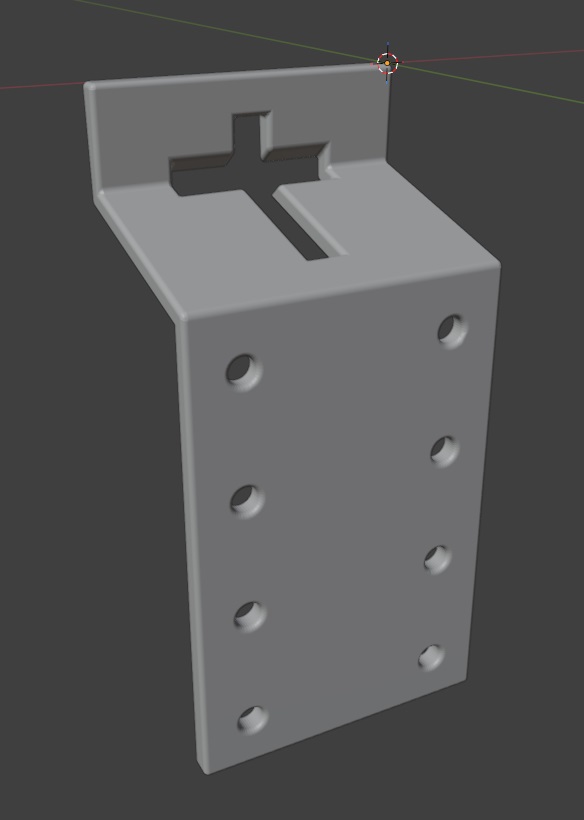
Voila – hopefully it’s a T-post sign holder! It at least looks like one.

import bpy
import bmesh
import math
from mathutils import Vector

# Clear all existing objects
for obj in list(bpy.data.objects):
    bpy.data.objects.remove(obj, do_unlink=True)

# -----------------------------
# Scene units (mm)
# -----------------------------
scene = bpy.context.scene
scene.unit_settings.system = 'METRIC'
scene.unit_settings.scale_length = 0.001  # 1 Blender unit = 1 mm

INCH = 25.4
def inch(x): return x * INCH

# -----------------------------
# PARAMETERS (mm)
# -----------------------------
bracket_thickness = inch(0.25)   # sheet thickness
bracket_width = inch(3)   # bracket width (across the post)

# Leg lengths (side profile)
bracket_top_length = inch(1)        # bracket segment 1 length
bracket_middle_length = inch(2)     # bracket segment 2 length
bracket_bottom_length = inch(4.5)   # bracket segment 3 length

# Bend included angles
bend1_angle_included = 105.0   # top flange
bend2_angle_included = 255.0   # web -> long leg

# If the long leg goes the wrong direction, flip this
flip_second_bend = True

# -----------------------------
# Punch hole
# -----------------------------
do_punch = True

# T-post size references
tpost_horizontal_hole_height = inch(0.25)
tpost_horizontal_hole_width = inch(1.5)
tpost_vertical_hole_height = inch(2)
tpost_vertical_hole_width = inch(0.25)
punch_clearance = 1.0 # clearance added around each rectangle (mm)

# Position of t-post before rotation (Z from p0 end, and X across width)
punch_center_z = inch(1)
punch_center_x = bracket_width / 2

# Vertical placement on top flange (Y=0 plane)
punch_center_y = -inch(0.5)

# -----------------------------
# Optional bevel to make edges25ook more formed
# -----------------------------
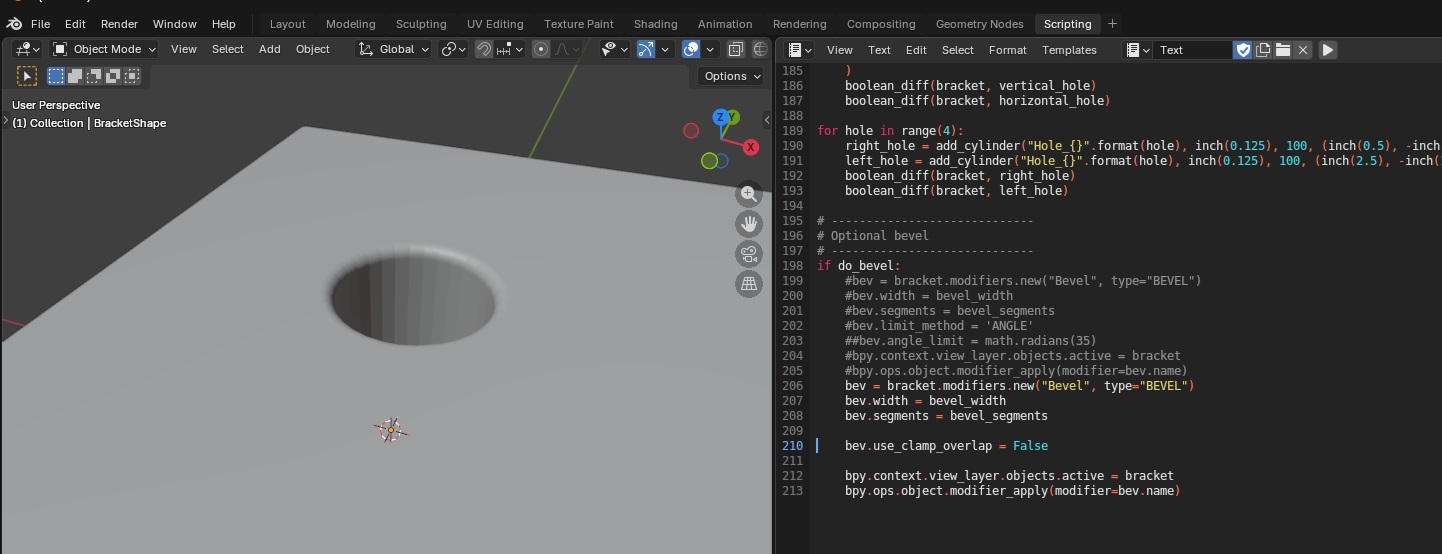
do_bevel = True

bevel_width = inch(0.05)
bevel_segments = 25

# -----------------------------
# Cleanup
# -----------------------------
#for n in ["BracketShape", "PunchBar", "PunchStem", "HoleRight1", "HoleRight2", "HoleRight3", "HoleRight4", "HoleLeft1", "HoleRLeft2", "HoleLeft3", "HoleLeft4"]:
#    o = bpy.data.objects.get(n)
#    if o:
#        bpy.data.objects.remove(o, do_unlink=True)

# -----------------------------
# Helpers (YZ plane directions)
# Define 0° as +Z. +90° is +Y. -90° is -Y.
# -----------------------------
def unit_from_angle(deg_from_posZ):
    a = math.radians(deg_from_posZ)
    return Vector((0.0, math.sin(a), math.cos(a)))

def boolean_diff(target, cutter):
    mod = target.modifiers.new(name=f"BOOL_{cutter.name}", type="BOOLEAN")
    mod.operation = 'DIFFERENCE'
    mod.solver = 'EXACT'
    mod.object = cutter
    bpy.context.view_layer.objects.active = target
    bpy.ops.object.modifier_apply(modifier=mod.name)
    cutter.hide_set(True)

def add_cube(name, size_xyz, location_xyz, rotation_xyz):
    bpy.ops.mesh.primitive_cube_add(size=1, location=location_xyz, rotation=rotation_xyz)
    obj = bpy.context.active_object
    obj.name = name
    obj.scale = (size_xyz[0], size_xyz[1], size_xyz[2])
    bpy.ops.object.transform_apply()
    return obj

def add_cylinder(name, radius, length, location_xyz, rotation_xyz):
    bpy.ops.mesh.primitive_cylinder_add(radius=radius, depth=length, location=location_xyz, rotation=rotation_xyz)
    obj = bpy.context.active_object
    obj.name = name
    bpy.ops.object.transform_apply()
    return obj

# Convert included bend angles to turn angles
angle_top = 180.0 - bend1_angle_included
angle_bottom = 180.0 - bend2_angle_included

# Start along +Z (top flange)
theta0 = 0.0
d0 = unit_from_angle(theta0)

# After bend1, go "down" (toward -Y) by turning negative
theta1 = theta0 - angle_top
d1 = unit_from_angle(theta1)

# After bend2, go toward +Z again (or flip if needed)
theta2 = theta1 + (angle_bottom if not flip_second_bend else - angle_bottom)
d2 = unit_from_angle(theta2)

# Profile points (center surface)
p0 = Vector((0.0, 0.0, 0.0))      # free end of top flange
p1 = p0 + d0 * bracket_top_length       # bend1 line
p2 = p1 + d1 * bracket_middle_length    # bend2 line
p3 = p2 + d2 * bracket_bottom_length    # end of long leg

# -----------------------------
# Build a single connected sheet surface:
# Create two polylines separated in X, then make quads between them.
# -----------------------------
mesh = bpy.data.meshes.new("BracketShapeMesh")
bracket = bpy.data.objects.new("BracketShape", mesh)
bpy.context.collection.objects.link(bracket)
bpy.context.view_layer.objects.active = bracket
bracket.select_set(True)

bm = bmesh.new()

x0, x1 = 0.0, bracket_width

# Left side (x0)
v0a = bm.verts.new((x0, p0.y, p0.z))
v1a = bm.verts.new((x0, p1.y, p1.z))
v2a = bm.verts.new((x0, p2.y, p2.z))
v3a = bm.verts.new((x0, p3.y, p3.z))

# Right side (x1)
v0b = bm.verts.new((x1, p0.y, p0.z))
v1b = bm.verts.new((x1, p1.y, p1.z))
v2b = bm.verts.new((x1, p2.y, p2.z))
v3b = bm.verts.new((x1, p3.y, p3.z))

# Faces (one per segment)
bm.faces.new((v0a, v0b, v1b, v1a))  # top flange
bm.faces.new((v1a, v1b, v2b, v2a))  # web
bm.faces.new((v2a, v2b, v3b, v3a))  # long leg

bm.normal_update()
bm.to_mesh(mesh)
bm.free()

# -----------------------------
# Solidify to thickness (sheet metal look)
# -----------------------------
solid = bracket.modifiers.new("Solidify", type="SOLIDIFY")
solid.thickness = bracket_thickness
solid.offset = 0.0
bpy.ops.object.modifier_apply(modifier=solid.name)

# -----------------------------
# Punch the lowercase "t" on the top flange
# (Top flange is flat at Y=0; punch straight through Y)
# -----------------------------
if do_punch:
    tpost_length_y = bracket_thickness * 5  # ensure it fully cuts through

    # Crossbar rectangle
    horizontal_hole = add_cube(
        "PunchBar",
        size_xyz=(tpost_horizontal_hole_width + 2 * punch_clearance, tpost_length_y, tpost_horizontal_hole_height + 2 * punch_clearance),
        location_xyz=(punch_center_x, 13 + punch_center_y, punch_center_z),
        rotation_xyz=(math.radians(90 - bend1_angle_included / 2), math.radians(0), math.radians(0))
    )

    # Stem rectangle (placed under the bar like a lowercase "t")
    vertical_hole = add_cube(
        "PunchStem",
        size_xyz=(tpost_vertical_hole_width + 2 * punch_clearance, tpost_length_y, tpost_vertical_hole_height + 2 * punch_clearance),
        location_xyz=(punch_center_x, punch_center_y, punch_center_z),
        rotation_xyz=(math.radians(90), math.radians(0), math.radians(0))
        #rotation_xyz=(math.radians(90 - bend1_angle_included / 2), math.radians(0), math.radians(0))
    )
    boolean_diff(bracket, vertical_hole)
    boolean_diff(bracket, horizontal_hole)


for hole in range(4):
    right_hole = add_cylinder(
        "HoleRight{}".format(hole),
        radius=inch(0.125),
        length=100,
        location_xyz=(inch(0.5), -inch(2), inch(2) + inch(1.175) * hole),
        rotation_xyz=(math.radians(90), 0, 0)
    )
    left_hole = add_cylinder(
        "HoleLeft{}".format(hole),
        radius=inch(0.125),
        length=100,
        location_xyz=(inch(2.5), -inch(2), inch(2) + inch(1.175) * hole),
        rotation_xyz=(math.radians(90), 0, 0)
    )
    boolean_diff(bracket, right_hole)
    boolean_diff(bracket, left_hole)

# -----------------------------
# Optional bevel
# -----------------------------
if do_bevel:
    bev = bracket.modifiers.new("Bevel", type="BEVEL")
    bev.width = bevel_width
    bev.segments = bevel_segments
    bev.limit_method = 'ANGLE'
    #bev.angle_limit = math.radians(35)
    bev.use_clamp_overlap = False
    bpy.context.view_layer.objects.active = bracket
    bpy.ops.object.modifier_apply(modifier=bev.name)
API Documentation Links:

https://docs.blender.org/api/current/bpy.ops.mesh.html
https://docs.blender.org/api/current/bmesh.ops.html