Month: April 2026

Using polkit to allow non-priv user to restart service

As I work through automating certificate installation, most applications have a “service account” user that has write access to the SSL certificate files. However, that user does not generally have permission to restart the application service.

We could get the ID added to sudoers with specific rights to manage the service … but it seemed more straightforward to use Polkit for very granular control permitting the service account to run specific verbs with systemctl.

The following rule allows the “tomcatadmin” user to run systemctl start, stop, or restart with the apache-tomcat.service unit.

cat > /etc/polkit-1/rules.d/60-apache-tomcat-tomcatadmin.rules <<'EOF'
polkit.addRule(function(action, subject) {
    if (action.id == "org.freedesktop.systemd1.manage-units") {
        var unit = action.lookup("unit");
        var verb = action.lookup("verb");

        if (subject.user == "tomcatadmin" &&
            unit == "apache-tomcat.service" &&
            (verb == "start" || verb == "stop" || verb == "restart")) {
            return polkit.Result.YES;
        }
    }
});
EOF

Polymarket and PCI Standards

Somewhat disparagingly, I’ve often thought the payment card companies came up with the PCI standards as an effort to avoid a legislative solution. Significant, public issues made people “demand answers” – and government regulation is an obvious answer. Except it’s outside of your control. If you can convince everyone that you’ve come up with rules to solve the problem … no need for those government types to waste their time and create more red tape! We’re all good here.

I thought of that when reading about the soldier arrested for using insider knowledge in Polymarket trades. “Insider trading has no place on Polymarket,” the company wrote. “Today’s arrest is proof the system works.” … an unregulated market were people see spikes in “trades” that appear to be driven on insider knowledge is bad for business. If you want to go and bet on which team ends up in the basketball championship, you aren’t betting against people with special knowledge that put you at a disadvantage. But bets like this? Who wants to put their money on “US invades Iran in 7 days” against someone sitting in the situation room delaying the troops movement because his bet was exactly 9:57PM UTC today.

Of course dude wants to show “the system works” — last thing he wants is to fall under securities regulations!

Vexing RDPSign Issue

With recent Windows updates, users now get a big message saying “Caution: Unknown remote connection” when launching RDP sessions from our CyberArk server. Easy enough – I have an internal CA, I can generate a code signing certificate, so I can sign these RDP files.

Except, in testing, I continually got an error indicating rdpsign cannot find the certificate. It’s there. I have a private key. It’s a code signing certificate. An hour or so later, I realize the “sha256” value is actually the SHA-1 thumbprint. Which … not my first guess and really more of a “out of reasonable options, start trying silly things” guess.

“$env:SystemRoot\System32\rdpsign.exe” /v /sha256 $hash256 $rdp

Voila, “All rdp file(s) have been successfully signed.”

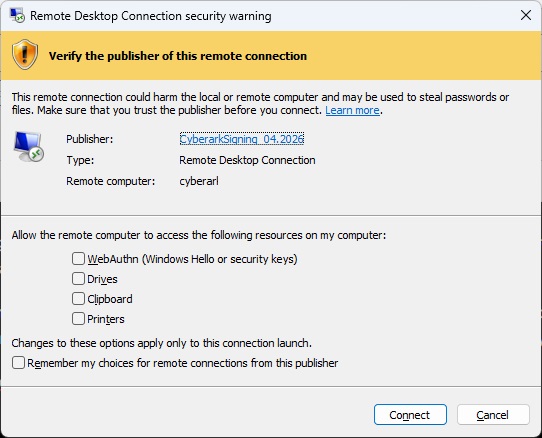
Sigh — and, after all this work? I go from the red “unknown publisher” error to a yellow “yeah, you should think about this” banner.

Blender Script: Distance Between Two Points

We were having a lot of trouble using the measure tool in Blender — after discovering that you can hold the Ctrl key and “snap” your selection to a vertex, it actually worked in the way we wanted it to. But, before that discovery, my thought was to manually select two vertices and use a Python script to measure the distance between those points. That is “blender units” … and the metric or imperial units would be more meaningful. So I converted based on the scene configuration.

import bpy
import bmesh


def format_metric(meters: float) -> str:
    a = abs(meters)

    if a >= 1.0:
        return f"{meters:.6f} m"
    elif a >= 0.01:
        return f"{meters * 100.0:.3f} cm"
    else:
        return f"{meters * 1000.0:.3f} mm"


def format_imperial(meters: float) -> str:
    total_inches = meters / 0.0254
    sign = "-" if total_inches < 0 else ""
    total_inches = abs(total_inches)

    feet = int(total_inches // 12)
    inches = total_inches - (feet * 12)

    if feet > 0:
        return f"{sign}{feet} ft {inches:.3f} in"
    else:
        return f"{sign}{total_inches:.3f} in"


def measure_selected_vertices():
    ctx = bpy.context
    obj = ctx.edit_object

    if obj is None or obj.type != 'MESH':
        raise RuntimeError("Go into Edit Mode on a mesh and select exactly 2 vertices.")

    bm = bmesh.from_edit_mesh(obj.data)
    selected_verts = [v for v in bm.verts if v.select]

    if len(selected_verts) != 2:
        raise RuntimeError(f"Expected exactly 2 selected vertices, found {len(selected_verts)}.")

    v1, v2 = selected_verts

    # Convert local vertex coordinates to world-space coordinates
    p1 = obj.matrix_world @ v1.co
    p2 = obj.matrix_world @ v2.co

    # Raw world-space distance in Blender units
    raw_distance = (p2 - p1).length

    scene = ctx.scene
    units = scene.unit_settings
    scale_length = units.scale_length if units.scale_length != 0 else 1.0

    # Convert Blender units to meters according to the scene unit scale
    distance_meters = raw_distance * scale_length

    print("\n----- Vertex Distance -----")
    print(f"Object: {obj.name}")
    print(f"Raw distance (Blender units): {raw_distance:.6f}")
    print(f"Scene unit system: {units.system}")
    print(f"Scene unit scale: {scale_length}")

    if units.system == 'METRIC':
        print(f"Formatted distance: {format_metric(distance_meters)}")

    elif units.system == 'IMPERIAL':
        print(f"Formatted distance: {format_imperial(distance_meters)}")

    else:
        print("Formatted distance: Scene unit system is 'NONE'")
        print(f"Interpreted using current unit scale: {format_metric(distance_meters)}")


measure_selected_vertices()

Signing PowerShell Scripts

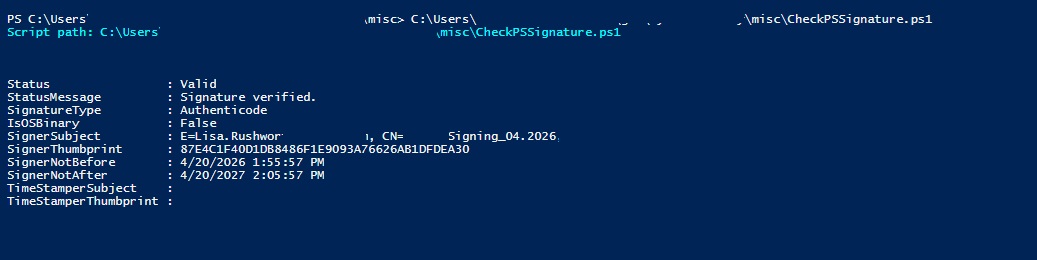
A quick PowerShell script to report on its own signature data:

$scriptPath = $PSCommandPath

if (-not $scriptPath) {
    throw 'This script must be run from a .ps1 file so $PSCommandPath is available.'
}

$sig = Get-AuthenticodeSignature -FilePath $scriptPath

Write-Host "Script path: $scriptPath`n" -ForegroundColor Cyan

[PSCustomObject]@{
    Status                  = $sig.Status
    StatusMessage           = $sig.StatusMessage
    SignatureType           = $sig.SignatureType
    IsOSBinary              = $sig.IsOSBinary
    SignerSubject           = $sig.SignerCertificate.Subject
    SignerThumbprint        = $sig.SignerCertificate.Thumbprint
    SignerNotBefore         = $sig.SignerCertificate.NotBefore
    SignerNotAfter          = $sig.SignerCertificate.NotAfter
    TimeStamperSubject      = $sig.TimeStamperCertificate.Subject
    TimeStamperThumbprint   = $sig.TimeStamperCertificate.Thumbprint
} | Format-List

To sign the script:

$thumb = '87E4C1F40D1DB8486F1E9093A76626AB1DFDEA30'
$scriptPath = "$env:USERPROFILE\git\CyberSecurity\misc\CheckPSSignature.ps1"

$cert = Get-ChildItem Cert:\CurrentUser\My, Cert:\LocalMachine\My |
    Where-Object {
        $_.Thumbprint -eq $thumb -and
        $_.HasPrivateKey -and
        ($_.EnhancedKeyUsageList | Where-Object {
            $_.ObjectId -eq '1.3.6.1.5.5.7.3.3' -or $_.FriendlyName -eq 'Code Signing'
        })
    } |
    Select-Object -First 1

if (-not $cert) {
    throw "Code signing certificate $thumb not found."
}

Set-AuthenticodeSignature -FilePath $scriptPath -Certificate $cert
Get-AuthenticodeSignature -FilePath $scriptPath | Format-List *

And now the script is signed:

Azure Key Vault Integration with Azure Pipelines

This document assumes:

Azure CLI is installed (https://learn.microsoft.com/en-us/cli/azure/install-azure-cli-linux)

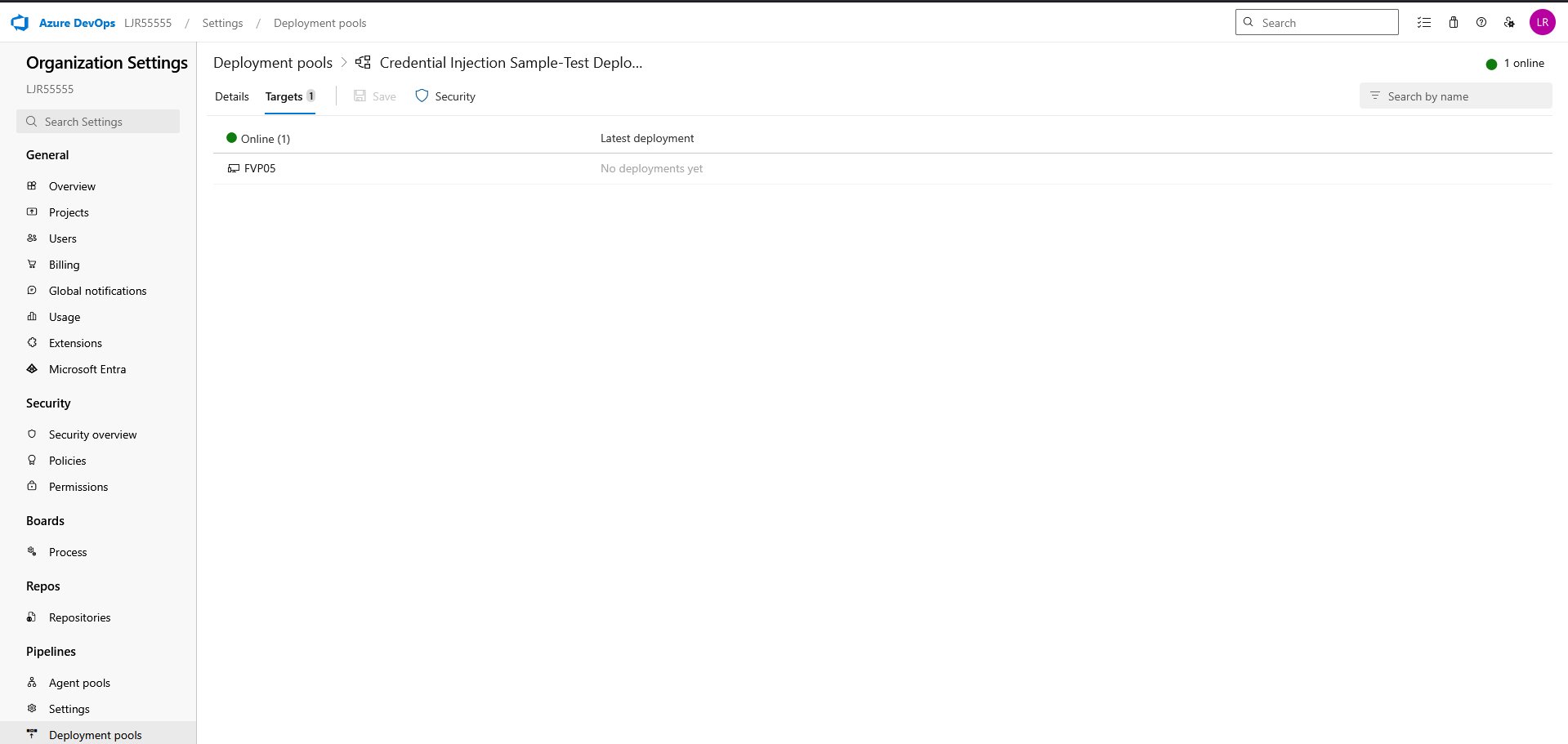
You already have an agent pool with online agent in a deployment pool

And, finally, that you have a pipeline deployment that uses a static keystore. We will be replacing that static keystore file with one obtained from the Azure Key Vault.

First, ensure the Azure DevOps service connection used by the pipeline has access to LJRVenafiTestKeyVault with at least:

  • Secrets: Get, List

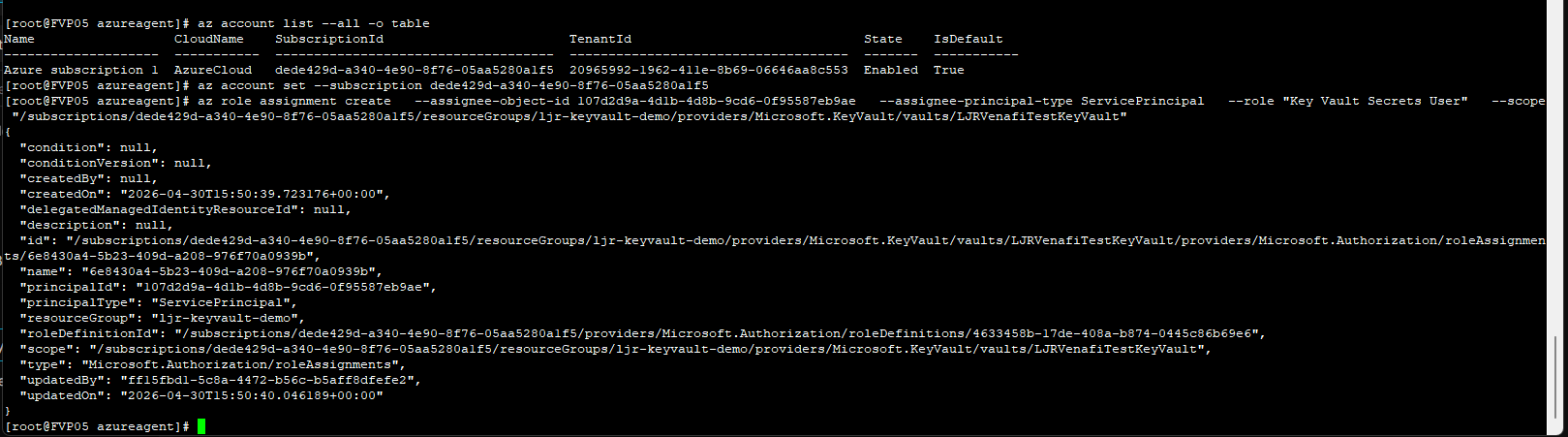
From the Azure command line, e.g.

az role assignment create –assignee-object-id 107d2d9a-4d1b-4d8b-9cd6-0f95587eb9ae –assignee-principal-type ServicePrincipal –role “Key Vault Secrets User” –scope “/subscriptions/dede429d-a340-4e90-8f76-05aa5280a1f5/resourceGroups/ljr-keyvault-demo/providers/Microsoft.KeyVault/vaults/LJRVenafiTestKeyVault”

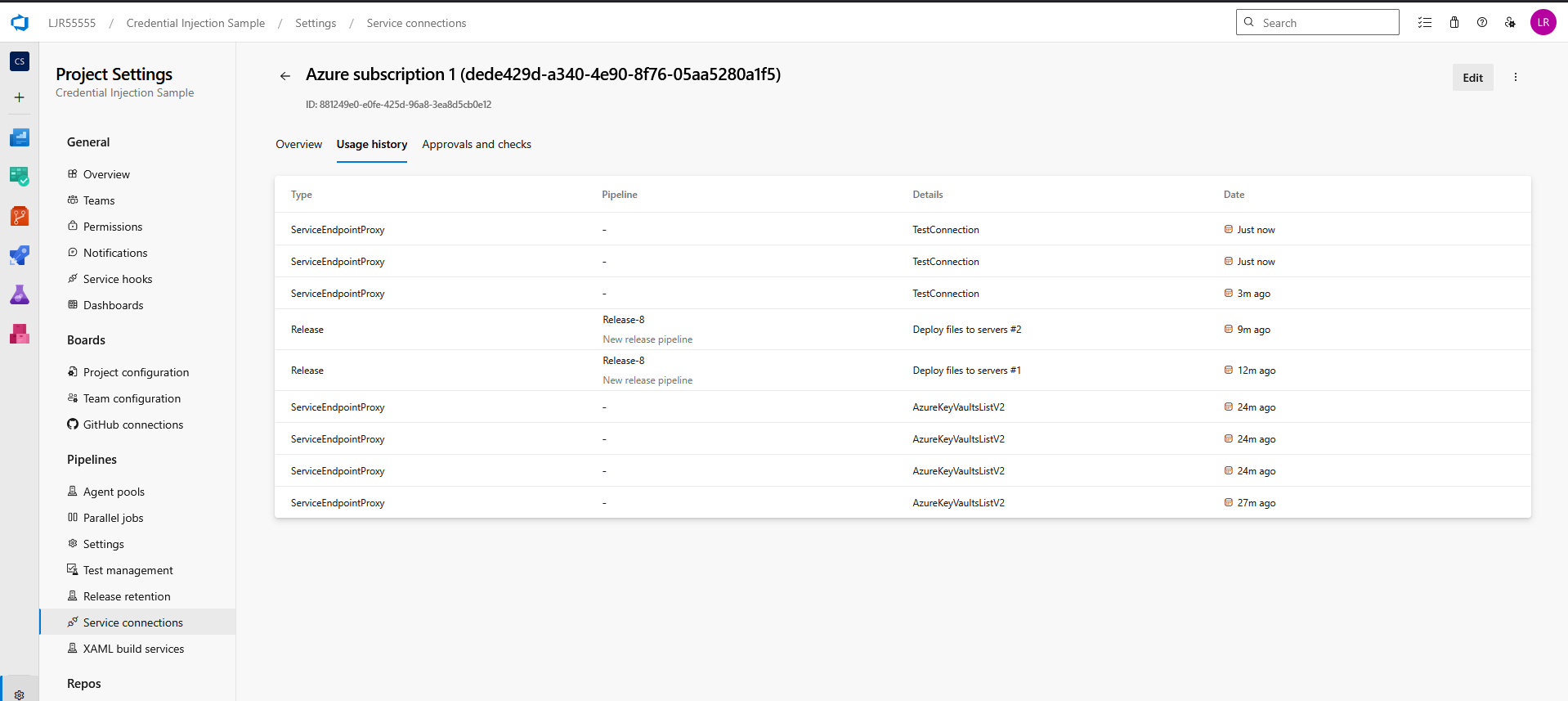
If you do not know which service connection is being used, update and run the pipeline. It will fail with a permission error, but the service connection’s usage history will reflect the release pipeline’s use:

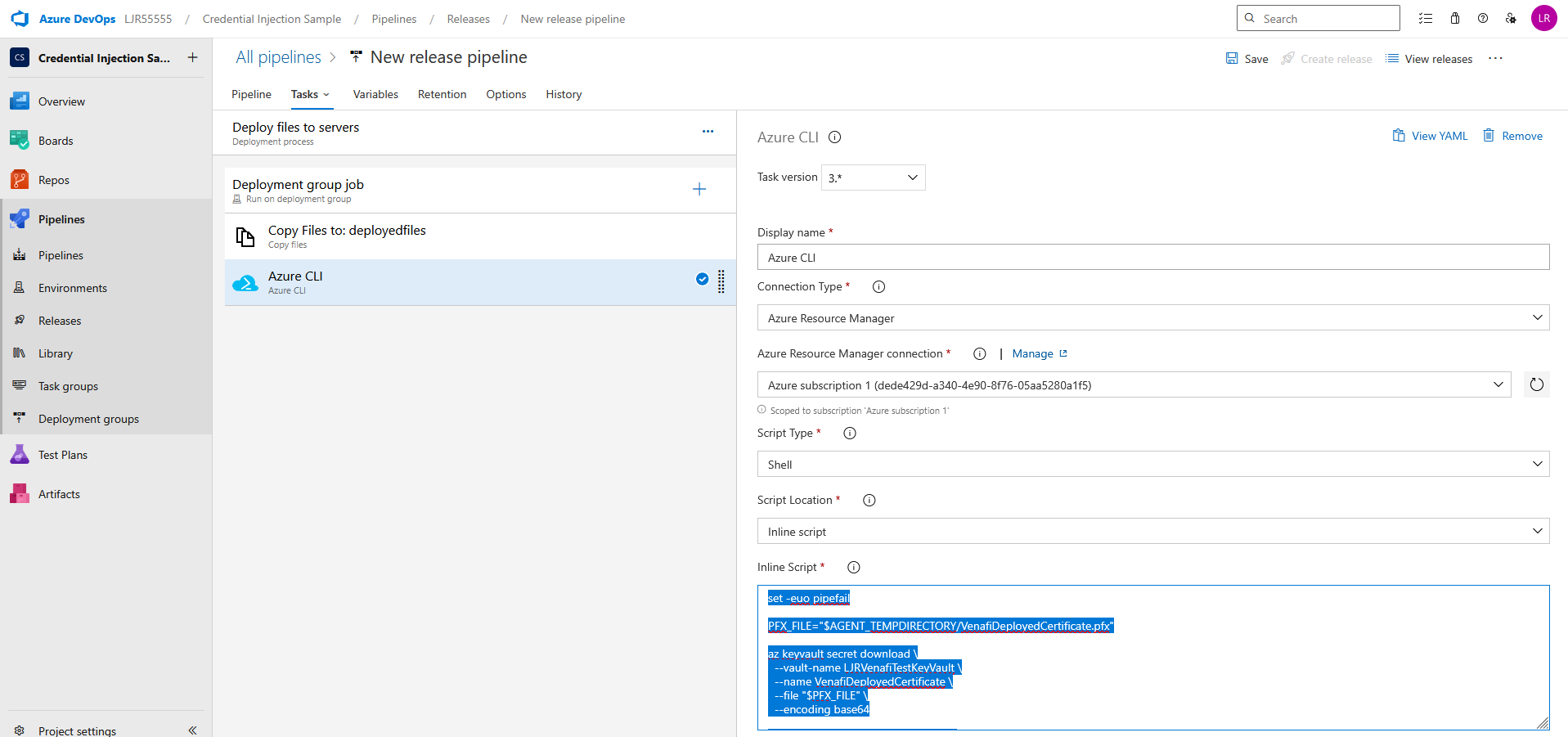
Update your pipeline to retrieve the certificate from the Azure KeyVault. Add an Azure CLI task using an inline script

set -euo pipefail

PFX_FILE=”$AGENT_TEMPDIRECTORY/VenafiDeployedCertificate.pfx”

az keyvault secret download \

–vault-name LJRVenafiTestKeyVault \

–name VenafiDeployedCertificate \

–file “$PFX_FILE” \

–encoding base64

echo “Downloaded PFX to $PFX_FILE”

echo “##vso[task.setvariable variable=PFX_PATH]$PFX_FILE”

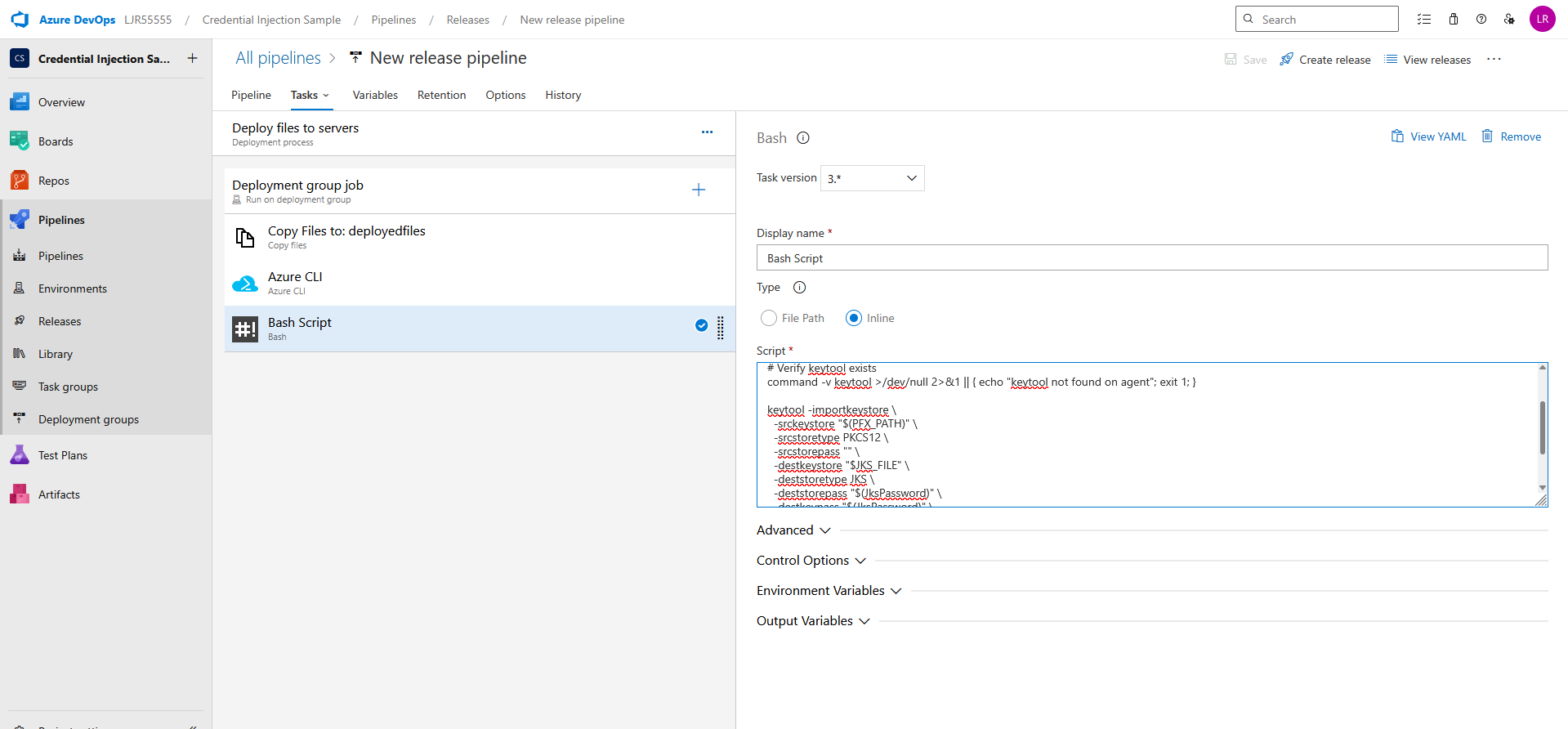
If you need a JKS file, add an additional bash task with an inline script

set -euo pipefail

JKS_FILE=”$AGENT_TEMPDIRECTORY/VenafiDeployedCertificate.jks”

# Verify keytool exists

command -v keytool >/dev/null 2>&1 || { echo “keytool not found on agent”; exit 1; }

keytool -importkeystore \

-srckeystore “$(PFX_PATH)” \

-srcstoretype PKCS12 \

-srcstorepass “” \

-destkeystore “$JKS_FILE” \

-deststoretype JKS \

-deststorepass “$(JksPassword)” \

-destkeypass “$(JksPassword)” \

-noprompt

echo “Created JKS at $JKS_FILE”

echo “##vso[task.setvariable variable=JKS_PATH]$JKS_FILE”

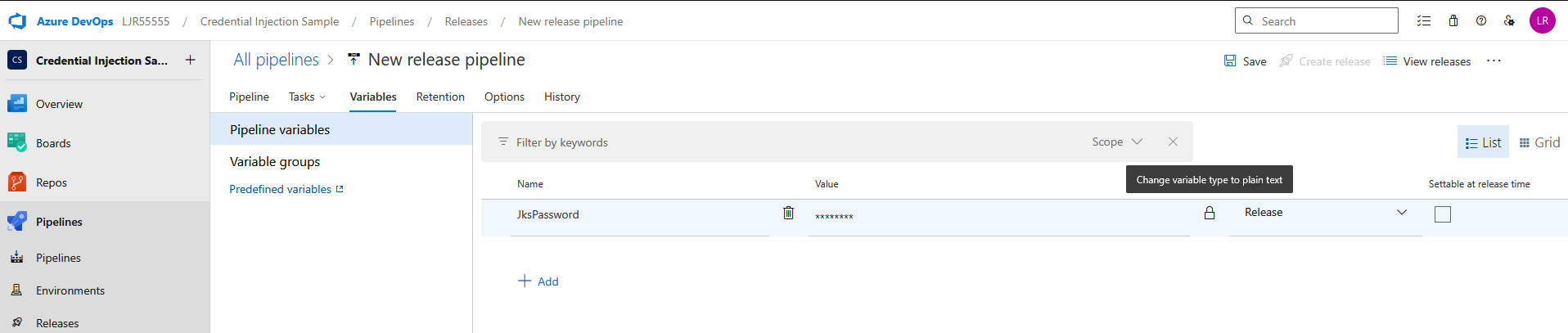
Add a pipeline variable for the JKS Password – make sure to click the lock icon to protect the password

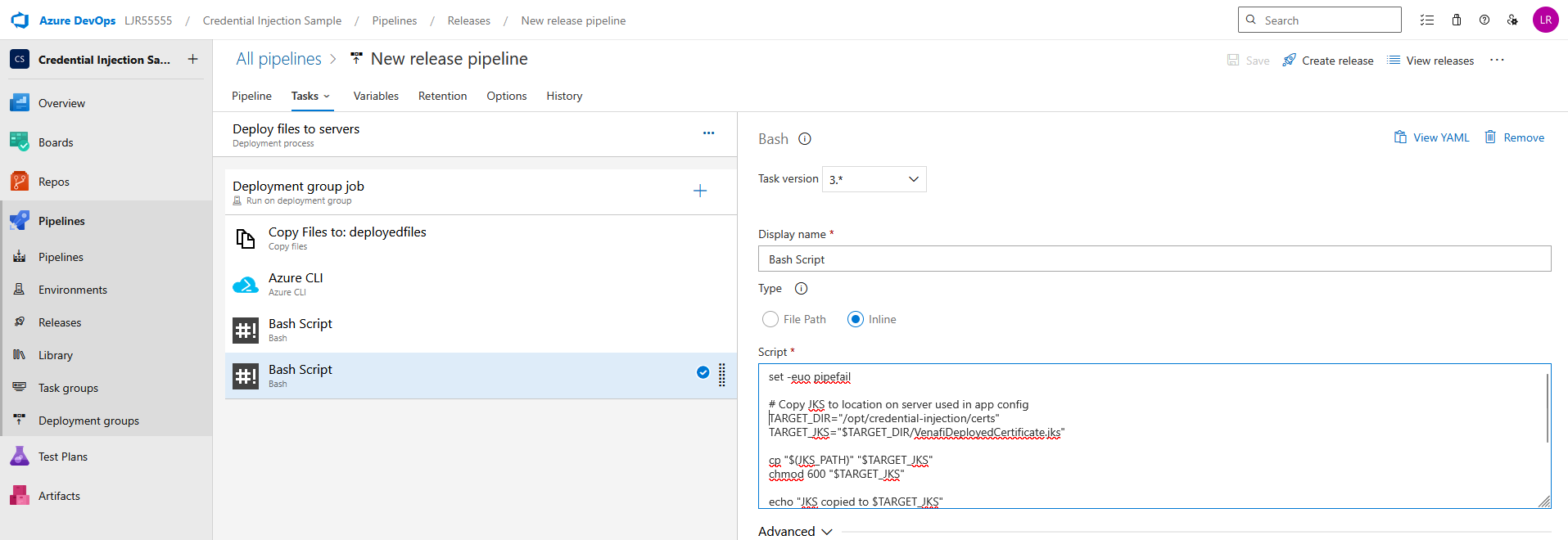
And, finally, add a bash task task to copy the JKS or PFX file to the proper place on the server

set -euo pipefail

# Copy JKS to location on server used in app config

TARGET_DIR=”/opt/credential-injection/certs”

TARGET_JKS=”$TARGET_DIR/VenafiDeployedCertificate.jks”

cp “$(JKS_PATH)” “$TARGET_JKS”

chmod 600 “$TARGET_JKS”

echo “JKS copied to $TARGET_JKS”

# Or copy pfx to location on server used in app config

TARGET_PFX=”$TARGET_DIR/VenafiDeployedCertificate.pfx”

cp “$(PFX_PATH)” “$TARGET_PFX”

chmod 600 “$TARGET_PFX”

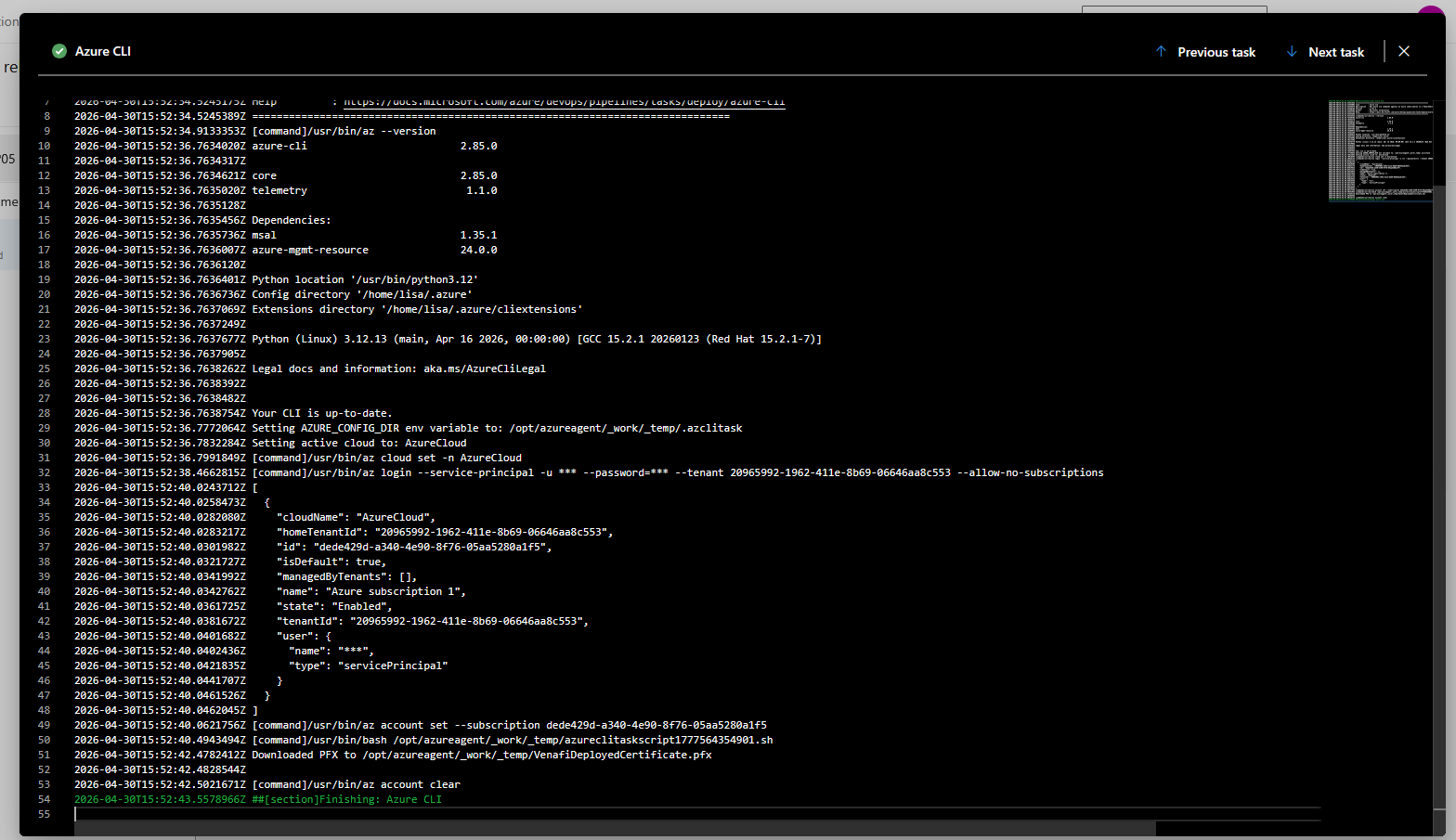
Create a release to run the pipeline. Looking at the logs, you should see a confirmation that the pfx file was created

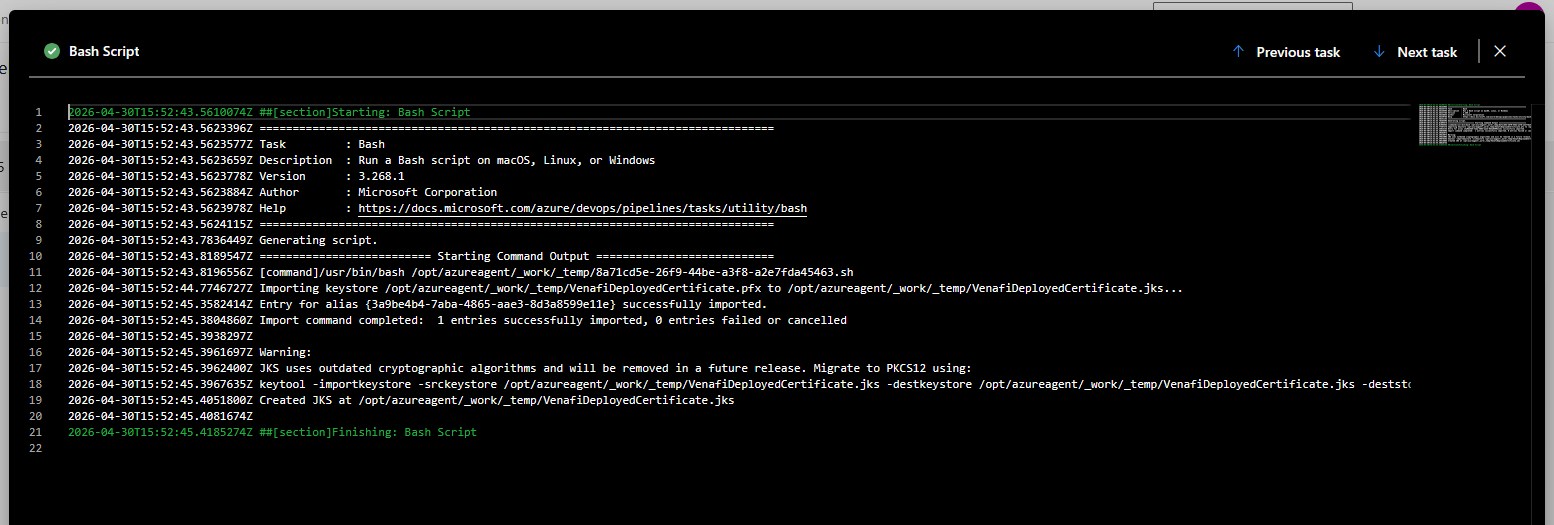
And, if you are creating a JKS file, a confirmation that it was created as well

You should also see the certificate file(s) on the server:


Time to Move Away from JKS Keystores

For many Java-based applications, Java KeyStore (JKS) has been the default for years. It’s familiar, widely used, and still supported. But “still supported” is not the same as “still the best choice.” If your application or platform supports it, now is a good time to move away from JKS and standardize on PKCS#12.

Why move away from JKS?

1. JKS is a proprietary format

JKS is Java-specific and tied to older Java conventions. By contrast, PKCS#12 is a standards-based format supported across platforms, tools, and vendors.

That difference matters operationally. Certificate and key material increasingly needs to work across Java applications, web servers, load balancers, cloud services, and automation tooling. PKCS#12 is far better suited to that multi-platform reality.

2. JKS has legacy security characteristics

JKS should not be considered a modern format for protecting private keys.

It uses non-standard, legacy protection mechanisms and has historically relied on weaker constructions than modern PKCS#12 implementations. As with any password-protected container, security depends heavily on password strength—but JKS offers less margin for error compared to more modern formats.

This becomes especially relevant if a keystore file is exposed. Offline password cracking is a realistic risk, and widely available tools can target JKS files—particularly when organizations use weak or reused passwords.

This does not mean existing JKS files are inherently compromised. It does mean JKS should no longer be the default when stronger, more widely supported alternatives exist.

3. Java itself moved on

The Java platform has already made this transition. Starting with Java 9, PKCS#12 became the default keystore type. JKS remains supported, but PKCS#12 is now the preferred standard in modern Java environments.

4. Many applications already support PKCS#12

In many environments, JKS persists simply because it’s what teams have always used—not because it’s required. Most modern Java frameworks, application servers, and tools support PKCS#12. For example, Tomcat has supported PKCS#12 since version 5.0, and current Java tooling handles it natively.

In practice, many applications can switch with little to no functional impact.

Why PKCS#12 is the better choice

PKCS#12 offers several clear advantages:

  • Broad interoperability across platforms and vendors
  • Better alignment with modern tooling and certificate automation
  • Reduced reliance on Java-specific legacy formats
  • Default support in current Java versions

What to do

If you manage Java applications or infrastructure, this is a good opportunity to review current keystore usage.

  • Identify where JKS keystores are currently in use
  • Verify whether those applications support PKCS#12
  • Review vendor documentation for any requirements or constraints
  • Update deployment standards to prefer PKCS#12 for new systems
  • Gradually migrate existing JKS-based deployments where practical

For many use cases, converting is straightforward. For example:

keytool -importkeystore \
  -srckeystore keystore.jks \
  -destkeystore keystore.p12 \
  -deststoretype PKCS12

Check vendor guidance

Before making changes, confirm support with the relevant application or platform vendor.

Key questions:

  • Does the application support PKCS#12 for keys and certificates?
  • Are there version-specific considerations?
  • Are configuration changes required?
  • Does the vendor recommend PKCS#12 for current deployments?

In most cases, the answer will be yes—but it’s still worth validating before making production changes.

Bottom line

JKS is not deprecated, but it is no longer the format organizations should be choosing by default.

It is a legacy, Java-specific keystore format with limited interoperability and older security characteristics. Meanwhile, PKCS#12 is standards-based, broadly supported, and the default in modern Java. If your application supports PKCS#12, prefer it. If you’re unsure, check—because in many cases, you can make the switch with minimal effort.

Choosing a modern keystore format is a small change that can meaningfully improve both security posture and operational flexibility.

Venafi Issue – Certs Immediately Revoked as Superseded When Using Stand-Alone Microsoft AD CS CA

Background:

Environment

  • Dev environment, Venafi 25.3.0.2740
  • Microsoft ADCS stand-alone CA
  • Enrollment method: DCOM
  • CA object uses a local account on the ADCS server
  • No custom workflows
  • No customizations
  • No consumers/app installation tied to the cert object
  • Simple certificate object created for testing

Problem

When a certificate is requested from Venafi against the stand-alone Microsoft CA, ADCS successfully issues the certificate, but the certificate is immediately revoked with revocation reason:

  • Superseded

This is happening to the same certificate that was just issued, not a prior cert.

Expected behavior

Venafi should submit the CSR, obtain the issued certificate, and leave the newly issued certificate valid.

Actual behavior

Venafi submits the CSR, ADCS issues the certificate successfully, and then the same certificate is immediately revoked as Superseded.

Evidence gathered

1. ADCS database confirms issued cert is the same cert being revoked

Example request:

  • Request ID: 41
  • Requester Name: HOSTNAME\venafi
  • Common Name: 20260331-withrevoke.example.com
  • Serial Number: 55000000299749d000d299f5ae000100000029
  • Disposition: Revoked
  • Disposition Message: Revoked by HOSTNAME\venafi
  • Revocation Reason: 0x4 — Superseded

This proves Venafi is revoking the cert it just obtained.

2. ADCS request contents are valid

For the same request, ADCS shows the CSR and issued certificate are normal and match expectations.

Request attributes

  • CertificateTemplate: WebServer
  • ccm: venafihost.servers.example.com

CSR / issued cert contents

  • Subject: CN=20260331-withrevoke.example.com, O=”Example Company, Inc”, L=Temple Terrace, S=Florida,C=US
  • SAN: DNS Name=20260331-withrevoke.example.com
  • RSA 2048 key
  • Certificate issued successfully before revoke

This suggests the CA is not returning malformed or obviously incorrect cert content.

3. Security event log confirms immediate issue then revoke

After enabling Certification Services auditing, Security log shows this sequence:

Event 4886

  • Certificate Services received the request

Event 4887

  • Certificate Services approved the request and issued the certificate
  • Requester: HOSTNAME\venafi
  • DCOM/RPC authentication path used
  • Template shown as WebServer

Event 4870

  • Certificate Services revoked the certificate
  • Same serial number as the issued certificate
  • Reason: 4 (Superseded)

This happens effectively immediately.

4. Pattern is repeatable

Querying the CA database for requests from HOSTNAME\venafi shows a repeated pattern where most requests are immediately revoked with:

  • Disposition: Revoked
  • Revocation Reason: Superseded
  • Disposition Message: Revoked by HOSTNAME\venafi

The exceptions were tests where revoke capability had been intentionally removed from the Venafi CA account.

5. Permission test changed behavior but did not fix root cause

When Issue and Manage Certificates was removed from the Venafi CA account, the request no longer completed the revoke path and instead failed earlier with:

  • PostCSR failed with error: CCertAdmin::SetCertificateExtension: Access is denied. 0x80070005

This indicates Venafi is performing CA administrative operations after CSR submission, and revocation happens later in that same general post-issuance path.

6. Procmon on the Venafi host shows VPlatform.exe using both CertRequest and CertAdmin

Procmon on CWWAPP1989D captured VPlatform.exe doing the following:

Cert enrollment path

VPlatform.exe queries and activates:

  • HKCR\CLSID\{98AFF3F0-5524-11D0-8812-00A0C903B83C}
  • CertRequest Class
  • C:\Windows\System32\certcli.dll

CA admin path

VPlatform.exe then queries and activates:

  • HKCR\CLSID\{37EABAF0-7FB6-11D0-8817-00A0C903B83C}
  • CertAdmin Class
  • %systemroot%\system32\certadm.dll

DCOM/RPC communication

Procmon also shows:

  • endpoint mapper (135) traffic via svchost.exe
  • VPlatform.exe connecting to the CA host on dynamic RPC port 50014

This strongly suggests:

  • VPlatform.exe first issues via CertRequest
  • then immediately performs CA admin operations via CertAdmin

Given the ADCS security logs, that admin path appears to be what revokes the newly issued cert.

Additional observations

Stand-alone CA

This is a stand-alone Microsoft CA, not enterprise template-based ADCS.

No special Venafi workflow/customization

This is a dev system with:

  • no custom workflows
  • no special consumers
  • no installation/application integration
  • minimal test object

That makes this look less like an environmental customization problem and more like:

  • default Venafi behavior in this integration path, or
  • a product defect in the stand-alone Microsoft CA DCOM path

Failed auth events also observed

We saw Security log 4625 failures from HOSTNAME for DOMAIN\USER

From the Security log:

  • 11:53:34 — 4886 request received
  • 11:53:36 — 4887 certificate issued
  • 11:53:36 — 4870 certificate revoked
  • 11:53:36 — multiple 4625 failures for DOMAIN\venafisystemuser
  • 11:53:37 — another 4625

Since time resolution in the log is seconds, it is possible Venafi is requesting the cert under the configured credential (HOSTNAME\venafi), attempting to do something else under DOMAIN\venafisystemuser, getting an auth failure, and then revoking the certificate under the configured credential (DOMAIN\venafisystemuser). I would be surprised if this is the case because “superseded” is a very specific revocation reason. I would expect something like a generic “Unspecified” or “Cessation of Operation” to be used.

Summary conclusion

Current evidence indicates that:

  • Venafi successfully enrolls the certificate from the stand-alone Microsoft CA using DCOM / CertRequest
  • VPlatform.exe then immediately invokes the Microsoft CA admin COM interface (CertAdmin)
  • the newly issued certificate is then revoked by the Venafi CA account with reason Superseded

At this point, this appears to be:

  • Venafi-driven post-issuance behavior
  • not spontaneous ADCS behavior
  • and likely either:
    1. expected-but-unwanted default behavior in this integration mode, or
    2. a product defect in the stand-alone Microsoft CA DCOM workflow

Resolution

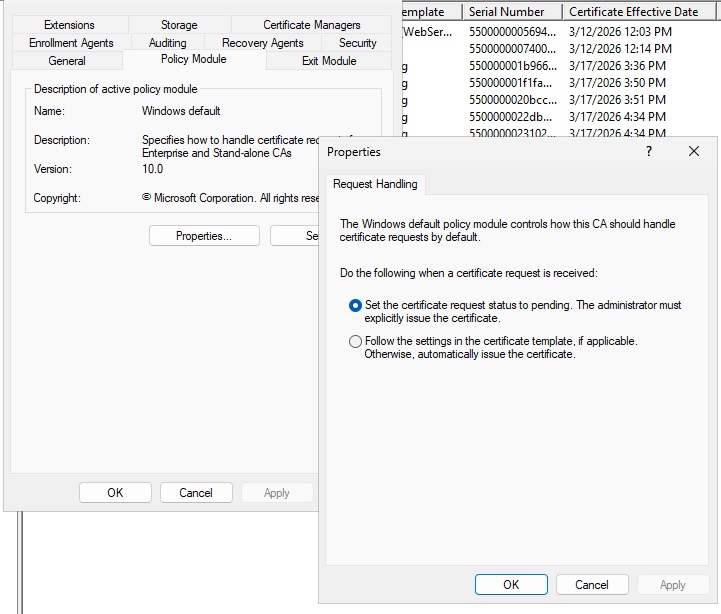
The issue was resolved by changing the policy module settings to set the cert request to pending instead of automatically issue. While I expected this to leave the cert in a pending state and require manual intervention (or a batch job to bulk approve whatever is pending), the cert was immediately issued.
 

Buzzards on the Roof

The buzzards used to hang out in this old, dead tree across the street; and, after the rain, they would spread their wings and dry out. The tree fell a while ago; but, now that our roof is stable … we’ve got buzzards airing out their wings on the roof.

Venafi TPP Installation Driver Ports

While Venafi documentation for each individual installation driver includes the port requirements, there was no single table view of the installation options and what port(s) are needed for that installation driver to work. Ended up putting together a table for our firewall rule discussion.

Installation TypeDescriptionDefault PortNotes
Adaptable Installation DriverPowershell22, 5985, 5986This is running a custom script
Amazon Web Services443To internet destination
Apache HTTPUses ssh22
Azure Key Vault443To internet destination
Citrix NetScalerNITRO API443
F5 BigIPiControl REST API443
Google Cloud Load Balancer443To internet destination
IBM DataPowerDataPower Gateway5550, 5554
IBM Keystore
JKSUses ssh22Tomcat, Jboss, WebLogic
Oracle iPlanet Web ServerUses ssh22
PEMUses ssh22
PKCS#12Uses ssh22
Windows CAPI & IISUses WinRM5985, 5986