Tag: ssl

Viewing *Real* Certificate Chain

Browsers implement AIA which “helps” by repairing the certificate chain and forming a trust even without proper server configuration. Which is great for user experience, but causes a lot of challenges to people troubleshooting SSL connection failures from devices, old equipment, etc. It’s fine when I try it from my laptop!

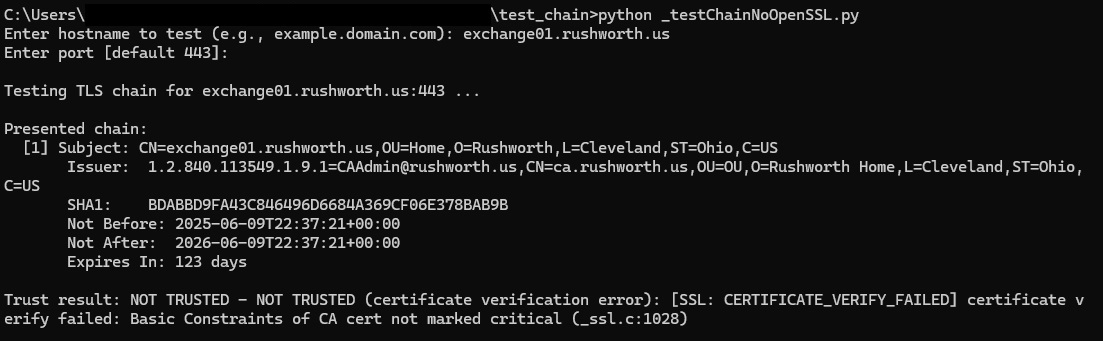
This python script reports on the real certificate chain being served from an endpoint. Self-signed certificates will show as untrusted

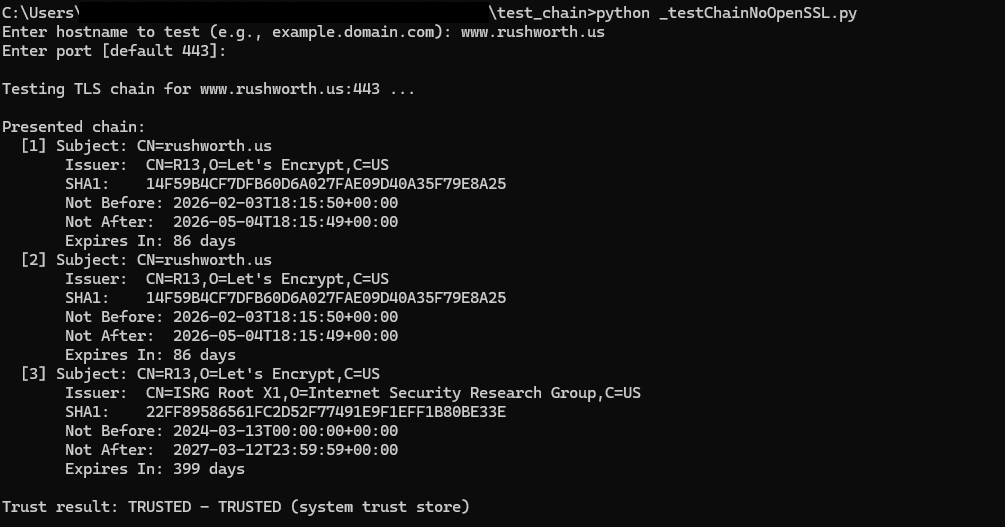
And public certs will show the chain and show as trusted

Code:

import ssl
import socket
import datetime
import select

# Third-party modules (install: pip install pyopenssl cryptography)
try:
    from OpenSSL import SSL, crypto
    from cryptography import x509
    from cryptography.hazmat.primitives import hashes
except ImportError as e:
    raise SystemExit(
        "Missing required modules. Please install:\n"
        "  pip install pyopenssl cryptography\n"
        f"Import error: {e}"
    )

def prompt(text, default=None):
    s = input(text).strip()
    return s if s else default

def check_trust(hostname: str, port: int, timeout=6.0):
    """
    Attempt a TLS connection using system trust store and hostname verification.
    Returns (trusted: bool, message: str).
    """
    try:
        ctx = ssl.create_default_context()
        with socket.create_connection((hostname, port), timeout=timeout) as sock:
            with ctx.wrap_socket(sock, server_hostname=hostname) as ssock:
                # Minimal HTTP GET to ensure we fully complete the handshake
                req = f"GET / HTTP/1.1\r\nHost: {hostname}\r\nConnection: close\r\n\r\n"
                ssock.sendall(req.encode("utf-8"))
                _ = ssock.recv(1)
        return True, "TRUSTED (system trust store)"
    except ssl.SSLCertVerificationError as e:
        return False, f"NOT TRUSTED (certificate verification error): {e}"
    except ssl.SSLError as e:
        return False, f"NOT TRUSTED (SSL error): {e}"
    except Exception as e:
        return False, f"Error connecting: {e}"

def _aware_utc(dt: datetime.datetime) -> datetime.datetime:
    """
    Ensure a datetime is timezone-aware in UTC. cryptography returns naive UTC datetimes.
    """
    if dt.tzinfo is None:
        return dt.replace(tzinfo=datetime.timezone.utc)
    return dt.astimezone(datetime.timezone.utc)

def _cert_to_info(cert: x509.Certificate):
    subj = cert.subject.rfc4514_string()
    issr = cert.issuer.rfc4514_string()
    fp_sha1 = cert.fingerprint(hashes.SHA1()).hex().upper()
    nb = _aware_utc(cert.not_valid_before_utc)
    na = _aware_utc(cert.not_valid_after_utc)
    now = datetime.datetime.now(datetime.timezone.utc)
    delta_days = max(0, (na - now).days)
    return {
        "subject": subj,
        "issuer": issr,
        "sha1": fp_sha1,
        "not_before": nb,
        "not_after": na,
        "days_to_expiry": delta_days
    }

def _do_handshake_blocking(conn: SSL.Connection, sock: socket.socket, timeout: float):
    """
    Drive the TLS handshake, handling WantRead/WantWrite by waiting with select.
    """
    deadline = datetime.datetime.now() + datetime.timedelta(seconds=timeout)
    while True:
        try:
            conn.do_handshake()
            return
        except SSL.WantReadError:
            remaining = (deadline - datetime.datetime.now()).total_seconds()
            if remaining <= 0:
                raise TimeoutError("TLS handshake timed out (WantRead)")
            r, _, _ = select.select([sock], [], [], remaining)
            if not r:
                raise TimeoutError("TLS handshake timed out (WantRead)")
            continue
        except SSL.WantWriteError:
            remaining = (deadline - datetime.datetime.now()).total_seconds()
            if remaining <= 0:
                raise TimeoutError("TLS handshake timed out (WantWrite)")
            _, w, _ = select.select([], [sock], [], remaining)
            if not w:
                raise TimeoutError("TLS handshake timed out (WantWrite)")
            continue

def fetch_presented_chain(hostname: str, port: int, timeout: float = 12.0):
    """
    Capture the presented certificate chain using pyOpenSSL.
    Returns (chain: list of {subject, issuer, sha1, not_before, not_after, days_to_expiry}, error: str or None).
    """
    # TCP connect
    try:
        sock = socket.create_connection((hostname, port), timeout=timeout)
        sock.settimeout(timeout)
    except Exception as e:
        return [], f"Error connecting: {e}"

    try:
        # TLS client context
        ctx = SSL.Context(SSL.TLS_CLIENT_METHOD)

        # Compatibility tweaks:
        # - Lower OpenSSL security level
        try:
            ctx.set_cipher_list(b"DEFAULT:@SECLEVEL=1")
        except Exception:
            pass

        # - Disable TLS 1.3 and set minimum TLS 1.2
        try:
            ctx.set_options(SSL.OP_NO_TLSv1_3)
        except Exception:
            pass
        try:
            # Ensure TLSv1.2+ (pyOpenSSL exposes set_min_proto_version on some builds)
            if hasattr(ctx, "set_min_proto_version"):
                ctx.set_min_proto_version(SSL.TLS1_2_VERSION)
        except Exception:
            pass

        # - Set ALPN to http/1.1 (some paths work better when ALPN is present)
        try:
            ctx.set_alpn_protos([b"http/1.1"])
        except Exception:
            pass

        conn = SSL.Connection(ctx, sock)
        conn.set_tlsext_host_name(hostname.encode("utf-8"))
        conn.set_connect_state()

        # Blocking mode (best effort)
        try:
            conn.setblocking(True)
        except Exception:
            pass

        # Drive handshake
        _do_handshake_blocking(conn, sock, timeout=timeout)

        # Retrieve chain (some servers only expose leaf)
        chain = conn.get_peer_cert_chain()
        infos = []
        if chain:
            for c in chain:
                der = crypto.dump_certificate(crypto.FILETYPE_ASN1, c)
                cert = x509.load_der_x509_certificate(der)
                infos.append(_cert_to_info(cert))
        else:
            peer = conn.get_peer_certificate()
            if peer is not None:
                der = crypto.dump_certificate(crypto.FILETYPE_ASN1, peer)
                cert = x509.load_der_x509_certificate(der)
                infos.append(_cert_to_info(cert))

        # Cleanup
        try:
            conn.shutdown()
        except Exception:
            pass
        finally:
            try:
                conn.close()
            except Exception:
                pass
            try:
                sock.close()
            except Exception:
                pass

        if not infos:
            return [], "No certificates captured (server did not present a chain and peer cert unavailable)"
        return infos, None

    except Exception as e:
        try:
            sock.close()
        except Exception:
            pass
        etype = type(e).__name__
        emsg = str(e) or "no message"
        return [], f"TLS handshake or chain retrieval error: {etype}: {emsg}"

def main():
    hostname = prompt("Enter hostname to test (e.g., example.domain.com): ")
    if not hostname:
        print("Hostname is required.")
        return
    port_str = prompt("Enter port [default 443]: ", "443")
    try:
        port = int(port_str)
    except ValueError:
        print("Invalid port.")
        return

    print(f"\nTesting TLS chain for {hostname}:{port} ...")
    chain, err = fetch_presented_chain(hostname, port)
    print("\nPresented chain:")
    if err:
        print(f"  [ERROR] {err}")
    elif not chain:
        print("  [No certificates captured]")
    else:
        for i, ci in enumerate(chain, 1):
            print(f"  [{i}] Subject: {ci['subject']}")
            print(f"       Issuer:  {ci['issuer']}")
            print(f"       SHA1:    {ci['sha1']}")
            nb_val = ci.get("not_before")
            na_val = ci.get("not_after")
            nb_str = nb_val.isoformat() if isinstance(nb_val, datetime.datetime) else str(nb_val)
            na_str = na_val.isoformat() if isinstance(na_val, datetime.datetime) else str(na_val)
            print(f"       Not Before: {nb_str}")
            print(f"       Not After:  {na_str}")
            dte = ci.get("days_to_expiry")
            if dte is not None:
                print(f"       Expires In: {dte} days")

    trusted, msg = check_trust(hostname, port)
    print(f"\nTrust result: {'TRUSTED' if trusted else 'NOT TRUSTED'} - {msg}")

if __name__ == "__main__":
    main()

ElastAlert2 SSL with OpenSearch 2.x

This turned out to be one of those situations where I went down a very complicated path for a very simple problem. We were setting up ElastAlert2 in our OpenSearch sandbox. I’ve used both the elasticsearch-py and opensearch-py modules with Python 3 to communicate with the cluster, so I didn’t anticipate any problems.

Which, of course, meant we had problems. A very cryptic message:

javax.net.ssl.SSLHandshakeException: Insufficient buffer remaining for AEAD cipher fragment (2). Needs to be more than tag size

A quick perusal of the archive of all IT knowledge (aka Google) led me to a Java bug: https://bugs.openjdk.org/browse/JDK-8221218 which may or may not be resolved in the latest OpenJDK (which we are using). I say may or may not because it’s marked as resolved in some places but people report experiencing the bug after resolution was reported.

Fortunately, the OpenSearch server reported something more useful:

[2022-09-20T12:18:55,869][WARN ][o.o.h.AbstractHttpServerTransport] [UOS-OpenSearch.example.net] caught exception while handling client http traffic, closing connection Netty4HttpChannel{localAddress=/10.1.2.3:9200, remoteAddress=/10.1.2.4:55494}
io.netty.handler.codec.DecoderException: io.netty.handler.ssl.NotSslRecordException: not an SSL/TLS record: 504f5354202f656c617374616c6572745f7374617475735f6572726f722f5f646f6320485454502f312e310d0a486f73743a20

Which I’ve shortened because it was several thousand fairly random seeming characters. Except they aren’t random — that’s the communication hex encoded. Throwing the string into a hex decoder, I see the HTTP POST request.

Which … struck me as rather odd because it should be SSL encrypted rubbish. Turns out use_ssl was set to False! Evidently attempting to send clear text ‘stuff’ to an encrypted endpoint produces the same error as reported in the Java bug.

Setting use_ssl to true brought us to another adventure — an SSLCertVerificationError. We have set the verify_certs to false — even going so far as to go into util.py and modifying line 354 so the default is False. No luck. But there’s another config in each ElastAlert2 rule — http_post_ignore_ssl_errors — that actually does ignore certificate errors. One the rules were configured with http_post_ignore_ssl_errors, ElastAlert2 was able to communicate with the OpenSearch cluster and watch for triggering events.

SSL Connection Failure from Docker Image

We have a script that’s used to securely retrieve passwords … a script which failed when run from a Docker container.

* could not load PEM client certificate, OpenSSL error error:140AB18E:SSL routines:SSL_CTX_use_certificate:ca md too weak, (no key found, wrong pass phrase, or wrong file format?)

Appears root of issue is tied to Debian OS that’s used in the python:3.7-slim container that’s being used. Newer iterations of some Linux OS’s have a default setting in the openssl config that provide a setting for SSL_CTX_set_security_level that precludes communication with password server.

Remediating this at the server end is not a reasonable approach, so client config needs to be changed to allow connection to be established. Setting security level to 1 allows connection to proceed, so proposed including additional instruction in Dockerfile that uses sed to update the configuration parameter.

sed -i 's/DEFAULT@SECLEVEL=2/DEFAULT@SECLEVEL=1/' /etc/ssl/openssl.cnf

Once that setting was updated, the script worked perfectly as it does on our physical and VM servers.

Maven Build Certificate Error

Attempting to build some Java code, I got a lot of errors indicating a trusted certificate chain was not available:

Could not transfer artifact 
org.springframework.boot:spring-boot-starter-parent:pom:2.2.0.RELEASE 
from/to repo.spring.io (<redacted>): sun.security.validator.ValidatorException: 
PKIX path building failed: sun.security.provider.certpath.SunCertPathBuilderException: 
unable to find valid certification path to requested target

And

[ERROR] Failed to execute goal on project errorhandler: 
Could not resolve dependencies for project com.example.npm:errorhandler:jar:0.0.1-SNAPSHOT: 
The following artifacts could not be resolved: 
org.springframework.boot:spring-boot-starter-data-jpa:jar:2.3.7.BUILD-SNAPSHOT, 
org.springframework.boot:spring-boot:jar:2.3.7.BUILD-SNAPSHOT, 
org.springframework.boot:spring-boot-configuration-processor:jar:2.3.7.BUILD-SNAPSHOT: 
Could not transfer artifact org.springframework.boot:spring-boot-starter-data-jpa:jar:2.3.7.BUILD-20201211.052207-37 
from/to spring-snapshots (https://repo.spring.io/snapshot): 
transfer failed for https://repo.spring.io/snapshot/org/springframework/boot/spring-boot-starter-data-jpa/2.3.7.BUILD-SNAPSHOT/spring-boot-starter-data-jpa-2.3.7.BUILD-20201211.052207-37.jar: 
Certificate for <repo.spring.io> doesn't match any of the subject alternative names: [] -> [Help 1]

Ideally, you could just add whatever cert(s) needed to be trusted into the cacerts file for the Java instance using keytool (.\keytool.exe -import -alias digicert-intermed -cacerts -file c:\tmp\digi-int.cer) however the work computers are locked down such that I am unable to import certs into the Java trust store. The second error makes me think it wouldn’t work anyway — if there’s no matching SAN on the cert, trusting the cert wouldn’t do anything.

Fortunately, there are a few flags you can add to mvn to ignore certificate errors — thus allowing the build to complete without requiring access to the cacerts file. There is, of course, a possibility that the trust failure is because your connection is being redirected maliciously … but I see enough other people getting trust failures for this spring-boot stuff (and visiting the site doesn’t show anything suspect) that I’m happy to bypass the security validation this once and just be done with the build 🙂

mvn package -DskipTests -Dmaven.wagon.http.ssl.insecure=true -Dmaven.wagon.http.ssl.allowall=true -Dmaven.wagon.http.ssl.ignore.validity.dates=true jib:build

Apache HTTPD and DER Encoded Certificate

We are in the process of updating one of the web servers at work to a newer OS – along with a newer Apache HTTPD and PHP iteration. Ran into a snag just setting up the SSL web site – we couldn’t get HTTPD started with our Venafi certificate.

[Fri Jan 28 14:35:05.092086 2022] [ssl:emerg] [pid 57739:tid 139948816931136] AH02561: Failed to configure certificate hostname.example.com:443:0, check /path/to/certs/production/server.crt

[Fri Jan 28 14:35:05.092103 2022] [ssl:emerg] [pid 57739:tid 139948816931136] SSL Library Error: error:0909006C:PEM routines:get_name:no start line (Expecting: CERTIFICATE) — Bad file contents or format – or even just a forgotten SSLCertificateKeyFile?

[Fri Jan 28 14:35:05.092115 2022] [ssl:emerg] [pid 57739:tid 139948816931136] SSL Library Error: error:140AD009:SSL routines:SSL_CTX_use_certificate_file:PEM lib

The certificate was DER encoded – that’s not what I use, but it was working on the old server.

I think there might be something between httpd-2.4.6-97 and httpd-2.4.37-43 that stopped DER encoded certificates from working. Rather than figure out some way to coerce HTTPD to use this DER file that I don’t really care if I’ve got … I just used a quick command to export the B64 version of the certificate, copied the header/footer/stuff in between, and made a base-64 encoded certificate file.

openssl x509 -inform DER -in server.crt | openssl x509 -text

And, voila, we’ve got a web server.


Memcached with TLS in Docker

To bring up a Docker container running memcached with SSL enabled, create a local folder to hold the SSL key. Mount a volume to your local config folder, then point the ssl-chain_cert and ssl_key to the in-container paths to the PEM and KEY file:


docker run -v /d/docker/memcached/config:/opt/memcached.config -p 11211:11211 –name memcached-svr -d memcached memcached -m 64 –enable-ssl -o ssl_chain_cert=/opt/memcached.config/localcerts/memcache.pem,ssl_key=/opt/memcached.config/localcerts/memcache.key -v

SSL Trust On Fedora

I have a CA on one of our Fedora boxes, and I use it to sign some of the internal certificates. I’ll probably stop doing that since the LetsEncrypt certs are free … but, for now, I’ve still got to set up a trust to my CA.

In /etc/pki/ca-trust/source/anchors, put a PEM file with the CA public key. Run update-ca-trust … the cert gets added to /etc/pki/ca-trust/extracted/pem/tls-ca-bundle.pem and your system will trust the CA.

Updating Oracle Unified Directory (OUD) SSL Certificate

# PRE-CHANGE VERIFICATION
# There are two environment variables set to allow this to work:
# WLSTOREPASS=Wh@t3v3rY0uU53d # WLSTOREPASS is set to whatever is used for the keystore and truststore password
# OUDINST=/path/to/OUD/installation (root into which both java and OUD were installed — if you are using an OS package
# for java, your paths will be different)
# Log into OUD web management GUI (https://hostname.domain.gTLD:7002/odsm) and verify for each server:
# Configuration=>General Configuration=>Connection Handlers=>LDAPS Connection handler: “Secure access properties” section, Key Manager Provider & Trust Manager Provider are JKS. Certificate name is short hostname
# Configuration=>General Configuration=>Kery Managers=>JKS: Path is /$OUDINST/Oracle/Middleware/<short hostname>.jks

# During Change, server can be online
# Use the web GUI to issue certificates from WIN-WEB-CA. Export each cert as a PFX with keystore password $WLSTOREPASS
# On each server, place the approprate PFX file named with the hostname (i.e. the cert for LDAPFrontEndAlias.domain.gTLD will be stored to HOST1 as host1.pfx but stored on HOST2 as host2.pfx) in /tmp/ssl
# Alternatively, issue one certificate with each hostname and the front end alias as SAN values and use a static filename for the PFX file
# Put the root & web CA base-64 public key in /tmp/ssl/ as well (named Win-Root-CA.b64.cer and Win-Web-CA.b64.cer)

### Import the chain for the private key certificate
$OUDINST/java/jdk/bin/keytool -import -v -trustcacerts -alias WIN-ROOT -file /tmp/ssl/Win-Root-CA.b64.cer -keystore /tmp/ssl/${HOSTNAME%%.*}.jks -keypass $WLSTOREPASS -storepass $WLSTOREPASS
$OUDINST/java/jdk/bin/keytool -import -v -trustcacerts -alias WIN-WEB -file /tmp/ssl/Win-Web-CA.b64.cer -keystore /tmp/ssl/${HOSTNAME%%.*}.jks -keypass $WLSTOREPASS -storepass $WLSTOREPASS

# get GUID for the private key in the PFX file
HOSTCERTALIAS=”$($OUDINST/java/jdk/bin/keytool -v -list -storetype pkcs12 -keystore /tmp/ssl/${HOSTNAME%%.*}.pfx –storepass $WLSTOREPASS | grep Alias | cut -d: -f2-)”

# Change the cert alias to be the short hostname
$OUDINST/java/jdk/bin/keytool -importkeystore -srckeystore /tmp/ssl/${HOSTNAME%%.*}.pfx -destkeystore /tmp/ssl/${HOSTNAME%%.*}.jks -srcstoretype pkcs12 -deststoretype JKS -alias $HOSTCERTALIAS -storepass $WLSTOREPASS -srcstorepass $WLSTOREPASS
$OUDINST/java/jdk/bin/keytool -changealias -alias $HOSTCERTALIAS -destalias ${HOSTNAME%%.*} -keypass $WLSTOREPASS -keystore /tmp/ssl/${HOSTNAME%%.*}.jks -storepass $WLSTOREPASS

# Verify you have a WIN-ROOT, WIN-WEB, and hostname record
$OUDINST/java/jdk/bin/keytool -v -list -keystore /tmp/ssl/${HOSTNAME%%.*}.jks –storepass $WLSTOREPASS | grep Alias

# STOP THE LDAP SERVER AT THIS POINT
# Back up the current Java keystore file and move the new one into place
CURRENTDATE=”$(date +%Y%m%d)”
mv $OUDINST/Oracle/Middleware/${HOSTNAME%%.*}.jks $OUDINST/Oracle/Middleware/$CURRENTDATE.jks

cp $OUDINST/Oracle/Middleware/asinst_1/OUD/config/truststore $OUDINST/Oracle/Middleware/asinst_1/OUD/config/truststore-$CURRENTDATE
$OUDINST/java/jdk/bin/keytool -import -v -trustcacerts -alias WIN-ROOT -file /tmp/ssl/Win-Root-CA.b64.cer -keystore $OUDINST/Oracle/Middleware/asinst_1/OUD/config/truststore -keypass $WLSTOREPASS -storepass $WLSTOREPASS
$OUDINST/java/jdk/bin/keytool -import -v -trustcacerts -alias WIN-WEB -file /tmp/ssl/Win-Web-CA.b64.cer -keystore $OUDINST/Oracle/Middleware/asinst_1/OUD/config/truststore -keypass $WLSTOREPASS -storepass $WLSTOREPASS

mv /tmp/ssl/${HOSTNAME%%.*}.jks $OUDINST/Oracle/Middleware/${HOSTNAME%%.*}.jks

# START THE LDAP SERVER AND check for errors / test

# Backout:
# Stop the LDAP server
# mv $OUDINST/Oracle/Middleware/$CURRENTDATE.jks $OUDINST/Oracle/Middleware/${HOSTNAME%%.*}.jks
# mv $OUDINST/Oracle/Middleware/${HOSTNAME%%.*}.jks /tmp/ssl/${HOSTNAME%%.*}.jks
# Start the LDAP server

Updating Weblogic Certificate For OUD Management Utility

This is the process I use to update the WebLogic SSL certificate for our OUD management web interface. 


# PRE-CHANGE VERIFICATION
# There are two environment variables set to allow this to work:
WLSTOREPASS=Wh@t3v3rY0uU53d # WLSTOREPASS is set to whatever is used for the keystore and truststore password
# OUDINST=/path/to/OUD/installation (root into which both java and OUD were installed — if you are using an OS package
# for java, your paths will be different)
#Log into https://hostname.domain.gTLD:7002/console (or whatever your WL console URL is)
# As my WebLogic instance auths users via LDAP, I log in with my UID & pwd … you may have a generic account like ‘admin’
#
#Navigate to Domain Structure => Environment => Servers
#Select “AdminServer”
#
#Keystores tab — will tell you the name of the keystore and trust store
#SSL tab — will tell you the friendly name of the certificate
# Verify the keystore and truststore are $OUDINST/Oracle/Middleware/${HOSTNAME%%.*}.jks,
# Verify the friendly name of the certificate is the short hostname
#
# Verify the keystore is using the normal keystore password
#[ldap@dell115 ~]$ $OUDINST/java/jdk/bin/keytool -v -list -keystore $OUDINST/Oracle/Middleware/dell115.jks –storepass $WLSTOREPASS| grep Alias
#Alias name: dell115
#Alias name: win-we
#Alias name: win-root
#Alias name: winca1-root
#Alias name: winca1-issuing
# *** If you do not get any output, remove the ” | grep Alias” part and check for errors. “keytool error: java.io.IOException: Keystore was tampered with, or password was incorrect” means the password is different.
# *** either try to guess the password (company name or ‘a’ are good guesses, along with the java-typical default of changeit)
# *** to continue using the existing password or you’ll need to update the keystore and truststore passwords in the web GUI.
# *** Since the keystores are generated using the process below … 99% of the time, the password matches.
#
# Generate a cert with appropriate info, export public/private key as a PFX file named with the short hostname of the server (i.e. dell115.pfx here) and, as the keystore password, use whatever you’ve set in $WLSTOREPASS

 # DURING THE CHANGE, as the ldap service account on the server:

mkdir /tmp/ssl

# Put base 64 public keys for our root and web CA in /tmp/ssl as Win-Root-CA.b64.cer and Win-Web-CA.b64.cer
# Put public/private key export from above in /tmp/ssl 

# Import the keychain for your certificate
$OUDINST/java/jdk/bin/keytool -import -v -trustcacerts -alias WIN-ROOT -file /tmp/ssl/Win-Root-CA.b64.cer -keystore /tmp/ssl/${HOSTNAME%%.*}.jks -keypass $WLSTOREPASS -storepass $WLSTOREPASS

$OUDINST/java/jdk/bin/keytool -import -v -trustcacerts -alias WIN-WEB -file /tmp/ssl/Win-Web-CA.b64.cer -keystore /tmp/ssl/${HOSTNAME%%.*}.jks -keypass $WLSTOREPASS -storepass $WLSTOREPASS 

# get GUID for cert within PFX file
HOSTCERTALIAS=”$($OUDINST/java/jdk/bin/keytool -v -list -storetype pkcs12 -keystore /tmp/ssl/${HOSTNAME%%.*}.pfx –storepass $WLSTOREPASS | grep Alias | cut -d: -f2-)” 

# Import the private key
$OUDINST/java/jdk/bin/keytool -importkeystore -srckeystore /tmp/ssl/${HOSTNAME%%.*}.pfx -destkeystore /tmp/ssl/${HOSTNAME%%.*}.jks -srcstoretype pkcs12 -deststoretype JKS -alias $HOSTCERTALIAS -storepass $WLSTOREPASS -srcstorepass Ra1n1ng1

# Change the alias to match what is configured in the web GUI
$OUDINST/java/jdk/bin/keytool -changealias -alias $HOSTCERTALIAS -destalias ${HOSTNAME%%.*} -keypass $WLSTOREPASS-keystore /tmp/ssl/${HOSTNAME%%.*}.jks -storepass $WLSTOREPASS
 

# Verify you have a WIN-ROOT, WIN-WEB, and hostname record

$OUDINST/java/jdk/bin/keytool -v -list -keystore /tmp/ssl/${HOSTNAME%%.*}.jks –storepass $WLSTOREPASS | grep Alias

# Stop the weblogic server

# Back up current keystore file and move new one into place
CURRENTDATE=”$(date +%Y%m%d)”
mv $OUDINST/Oracle/Middleware/${HOSTNAME%%.*}.jks $OUDINST/Oracle/Middleware/$CURRENTDATE.jks
cp /tmp/ssl/${HOSTNAME%%.*}.jks $OUDINST/Oracle/Middleware/${HOSTNAME%%.*}.jks

# Start the weblogic server in the screen session, then disconnect from the screen session

# Assuming success
rm -rf /tmp/ssl

# Backout is
# stop weblogic
mv $OUDINST/Oracle/Middleware/$CURRENTDATE.jks  $OUDINST/Oracle/Middleware/${HOSTNAME%%.*}.jks
# start weblogic

Checking Supported TLS Versions and Ciphers

There have been a number of ssl vulnerabilities (and deprecated ciphers that should be unavailable, especially when transiting particularly sensitive information). On Linux distributions, nmap includes a script that enumerates ssl versions and, per version, the supported ciphers.

[lisa@linuxbox ~]# nmap -P0 -p 25 –script +ssl-enum-ciphers myhost.domain.ccTLD

Starting Nmap 7.40 ( https://nmap.org ) at 2017-10-13 11:36 EDT
Nmap scan report for myhost.domain.ccTLD (#.#.#.#)
Host is up (0.00012s latency).
Other addresses for localhost (not scanned): ::1
PORT STATE SERVICE
25/tcp open smtp
| ssl-enum-ciphers:
| TLSv1.0:
| ciphers:
| TLS_ECDHE_RSA_WITH_AES_256_CBC_SHA (rsa 2048) – A
| TLS_DHE_RSA_WITH_AES_256_CBC_SHA (dh 2048) – A
| TLS_DHE_RSA_WITH_CAMELLIA_256_CBC_SHA (dh 2048) – A
| TLS_ECDHE_RSA_WITH_AES_128_CBC_SHA (rsa 2048) – A
| TLS_DHE_RSA_WITH_AES_128_CBC_SHA (dh 2048) – A
| TLS_DHE_RSA_WITH_CAMELLIA_128_CBC_SHA (dh 2048) – A
| TLS_RSA_WITH_AES_256_CBC_SHA (rsa 2048) – A
| TLS_RSA_WITH_CAMELLIA_256_CBC_SHA (rsa 2048) – A
| TLS_RSA_WITH_AES_128_CBC_SHA (rsa 2048) – A
| TLS_RSA_WITH_CAMELLIA_128_CBC_SHA (rsa 2048) – A
| compressors:
| NULL
| cipher preference: server
| TLSv1.1:
| ciphers:
| TLS_ECDHE_RSA_WITH_AES_256_CBC_SHA (rsa 2048) – A
| TLS_DHE_RSA_WITH_AES_256_CBC_SHA (dh 2048) – A
| TLS_DHE_RSA_WITH_CAMELLIA_256_CBC_SHA (dh 2048) – A
| TLS_ECDHE_RSA_WITH_AES_128_CBC_SHA (rsa 2048) – A
| TLS_DHE_RSA_WITH_AES_128_CBC_SHA (dh 2048) – A
| TLS_DHE_RSA_WITH_CAMELLIA_128_CBC_SHA (dh 2048) – A
| TLS_RSA_WITH_AES_256_CBC_SHA (rsa 2048) – A
| TLS_RSA_WITH_CAMELLIA_256_CBC_SHA (rsa 2048) – A
| TLS_RSA_WITH_AES_128_CBC_SHA (rsa 2048) – A
| TLS_RSA_WITH_CAMELLIA_128_CBC_SHA (rsa 2048) – A
| compressors:
| NULL
| cipher preference: server
| TLSv1.2:
| ciphers:
| TLS_ECDHE_RSA_WITH_AES_256_GCM_SHA384 (rsa 2048) – A
| TLS_DHE_RSA_WITH_AES_256_GCM_SHA384 (dh 2048) – A
| TLS_ECDHE_RSA_WITH_CHACHA20_POLY1305_SHA256 (rsa 2048) – A
| TLS_DHE_RSA_WITH_CHACHA20_POLY1305_SHA256 (dh 2048) – A
| TLS_DHE_RSA_WITH_AES_256_CCM_8 (dh 2048) – A
| TLS_DHE_RSA_WITH_AES_256_CCM (dh 2048) – A
| TLS_ECDHE_RSA_WITH_AES_128_GCM_SHA256 (rsa 2048) – A
| TLS_DHE_RSA_WITH_AES_128_GCM_SHA256 (dh 2048) – A
| TLS_DHE_RSA_WITH_AES_128_CCM_8 (dh 2048) – A
| TLS_DHE_RSA_WITH_AES_128_CCM (dh 2048) – A
| TLS_ECDHE_RSA_WITH_AES_256_CBC_SHA384 (rsa 2048) – A
| TLS_DHE_RSA_WITH_AES_256_CBC_SHA256 (dh 2048) – A
| TLS_ECDHE_RSA_WITH_CAMELLIA_256_CBC_SHA384 (rsa 2048) – A
| TLS_DHE_RSA_WITH_CAMELLIA_256_CBC_SHA256 (dh 2048) – A
| TLS_ECDHE_RSA_WITH_AES_128_CBC_SHA256 (rsa 2048) – A
| TLS_DHE_RSA_WITH_AES_128_CBC_SHA256 (dh 2048) – A
| TLS_ECDHE_RSA_WITH_CAMELLIA_128_CBC_SHA256 (rsa 2048) – A
| TLS_DHE_RSA_WITH_CAMELLIA_128_CBC_SHA256 (dh 2048) – A
| TLS_ECDHE_RSA_WITH_AES_256_CBC_SHA (rsa 2048) – A
| TLS_DHE_RSA_WITH_AES_256_CBC_SHA (dh 2048) – A
| TLS_DHE_RSA_WITH_CAMELLIA_256_CBC_SHA (dh 2048) – A
| TLS_ECDHE_RSA_WITH_AES_128_CBC_SHA (rsa 2048) – A
| TLS_DHE_RSA_WITH_AES_128_CBC_SHA (dh 2048) – A
| TLS_DHE_RSA_WITH_CAMELLIA_128_CBC_SHA (dh 2048) – A
| TLS_RSA_WITH_AES_256_GCM_SHA384 (rsa 2048) – A
| TLS_RSA_WITH_AES_256_CCM_8 (rsa 2048) – A
| TLS_RSA_WITH_AES_256_CCM (rsa 2048) – A
| TLS_RSA_WITH_AES_128_GCM_SHA256 (rsa 2048) – A
| TLS_RSA_WITH_AES_128_CCM_8 (rsa 2048) – A
| TLS_RSA_WITH_AES_128_CCM (rsa 2048) – A
| TLS_RSA_WITH_AES_256_CBC_SHA256 (rsa 2048) – A
| TLS_RSA_WITH_CAMELLIA_256_CBC_SHA256 (rsa 2048) – A
| TLS_RSA_WITH_AES_128_CBC_SHA256 (rsa 2048) – A
| TLS_RSA_WITH_CAMELLIA_128_CBC_SHA256 (rsa 2048) – A
| TLS_RSA_WITH_AES_256_CBC_SHA (rsa 2048) – A
| TLS_RSA_WITH_CAMELLIA_256_CBC_SHA (rsa 2048) – A
| TLS_RSA_WITH_AES_128_CBC_SHA (rsa 2048) – A
| TLS_RSA_WITH_CAMELLIA_128_CBC_SHA (rsa 2048) – A
| compressors:
| NULL
| cipher preference: server
|_ least strength: A

Nmap done: 1 IP address (1 host up) scanned in 144.67 seconds