Tag: Apache

Apache OIDC Authentication to PingFederate (or PingID) Using OIDC

This is kind of a silly update to my attempt to document using mod_auth_openidc in Apache. At the time, I didn’t know who set up the PingFederate side of the connection, so I just used Google as the authentication provider. Five years later, I am one of the people setting up the connections and can finally finish the other side. So here is an update — now using PingFederate as the OIDC/OAUTH provider.

OAUTH Client Setup – Apache

First, make sure mod_auth_openidc is installed

In your Apache config, you can add authentication to the entire site or just specific paths under the site. In this example, we are creating an authenticated sub-directory at /authtest

In the virtual host, I am adding an alias for the protected path as /authtest, configuring the directory, and configuring the location to require valid-user using openid-connect. I am then configuring the OIDC connection.

The OIDCClientID and OIDCClientSecret will be provided to you after the connection is set up in PingID. Just put placeholders in until the real values are known.

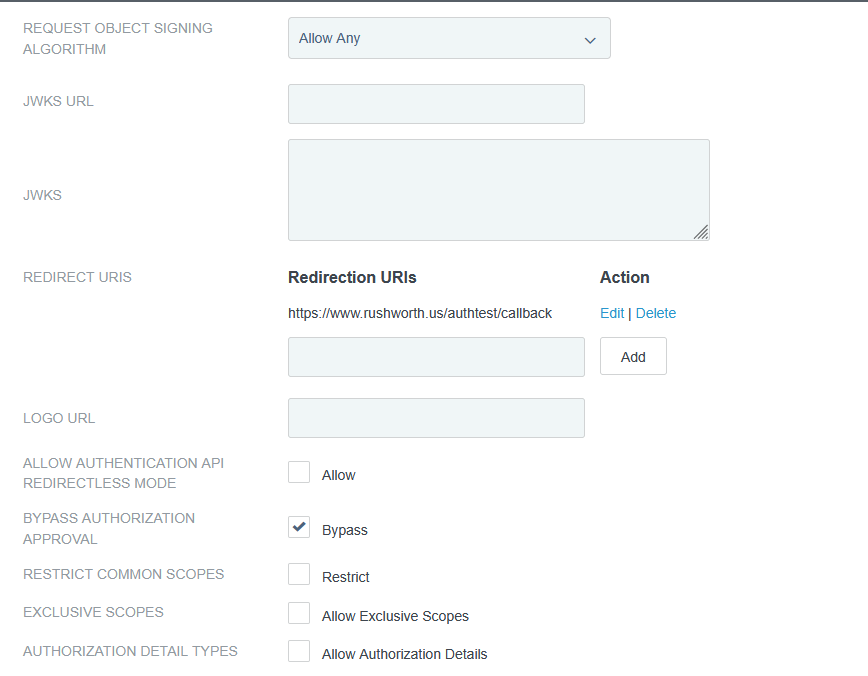
The OIDCRedirectURI needed to be a path under the protected directory for me – the Apache module handles the callback. Provide this path on the OIDC connection request.

The OIDCCryptoPassphrase just needs to be a long pseudo-random string. It can include special characters.

# Serve /authtest from local filesystem
Alias /authtest "/var/www/vhtml/sandbox/authtest/"

<Directory "/var/www/vhtml/sandbox/authtest">
Options -Indexes +FollowSymLinks
AllowOverride None
Require all granted
</Directory>

# mod_auth_openidc configuration for Ping (PingFederate/PingID)
# The firewall will need to be configured to allow web server to communicate with this host
OIDCProviderMetadataURL https://login-dev.windstream.com/.well-known/openid-configuration

# The ID and secret will be provided to you
OIDCClientID d5d53555-7525-4555-a565-b525c59545d5
OIDCClientSecret p78…Q2kxB

# Redirect/callback URI – provide this in the request form for the callback URL
OIDCRedirectURI https://www.rushworth.us/authtest/callback

# Session/cookie settings – you make up the OIDCCryptoPassphrase
OIDCCryptoPassphrase "…T9y"
OIDCCookiePath /authtest
OIDCSessionInactivityTimeout 3600
OIDCSessionMaxDuration 28800

# Scopes and client auth
OIDCScope "openid profile email"
OIDCRemoteUserClaim preferred_username
OIDCProviderTokenEndpointAuth client_secret_basic

# If Ping's TLS cert at https://localhost:9031 isn't trusted by the OS CA store,
# install the proper CA chain, or temporarily disable validation (not recommended long-term):
# OIDCSSLValidateServer Off

# Protect the URL path with OIDC
<Location /authtest>
AuthType openid-connect
Require valid-user
OIDCUnAuthAction auth
</Location>

Sample web code for the “protected” page if you want to use the user’s ID. The user’s email is found at $_server[‘OIDC_CLAIM_email’]

[lisa@fedora conf.d]# cat /var/www/vhtml/sandbox/authtest/index.php
<?php
     if( isset($_SERVER['OIDC_CLAIM_iss']) && $_SERVER['OIDC_CLAIM_iss'] == "https://login-dev.windstream.com"){
          echo "I trust you are " . $_SERVER['OIDC_CLAIM_username'] . "\n";
     }

else{
     print "Not authenticated ... \n";
     print "<UL>\n";
     foreach($_SERVER as $key_name => $key_value) {
          print "<LI>" . $key_name . " = " . $key_value . "\n";
     }
     
     print "</UL>\n";
}
?>

Results on the web page – user will be directed to PingID to authenticate, and you will verify that login-dev.windstream.com (or login.windstream.com in production) has authenticated them as the OIDC_CLAIM_username value:

OAUTH Client Setup – PingID

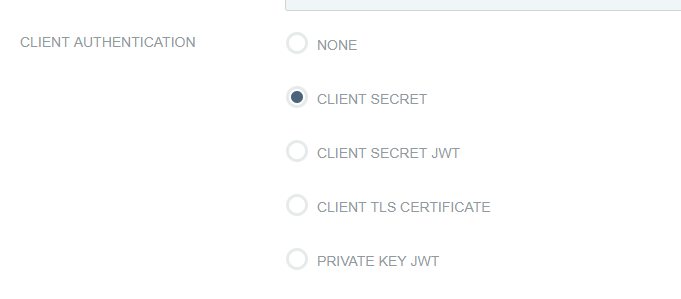
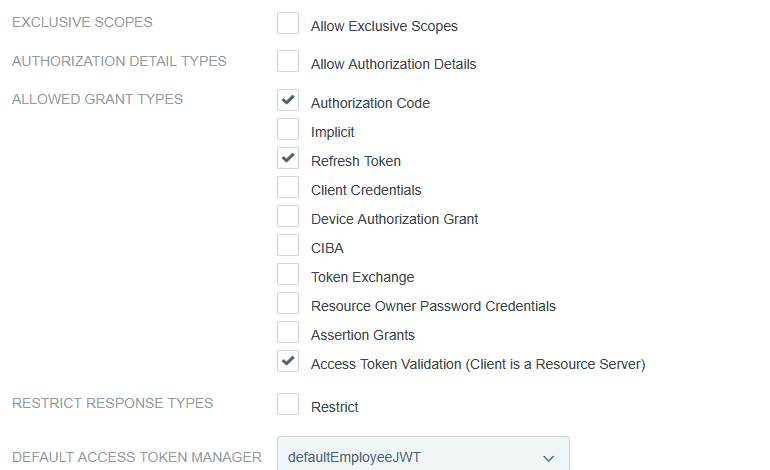
Client auth, add redirect URLs


Apache HTTPD: SSL Virtual Hosts

For quite some time, you couldn’t bind multiple SSL web sites to a single IP:Port combination — this had to do with the mechanics of negotiating an SSL session — the client and server negotiated encryption based on a specific certificate before the server really knew what the client was trying to retrieve. The quick/easy solution was to just add a virtual IP to the box and bind each individual web site to a unique IP address. While this was quite effective in a corporate environment or purely internal network, it was a terrible solution for a set of home-hosted personal web servers — I don’t want to buy four public IP addresses to host four differently named websites. My workaround was to off-port sites no one else would be using (the MQTT WebSockets reverse proxy) and use a reverse proxy to map paths within the family website to the remaining web servers. This page, for instance, is rushworth.us/lisa … which the reverse proxy re-maps to https://lisa.rushworth.us behind the scenes.

With Apache HTTPD 2.2.12 or later built against OpenSSL v0.9.8g or later, you can use Server Name Indication (SNI) to serve multiple SSL websites from a single IP:Port just like you have been able to do with non-SSL sites. Using SNI, the client includes “what they’re looking for” in first message of the SSN negotiation process so the server knows which cert to serve.

In your httpd.conf, indicate that you want to use SNI on an IP:Port combo

# Listen for virtual host requests on all IP addresses
NameVirtualHost *:443

And, optionally, configure one of the named virtual hosts as the default for non-SNI browsers:

SSLStrictSNIVHostCheck off

Now the configuration for your SSL sites can include a ServerName directive. Restart Apache HTTPD, and you’ll be able to access the proper SSL-enabled website without adding virtual IP addresses.

Zoneminder, time zones, and php-fpm

I’m in the process of installing Zoneminder on our new server. It was a fairly straightforward process — stop Zoneminder on the old server, dump the SQL database, fix the DEFINER values since I’m using a central database server instead of a server on localhost, install Zoneminder, copy the config file, set up the database user, pull in the SQL file, and start it all up.

Visiting the website, I get “ZoneMinder is not installed properly: php’s date.timezone is not set to a valid timezone”. I’d forgotten to set the timezone in php.ini. Added ‘date.timezone = “America/New_York”‘, restarted httpd and Zoneminder. And got the same error.

<?php
error_reporting(E_ALL);
var_dump(ini_get('date.timezone'),date_default_timezone_get());
?>

It’s not set. This isn’t a funky Zoneminder thing — this is a PHP problem. I realized that PHP now runs as its own service. Restarting httpd is insufficient. Restarted php-ftm and the time zone I’d set in php.ini showed up. This is a case where a reboot would have sorted it … but good to remember that, when changing PHP settings, the php service needs to be restarted.

Apache — Switching to PHP-FPM

A few system updates ago, PHP fell over completely because of some multi-processing module. The quick fix was to change the multi-processing module and avoid having to figure out what changed and how to use php-fpm. Part of moving my VM’s to the new server, though, is cleaning up anything I’ve patched together as a quick fix. And, supposedly, php-fpm is a lot faster than the old-school Apache handler. Switching was a lot less involved than I had expected.

Install php-fpm:

dnf install php-fpm

Edit 00-mpm.conf

My quick fix was to switch to a non-default multi-processing module. That change is reverted to re-enable the ‘event’ module

vim /etc/httpd/conf.modules.d/00-mpm.conf

Configure Apache PHP Module

Verify the socket name used in /etc/php-fpm.d/ — Fedora is configured from /etc/php-fpm.d/www.conf with a socket at /var/run/php-fpm/www.sock

cp /etc/httpd/conf.modules.d/15-php.conf /etc/httpd/conf.modules.d/15-php.conf.orig
vi /etc/httpd/conf.modules.d/15-php.conf

# Handle files with .php extension using PHP interpreter

# Proxy declaration
<Proxy "unix:/var/run/php-fpm/www.sock|fcgi://php-fpm">
    	ProxySet disablereuse=off
</Proxy>

# Redirect to the proxy
<FilesMatch \.php$>
	SetHandler proxy:fcgi://php-fpm
</FilesMatch>

#
# Allow php to handle Multiviews
#
AddType text/html .php

#
# Add index.php to the list of files that will be served as directory
# indexes.
#
DirectoryIndex index.php

Enable php-fpm to auto-start, start php-fpm, and restart Apache

systemctl enable php-fpm
systemctl start php-fpm
systemctl restart httpd

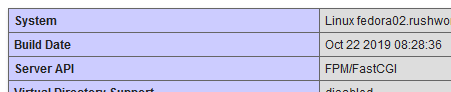
Voila — phpinfo() confirms that I am using FPM/FastCGI

We’ll see if this actually does anything to improve performance!

Did you know … you can redirect custom URLs to Microsoft Forms?

Microsoft Forms provides a simple framework for creating surveys and polls which can be distributed either to internal users or made publicly available. Including your Form URL in an a href tag is one way to avoid trying to communicate the super-long Form URL … but if you’re looking for a ‘pretty’ URL, something that can be included in print media or provided to someone verbally, you can redirect custom URLs to your Form URL.

Generally, hosting a forwarding URL requires a web server; but URL-shortening services should work. To use a web server, you’ll need to configure a site (or path from a site) to serve an HTTP redirect. I am using 302 (temporary) redirection instead of 301 (permanent redirection) in case I want to forward my custom URL to a different Form.

Apache config

Use the “Redirect” directive in your virtual host config:

<VirtualHost 10.1.2.3:80>
     ServerName customsite.example.com
     ServerAlias customsite.example.com customsite
     Redirect / https://forms.office.com/Pages/DesignPage.aspx#FormID=wbRnJe2w9UCu41....
</VirtualHost>

IIS Config

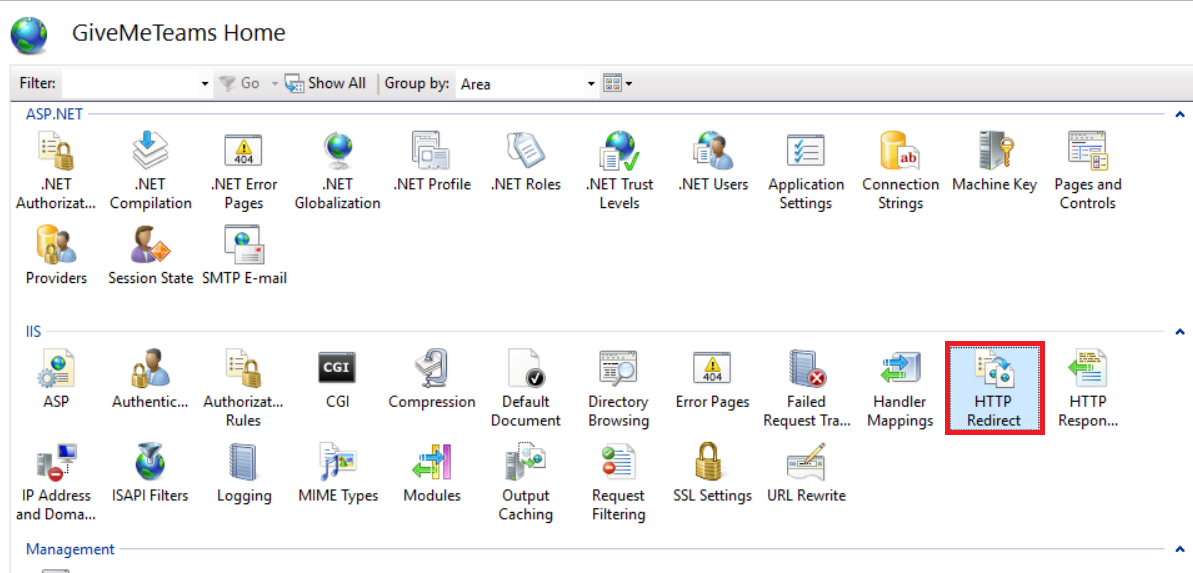
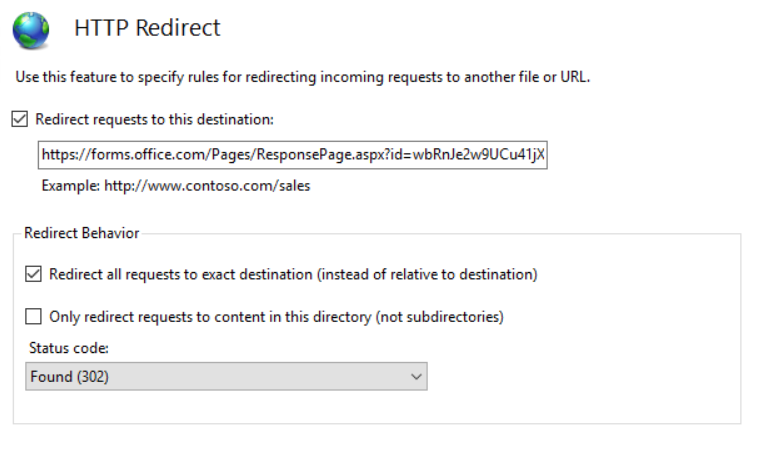
In the IIS management utility, navigate to your website and select “HTTP Redirect”.

Check the box to redirect requests and paste in your Forms URL. Check the box to redirect all requests to the exact destination.

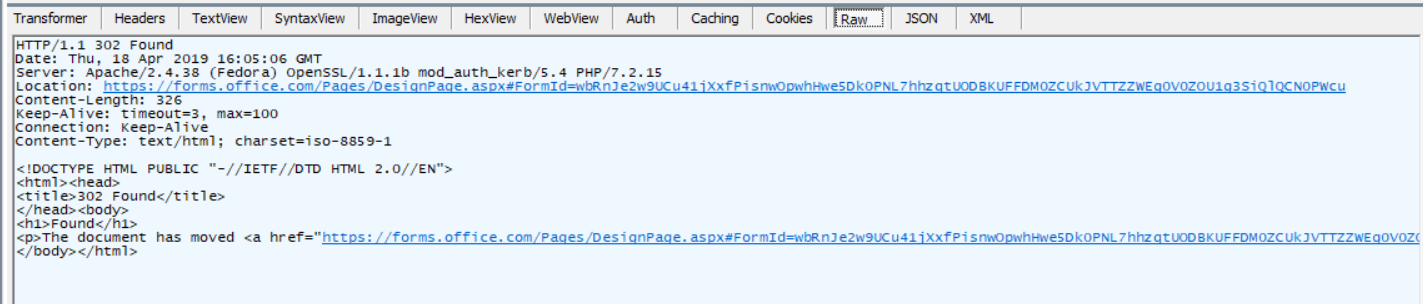
When your site is accessed, the browser receives the HTTP redirect and displays your Form.


The Colloquial Occam’s Razor

Occam’s razor – it is futile to do with more things that which can be done with fewer – is colloquially rendered as “the simplest solution is the most likely”. We had multiple tickets opened today for authentication failures on an Apache web server. Each malfunctioning site uses LDAP authentication and authorization against an Oracle Unified Directory. Nothing in the error logs. The service account from the Apache configuration can log in and query the directory from the box using ldapsearch, so the account is valid and there is nothing in the OUD preventing access from this particular host.

That’s a puzzler, and I was about to take down a lot of web sites to reload the service with its log level set to debug. Not even sure what made me do it, but I went out to the groups and looked at their member lists. Oops. Something had gone wrong with the identity management platform and employee accounts had been cleared from the groups (all of the contractors were still members, which made it even stranger). Added a few people back into groups appropriate for their position, voila they could log into their site again.

No idea how the identity management group restored the memberships, but verifying people who should have been members (who had been members and had done nothing to remove their memberships) were actually members of the group saved a lot of time running through debug logs. Sometimes the simplest answer is the most likely.

Apache HTTP Sandbox With Docker

I set up a quick Apache HTTPD sandbox — primarily to test authentication configurations — in Docker today. It was an amazingly quick process.

Install an image that has an Apache HTTPD server:    docker pull httpd
Create a local file system for Apache config files (c:\docker\httpd\httpd.conf for main config, c:\docker\httpd\conf.d for all of the extras like ssl.conf and php.conf, plus web sites), and c:\docker\httpd\vhtml for the web site content)
Launch the container: docker run -detach –publish 80:80 –publish 443:443 –name ApacheWebServer –restart always -v /c/docker/httpd/httpd.conf:/etc/httpd/conf/httpd.conf:ro -v /c/docker/httpd/conf.d/:/etc/httpd/conf.d/:ro -v /c/docker/httpd/vhtml/:/var/www/vhtml/:ro httpd

Shell into it (docker exec -it ApacheWebServer bash) to look around, or just access http://localhost from the Docker host.

Apache Airflow — No Backfill

A lot of software seems to be designed to save the user from themselves. This is great 90% of the time when you mess up and really want their help (or when the software’s help is cosmetic … my gripe against auto-correcting smart quotes, as an example). But I seem to fall into the other 10% a lot. And I mean a LOT. Apache Airflow jobs try to grab new information all.of.the.time. It’s a feature called “backfill”, and I’m sure it helps all sorts of people do exactly what they really wanted done. Not me 🙁

Having updated to 1.8, though, I now see a configuration parameter to instruct a DAG not to do me any favors. Just do what you’re asked when you’re asked to do it: catchup = False

DAG('testjob', default_args=default_args, schedule_interval='0 * * * *', catchup=False)

Uninformed Upgrades (PHP 5 => 7)

TL;DR: Check the list of what is being updated before you let an OS automatically update its programs.

We have a home automation / MythTV / ZoneMinder server with automatic updates disabled. In the process of updating OpenHAB to OpenHAB2, Scott suggested we update everything else while we’re at it. No big, did a quick “dnf update” … got a gig of packages downloaded, waiting for >1400 packages to install, and rebooted.

PHP could not talk to MySQL. At all. ZoneMinder just threw an error saying we didn’t have the PHP MySQL module installed (it worked half an hour ago, so it is INSTALLED). MythWeb completely failed to load – just a white screen. The quick web view of OpenHAB persistence history threw a class not found error.

I checked to see if the extensions were loaded (use the command “print_r(get_loaded_extensions());” in a PHP page) – huh, a LOT of my modules were missing. But there weren’t any useful errors anywhere indicating why.

I modified the php.ini file to show startup errors.

[root@fedora01 conf.modules.d]# grep display_startup_errors /etc/php.ini
; display_startup_errors
display_startup_errors = On

Oooooh, now there are errors! A lot of them. Not particularly useful, but at least a good clue that this isn’t going to go so well for me:

PHP Warning: PHP Startup: Unable to load dynamic library ‘/usr/lib64/php/modules/pdo.so’ – /usr/lib64/php/modules/pdo.so: undefined symbol: zend_ce_exception in Unknown on line 0
PHP Warning: PHP Startup: Unable to load dynamic library ‘/usr/lib64/php/modules/mysqlnd.so’ – /usr/lib64/php/modules/mysqlnd.so: undefined symbol: zend_hash_str_del in Unknown on line 0
PHP Warning: PHP Startup: Unable to load dynamic library ‘/usr/lib64/php/modules/bcmath.so’ – /usr/lib64/php/modules/bcmath.so: undefined symbol: _emalloc_16 in Unknown on line 0
PHP Warning: PHP Startup: Unable to load dynamic library ‘/usr/lib64/php/modules/bz2.so’ – /usr/lib64/php/modules/bz2.so: undefined symbol: zend_fetch_resource2_ex in Unknown on line 0
PHP Warning: PHP Startup: Unable to load dynamic library ‘/usr/lib64/php/modules/calendar.so’ – /usr/lib64/php/modules/calendar.so: undefined symbol: _emalloc_32 in Unknown on line 0
PHP Warning: PHP Startup: ctype: Unable to initialize module\nModule compiled with module API=20151012\nPHP compiled with module API=20131226\nThese options need to match\n in Unknown on line 0
PHP Warning: PHP Startup: Unable to load dynamic library ‘/usr/lib64/php/modules/curl.so’ – /usr/lib64/php/modules/curl.so: undefined symbol: zend_list_close in Unknown on line 0
PHP Warning: PHP Startup: Unable to load dynamic library ‘/usr/lib64/php/modules/dom.so’ – /usr/lib64/php/modules/dom.so: undefined symbol: zend_ce_exception in Unknown on line 0
PHP Warning: PHP Startup: Unable to load dynamic library ‘/usr/lib64/php/modules/exif.so’ – /usr/lib64/php/modules/exif.so: undefined symbol: zend_hash_str_exists in Unknown on line 0
PHP Warning: PHP Startup: Unable to load dynamic library ‘/usr/lib64/php/modules/fileinfo.so’ – /usr/lib64/php/modules/fileinfo.so: undefined symbol: zend_list_close in Unknown on line 0
PHP Warning: PHP Startup: Unable to load dynamic library ‘/usr/lib64/php/modules/ftp.so’ – /usr/lib64/php/modules/ftp.so: undefined symbol: zend_fetch_resource2 in Unknown on line 0
PHP Warning: PHP Startup: Unable to load dynamic library ‘/usr/lib64/php/modules/gd.so’ – /usr/lib64/php/modules/gd.so: undefined symbol: zend_list_close in Unknown on line 0
PHP Warning: PHP Startup: Unable to load dynamic library ‘/usr/lib64/php/modules/gettext.so’ – /usr/lib64/php/modules/gettext.so: undefined symbol: zend_parse_arg_str_slow in Unknown on line 0
PHP Warning: PHP Startup: Unable to load dynamic library ‘/usr/lib64/php/modules/iconv.so’ – /usr/lib64/php/modules/iconv.so: undefined symbol: _zval_get_string_func in Unknown on line 0
PHP Warning: PHP Startup: Unable to load dynamic library ‘/usr/lib64/php/modules/json.so’ – /usr/lib64/php/modules/json.so: undefined symbol: _emalloc_56 in Unknown on line 0
PHP Warning: PHP Startup: Unable to load dynamic library ‘/usr/lib64/php/modules/mbstring.so’ – /usr/lib64/php/modules/mbstring.so: undefined symbol: zend_hash_str_del in Unknown on line 0
PHP Warning: PHP Startup: Unable to load dynamic library ‘/usr/lib64/php/modules/mysqlnd.so’ – /usr/lib64/php/modules/mysqlnd.so: undefined symbol: zend_hash_str_del in Unknown on line 0
PHP Warning: PHP Startup: Unable to load dynamic library ‘/usr/lib64/php/modules/phar.so’ – /usr/lib64/php/modules/phar.so: undefined symbol: zend_sort in Unknown on line 0
PHP Warning: PHP Startup: Unable to load dynamic library ‘/usr/lib64/php/modules/posix.so’ – /usr/lib64/php/modules/posix.so: undefined symbol: _zend_hash_str_update in Unknown on line 0
PHP Warning: PHP Startup: Unable to load dynamic library ‘/usr/lib64/php/modules/shmop.so’ – /usr/lib64/php/modules/shmop.so: undefined symbol: zend_list_close in Unknown on line 0
PHP Warning: PHP Startup: Unable to load dynamic library ‘/usr/lib64/php/modules/simplexml.so’ – /usr/lib64/php/modules/simplexml.so: undefined symbol: zend_ce_exception in Unknown on line 0
PHP Warning: PHP Startup: Unable to load dynamic library ‘/usr/lib64/php/modules/sockets.so’ – /usr/lib64/php/modules/sockets.so: undefined symbol: zend_hash_str_del in Unknown on line 0
PHP Warning: PHP Startup: Unable to load dynamic library ‘/usr/lib64/php/modules/sqlite3.so’ – /usr/lib64/php/modules/sqlite3.so: undefined symbol: zend_ce_exception in Unknown on line 0
PHP Warning: PHP Startup: Unable to load dynamic library ‘/usr/lib64/php/modules/sysvmsg.so’ – /usr/lib64/php/modules/sysvmsg.so: undefined symbol: _emalloc_64 in Unknown on line 0
PHP Warning: PHP Startup: Unable to load dynamic library ‘/usr/lib64/php/modules/sysvsem.so’ – /usr/lib64/php/modules/sysvsem.so: undefined symbol: _emalloc_24 in Unknown on line 0
PHP Warning: PHP Startup: Unable to load dynamic library ‘/usr/lib64/php/modules/sysvshm.so’ – /usr/lib64/php/modules/sysvshm.so: undefined symbol: zend_list_close in Unknown on line 0
PHP Warning: PHP Startup: Unable to load dynamic library ‘/usr/lib64/php/modules/tidy.so’ – /usr/lib64/php/modules/tidy.so: undefined symbol: _zend_hash_str_update in Unknown on line 0
PHP Warning: PHP Startup: Unable to load dynamic library ‘/usr/lib64/php/modules/tokenizer.so’ – /usr/lib64/php/modules/tokenizer.so: undefined symbol: _emalloc_large in Unknown on line 0
PHP Warning: PHP Startup: Unable to load dynamic library ‘/usr/lib64/php/modules/xml.so’ – /usr/lib64/php/modules/xml.so: undefined symbol: _zend_hash_str_add in Unknown on line 0
PHP Warning: PHP Startup: Unable to load dynamic library ‘/usr/lib64/php/modules/xmlwriter.so’ – /usr/lib64/php/modules/xmlwriter.so: undefined symbol: _emalloc_16 in Unknown on line 0
PHP Warning: PHP Startup: Unable to load dynamic library ‘/usr/lib64/php/modules/xsl.so’ – /usr/lib64/php/modules/xsl.so: undefined symbol: dom_node_class_entry in Unknown on line 0
PHP Warning: PHP Startup: Unable to load dynamic library ‘/usr/lib64/php/modules/mysql.so’ – /usr/lib64/php/modules/mysql.so: undefined symbol: mysqlnd_connect in Unknown on line 0
PHP Warning: PHP Startup: Unable to load dynamic library ‘/usr/lib64/php/modules/mysqli.so’ – /usr/lib64/php/modules/mysqli.so: undefined symbol: zend_ce_exception in Unknown on line 0
PHP Warning: PHP Startup: Unable to load dynamic library ‘/usr/lib64/php/modules/pdo_mysql.so’ – /usr/lib64/php/modules/pdo_mysql.so: undefined symbol: mysqlnd_allocator in Unknown on line 0
PHP Warning: PHP Startup: Unable to load dynamic library ‘/usr/lib64/php/modules/pdo_sqlite.so’ – /usr/lib64/php/modules/pdo_sqlite.so: undefined symbol: php_pdo_unregister_driver in Unknown on line 0
PHP Warning: PHP Startup: Unable to load dynamic library ‘/usr/lib64/php/modules/wddx.so’ – /usr/lib64/php/modules/wddx.so: undefined symbol: zend_list_close in Unknown on line 0
PHP Warning: PHP Startup: Unable to load dynamic library ‘/usr/lib64/php/modules/xmlreader.so’ – /usr/lib64/php/modules/xmlreader.so: undefined symbol: dom_node_class_entry in Unknown on line 0
PHP Warning: PHP Startup: Unable to load dynamic library ‘/usr/lib64/php/modules/json.so’ – /usr/lib64/php/modules/json.so: undefined symbol: _emalloc_56 in Unknown on line 0

Turns out DNF installed PHP 7, but didn’t do anything to remove the PHP 5 modules from my Apache configuration:

[root@fedora01 tmp]# cd /etc/httpd/modules
[root@fedora01 modules]# grep php *
Binary file libphp5.so matches
Binary file libphp5-zts.so matches
Binary file libphp7.so matches
Binary file libphp7-zts.so matches

[root@fedora01 modules]# mkdir /tmp/oldphp
[root@fedora01 modules]# mv libphp5* /tmp/oldphp

And remove them from the conf.modules.d too (if you just remove the module files but try to load them in the conf.modules.d … Apache will just fail to load. You could remove them from conf.modules.d … but I don’t want a lot of no-longer-used files sitting there to confuse me in a year or two!)

[root@fedora01 modules]# cd /etc/httpd/conf.modules.d/
[root@fedora01 conf.modules.d]# grep php *
10-php.conf: LoadModule php5_module modules/libphp5.so
10-php.conf: LoadModule php5_module modules/libphp5-zts.so
15-php.conf:# Cannot load both php5 and php7 modules
15-php.conf:<IfModule !mod_php5.c>
15-php.conf: LoadModule php7_module modules/libphp7.so
15-php.conf:<IfModule !mod_php5.c>
15-php.conf: LoadModule php7_module modules/libphp7-zts.so

[root@fedora01 conf.modules.d]# mv 10-php.conf /tmp/oldphp/

Then restart Apache without PHP 5:

root@fedora01 conf.modules.d]# service httpd start
Redirecting to /bin/systemctl start httpd.service

Voila, perfectly functioning web sites. And, yeah, I should probably check the list of “what will be updated” when I update a server. Would save HOURS of reading through strace output to find out old versions were still hanging about.

 

OpenHAB Through A Reverse Proxy

This isn’t something we do, but my Google dashboard says a lot of people are finding my site by searching for OpenHAB and reverse proxy. I do a lot of other things through Apache’s reverse proxy, so I figured I’d provide a quick config.

To start, you either need to have the proxy modules statically built into Apache or load them in your httpd.conf file. I load the modules, so am showing the httpd.conf method. I have the WebStream module loaded as well because we reverse proxy an MQTT server for presence – the last line isn’t needed if you don’t reverse proxy WebStream data.

LoadModule proxy_module modules/mod_proxy.so
LoadModule proxy_http_module modules/mod_proxy_http.so
LoadModule proxy_wstunnel_module modules/mod_proxy_wstunnel.so

If I were reverse proxying our OpenHAB site, I would only do so over HTTPS and I’d have authentication on the site (i.e. any random dude on the Internet shouldn’t be able to load the site and turn my lights off without putting some effort into it). There are other posts on this site providing instructions for adding Kerberos authentication to a site (to an Active Directory domain). You could also use LDAP to authenticate to any LDAP compliant directory – config is similar to the Kerberos authentication with LDAP authorization. You can do local authentication too – not something I do, but I know it is a thing.

Once you have the proxy modules loaded, you need to add the site to relay traffic back to OpenHAB. To set up a new web site, you’ll need to set up a new virtual host. Server Name Indication was introduced in Apache 2.2.12 — this allows you to host multiple SSL web sites on a single IP:Port combination. Prior to 2.2.12, the IP:Port combination needed to be unique per virtual host to avoid certificate name mismatch errors. You still can use a unique combination, but if you want to use the default HTTP-SSL port, 443, and identify the site through ServerName/ServerAlias values … Google setting up SNI with Apache.

Within your VirtualHost definition, you need a few lines to set up the reverse proxy. Then add the “ProxyPass” and “ProxyPassReverse” lines with the URL for your OpenHAB at the end

ProxyRequests Off
<VirtualHost 10.1.2.25:8443>
        ServerName openhabExternalHost.domain.gTLD
        ServerAlias openhab
        SetEnv force-proxy-request-1.0 1
        SetEnv proxy-nokeepalive 1
        SetEnv proxy-initial-not-pooled
        SetEnv proxy-initial-not-pooled 1

        ProxyPreserveHost On
        ProxyTimeOut 1800

        ProxyPass / https://openhabInternalHost.domain.gTLD:9443/
        ProxyPassReverse / https://openhabInternalHost.domain.gTLD:9443/

        SSLEngine On
        SSLProxyEngine On
        SSLProxyCheckPeerCN off
        SSLProxyCheckPeerName off
        SSLCertificateFile /apache/httpd/conf/ssl/www.rushworth.us.cert
        SSLCertificateKeyFile /apache/httpd/conf/ssl/www.rushworth.us.key
        SSLCertificateChainFile /apache/httpd/conf/ssl/signingca-v2.crt
</VirtualHost>

Reload Apache and you should be able to access your OpenHAB web site via your reverse proxy. You can add authentication into the reverse proxy configuration too — this would allow you to use the OpenHAB site directly from your internal network but require authentication when coming in from the Internet.