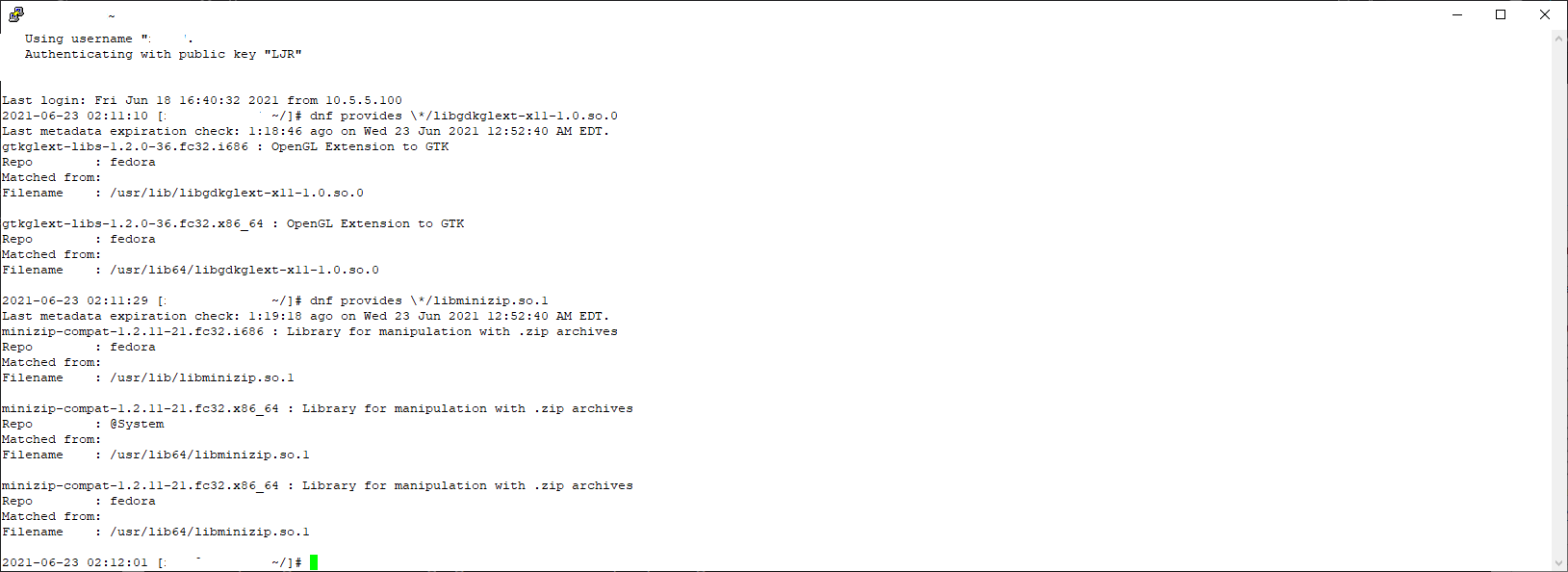
“Dependency hell” used to be a big problem — you’d download one package, attempt to install it, and find out you needed three other packages. Download one of them, attempt to install it, and learn about five other packages. Fifty seven packages later, you forgot what you were trying to install in the first place and went home. Or, I suppose, you managed to install that first package and actually use it. The advent of repo-based deployments — where dependencies can be resolved and automatically downloaded — has mostly eliminated dependency hell. But, occasionally, you’ll have a manual install that says “oh, I cannot complete. I need libgdkglext-x11-1.0.so.0 or libminizip.so.1 … and, if there’s a package that’s named libgdkglext-x11 or libminizip … you’re good. There’s not. Fortunately, you can use “dnf provides” to search for a package that provides a specific file — thus learning that you need the gtkglext-libs and minizip-compat packages to resolve your dependencies.
Tag: Linux
Viewing and recording packets using tshark
This time, I’m writing this down so I don’t have to keep looking it up. To display some packet info to the screen while writing a network capture to a file, include the -P option (older versions of tshark used -S)
2021-04-18 13:58:58 [lisa@server ~]# tshark -f "udp port 123" -w /tmp/ntpd.cap -P Running as user "root" and group "root". This could be dangerous. Capturing on 'enp0s25' 1 0.000000000 10.x.x.x → x.x.x.18 NTP 90 NTP Version 4, client 2 3.898916081 10.x.x.x → x.x.x.199 NTP 90 NTP Version 4, client 3 7.898948128 10.x.x.x → x.x.x.20 NTP 90 NTP Version 4, client 4 7.928749596 x.x.x.20 → 10.x.x.x NTP 90 NTP Version 4, server 5 9.898958577 10.x.x.x → x.x.x.76 NTP 90 NTP Version 4, client 6 9.949450324 x.x.x.76 → 10.x.x.x NTP 90 NTP Version 4, server 7 10.898981132 10.x.x.x → x.x.x.185 NTP 90 NTP Version 4, client 8 11.009163093 x.x.x.185 → 10.x.x.x NTP 90 NTP Version 4, server
Fedora — Disabling IPv6
Since it’s the third time I’ve had to do this so far this year, I’m going to write down how I disable IPv6 in Fedora. Add these lines to /etc/sysctl.conf
[lisa@server~]# grep ipv6 /etc/sysctl.conf net.ipv6.conf.all.disable_ipv6=1 net.ipv6.conf.default.disable_ipv6=1 net.ipv6.conf.lo.disable_ipv6=1
Then load the sysctl settings (sysctl -p) or reboot.
Without IPv6, if you do X-redirection, you may get an error indicating the redirection was refused. In journalctl, there’s an error “error: Failed to allocate internet-domain X11 display socket”. Evidently you’ve got to configure sshd to use IPv4 by setting “AddressFamily inet” in /etc/ssh/sshd_config
[lisa@server~/]# grep AddressFamily /etc/ssh/sshd_config AddressFamily inet
Fedora – Why were my packets dropped?
We’ve been seeing dropped packets on one of our servers — that usually means more data is coming in than can be processed, but it’s nice to confirm rather than guess. The command “netstat -s” displays summary statistics that are nicely grouped into causes:
TcpExt: 16 invalid SYN cookies received 88 resets received for embryonic SYN_RECV sockets 18 packets pruned from receive queue because of socket buffer overrun 2321 ICMP packets dropped because they were out-of-window 838512 TCP sockets finished time wait in fast timer
Increasing message text size in Evolution
Evolution has the most microscopic text. Scott literally picks his computer up sometimes just so he can read the message. You get a lot of text on the screen … I guess. But it’s not really useful if you cannot read it.
(1) There’s a system-wide default font in KDE. Under the Fonts, there are setting for “small”, “toolbar”, “menu”, “window title” … they seem to default to 10 points (8 for small). That’s rather small on a high-resolution monitor.
(2) In Evolution, select Edit > Preferences
Select Mail Preferences from the left sidebar. Untick the box “Use the same fonts as other applications” and then pick a bigger font. This only changes the message text — the from/subject/date and folder structure are still using the system font.
Notes on Adding Drive to Linux Host
Create partition, format, find UUID, and add line to fstab to mount the volume
[lisa@linuxhost ~]# parted /dev/sdb
GNU Parted 3.2.153
Using /dev/sdb
Welcome to GNU Parted! Type ‘help’ to view a list of commands.
(parted) mklabel GPT
Warning: The existing disk label on /dev/sdb will be destroyed and all data on this disk will be lost. Do you want to continue?
Yes/No? y
(parted) mkpart primary 2048s 100%
(parted) q
Information: You may need to update /etc/fstab.
[lisa@linuxhost ~]# mkfs.xfs -f /dev/sdb1
meta-data=/dev/sdb1 isize=512 agcount=4, agsize=163839872 blks
= sectsz=512 attr=2, projid32bit=1
= crc=1 finobt=1, sparse=1, rmapbt=0
= reflink=1
data = bsize=4096 blocks=655359488, imaxpct=5
= sunit=0 swidth=0 blks
naming =version 2 bsize=4096 ascii-ci=0, ftype=1
log =internal log bsize=4096 blocks=319999, version=2
= sectsz=512 sunit=0 blks, lazy-count=1
realtime =none extsz=4096 blocks=0, rtextents=0
[lisa@linuxhost ~]# lsblk
NAME MAJ:MIN RM SIZE RO TYPE MOUNTPOINT
sda 8:0 0 20G 0 disk
├─sda1 8:1 0 1G 0 part /boot
└─sda2 8:2 0 19G 0 part
├─fedora-lisa 253:0 0 17G 0 lvm /
└─fedora-swap 253:1 0 2G 0 lvm [SWAP]
sdb 8:16 0 2.5T 0 disk
└─sdb1 8:17 0 2.5T 0 part
sr0 11:0 1 650M 0 rom
[lisa@linuxhost ~]# blkid | grep sdb1
/dev/sdb1: UUID=”801ebed3-ddd6-459d-bd62-04a0a75f91b8″ TYPE=”xfs” PARTLABEL=”primary” PARTUUID=”b9a9a340-28f5-4efb-b649-af804ef5bc4c”
Add a line to /etc/fstab to mount the volume — here I’m mounting it to /mnt/data/mythtv:
UUID=801ebed3-ddd6-459d-bd62-04a0a75f91b8 /mnt/data/mythtv xfs defaults 0 0
Changing Default Shell With User-Level Access
To change the default shell without root access, use chsh. You will need to use a valid shell. To obtain a list, run ” chsh –list-shells”
Once you have the proper path for your preferred shell, use chsh with the –shell option. For example, to use the Korn shell as default, run “chsh –shell /bin/ksh username”
Tar Excluding Git Folders
You can, of course, use –exclude and avoid adding the .git folders to your tar archive, but I discovered a really cool option that excludes the folders created by a whole host of version control systems:
--exclude-vcs
Which, as of version 1.32, means excluding CVS, RCS, SCCS, git, SVN, Arch, Bazaar, Mercurial, and Darcs as follows:
- CVS/ — recursive
- RCS/ — recursive
- SCCS/ — recursive
- .git/ — recursive
- .gitignore
- .gitmodules
- .gitattributes
- .cvsignore
- .svn/ — recursive
- .arch-ids/ — recursive
- {arch}/ — recursive
- =RELEASE-ID
- =meta-update
- =update
- .bzr
- .bzrignore
- .bzrtags
- .hg
- .hgignore
- .hgrags
- _darcs
PrivateTmp Strangeness — apachectl v/s systemctl
This is a very strange problem — we had a web server upgraded recently. We use “sudo apachectl start” to bring up the server since the server is maintained by a dedicated Unix support team, and the site worked fine. Until … Sunday morning after the log rotation. Then Box Spout was unable to access the XML data for an Excel file to compress it. Lots of errors:
[Mon Sep 14 10:59:39.137728 2020] [:error] [pid 57117] [client 10.1.2.3:49276] PHP Warning: ZipArchive::close(): Zlib error: stream error in /path/to/site/classes/vendor/box/spout/src/Spout/Writer/Common/Helper/ZipHelper.php on line 199, referer: https://hostname.example.com/path/to/code.php
[Mon Sep 14 10:59:39.137785 2020] [:error] [pid 57117] [client 10.1.2.3:49276] PHP Warning: fopen(/tmp/xlsx5f5f934699dcd9.17695276.zip): failed to open stream: No such file or directory in /path/to/site/classes/vendor/box/spout/src/Spout/Writer/Common/Helper/ZipHelper.php on line 213, referer: https://hostname.example.com/path/to/code.php
[Mon Sep 14 10:59:39.137803 2020] [:error] [pid 57117] [client 10.1.2.3:49276] PHP Warning: stream_copy_to_stream() expects parameter 1 to be resource, boolean given in /path/to/site/classes/vendor/box/spout/src/Spout/Writer/Common/Helper/ZipHelper.php on line 214, referer: https://hostname.example.com/path/to/code.php
[Mon Sep 14 10:59:39.137814 2020] [:error] [pid 57117] [client 10.1.2.3:49276] PHP Warning: fclose() expects parameter 1 to be resource, boolean given in /path/to/site/classes/vendor/box/spout/src/Spout/Writer/Common/Helper/ZipHelper.php on line 215, referer: https://hostname.example.com/path/to/code.php
[Mon Sep 14 10:59:39.138360 2020] [:error] [pid 57117] [client 10.1.2.3:49276] PHP Fatal error: Uncaught exception ‘Box\\Spout\\Common\\Exception\\IOException’ with message ‘Cannot perform I/O operation outside of the base folder: /tmp’ in /path/to/site/classes/vendor/box/spout/src/Spout/Common/Helper/FileSystemHelper.php:130\nStack trace:\n#0 /path/to/site/classes/vendor/box/spout/src/Spout/Common/Helper/FileSystemHelper.php(82): Box\\Spout\\Common\\Helper\\FileSystemHelper->throwIfOperationNotInBaseFolder(‘/tmp/xlsx5f5f93…’)\n#1 /path/to/site/classes/vendor/box/spout/src/Spout/Writer/XLSX/Helper/FileSystemHelper.php(369): Box\\Spout\\Common\\Helper\\FileSystemHelper->deleteFile(‘/tmp/xlsx5f5f93…’)\n#2 /path/to/site/classes/vendor/box/spout/src/Spout/Writer/XLSX/Internal/Workbook.php(134): Box\\Spout\\Writer\\XLSX\\Helper\\FileSystemHelper->zipRootFolderAndCopyToStream(Resource id #26)\n#3 /path/to/site/ in /path/to/site/classes/vendor/box/spout/src/Spout/Common/Helper/FileSystemHelper.php on line 130, referer: https://hostname.example.com/path/to/code.php
[Mon Sep 14 10:59:39.139468 2020] [:error] [pid 57117] [client 10.1.2.3:49276] PHP Warning: ZipArchive::close(): Zlib error: stream error in /path/to/site/classes/vendor/box/spout/src/Spout/Writer/Common/Helper/ZipHelper.php on line 199, referer: https://hostname.example.com/path/to/code.php
[Mon Sep 14 10:59:39.139504 2020] [:error] [pid 57117] [client 10.1.2.3:49276] PHP Warning: fopen(/tmp/xlsx5f5f934699dcd9.17695276.zip): failed to open stream: No such file or directory in /path/to/site/classes/vendor/box/spout/src/Spout/Writer/Common/Helper/ZipHelper.php on line 213, referer: https://hostname.example.com/path/to/code.php
[Mon Sep 14 10:59:39.139515 2020] [:error] [pid 57117] [client 10.1.2.3:49276] PHP Warning: stream_copy_to_stream() expects parameter 1 to be resource, boolean given in /path/to/site/classes/vendor/box/spout/src/Spout/Writer/Common/Helper/ZipHelper.php on line 214, referer: https://hostname.example.com/path/to/code.php
[Mon Sep 14 10:59:39.139533 2020] [:error] [pid 57117] [client 10.1.2.3:49276] PHP Warning: fclose() expects parameter 1 to be resource, boolean given in /path/to/site/classes/vendor/box/spout/src/Spout/Writer/Common/Helper/ZipHelper.php on line 215, referer: https://hostname.example.com/path/to/code.php
[Mon Sep 14 10:59:39.139599 2020] [:error] [pid 57117] [client 10.1.2.3:49276] PHP Fatal error: Uncaught exception ‘Box\\Spout\\Common\\Exception\\IOException’ with message ‘Cannot perform I/O operation outside of the base folder: /tmp’ in /path/to/site/classes/vendor/box/spout/src/Spout/Common/Helper/FileSystemHelper.php:130\nStack trace:\n#0 /path/to/site/classes/vendor/box/spout/src/Spout/Common/Helper/FileSystemHelper.php(82): Box\\Spout\\Common\\Helper\\FileSystemHelper->throwIfOperationNotInBaseFolder(‘/tmp/xlsx5f5f93…’)\n#1 /path/to/site/classes/vendor/box/spout/src/Spout/Writer/XLSX/Helper/FileSystemHelper.php(369): Box\\Spout\\Common\\Helper\\FileSystemHelper->deleteFile(‘/tmp/xlsx5f5f93…’)\n#2 /path/to/site/classes/vendor/box/spout/src/Spout/Writer/XLSX/Internal/Workbook.php(134): Box\\Spout\\Writer\\XLSX\\Helper\\FileSystemHelper->zipRootFolderAndCopyToStream(Resource id #26)\n#3 /path/to/site in /path/to/site/classes/vendor/box/spout/src/Spout/Common/Helper/FileSystemHelper.php on line 130, referer: https://hostname.example.com/path/to/code.php
The postupdate script is “systemctl reload httpd.service” — so not exactly the same thing we used to launch the service originally. But I’ve never seen differing behavior between apachectl and systemctl started HTTPD instances. Quick/dirty solution is to disable PrivateTmp, but I’m hoping to be able to isolate why exactly the postupdate script appears to break the service’s access to the private tmp space.
30 November 2020 addendum — In discussing the issue with RedHat, they suggested using either
/sbin/killall -HUP httpd
or
/bin/systemctl restart httpd.service > /dev/null 2>/dev/null || true
Doing this has allowed continual access to the Private Tmp space after log rotation. Woohoo! Not sure why the default configuration that came from the Apache httpd package didn’t work (i.e. it’s not like we built some funky weird log rotation script). But success is good enough for me.
Listing Modules In Dynamically Linked Shared Object Libraries
We had to rebuild a server over the weekend — it’s a lot harder to get Apache and PHP set up when you don’t have root access to just install things from the yum repository. And, unlike the servers where I built httpd and php from source … we basically relayed requests to the Unix admin to have packages installed. One of the confusions during the whole process was that we didn’t know what to use as the module name for PHP to load in the httpd.conf file. The line from our old server (LoadModule php5_module /etc/httpd/modules/libphp5.so) produced an error that there was no such thing to load.
When a library fails to load with some error, I know to use ldd … but I didn’t know there was a way to list out the modules in a library. Fortunately, one of my coworkers had already run nm and listed out the modules — nm -D –defined-only sharedLibraryFile | grep module — and we were able to identify that the libphp5.so that we had wasn’t anything like the one on the old server. By listing the modules for each of the shared object libraries installed by the php package, we got the proper module name for httpd.conf