There are a LOT of tubes coming into our pit – and Anya is really going to miss the construction equipment when it’s gone.



There are a LOT of tubes coming into our pit – and Anya is really going to miss the construction equipment when it’s gone.
Still drilling … it’s really cool to watch. Especially from the dining room window where we get a good view and stay somewhat warm 🙂

We siphoned our mead with the 47b yeast into a new container and pulled some out for Christmas dinner. It is really good – a slightly sweet young tasting white wine. We’ve got a gallon left that we’re going to let age. I’m hoping the 71b batches are this good.
While looking for a healthy snack for Anya’s preschool Christmas party, I came across quite a few cute but not-for-bunches-of-kids snacks. One of them was penguins made of olives, cream cheese, and carrots. The not-kid-friendly part was the toothpick that holds the whole thing together. Well … turns out you can make them without toothpicks. Don’t move them afterward, walk softly … and there is a lot of intricacy that means I’m not making enough for a party tray. But Anya loved having half a dozen little penguin snacks to munch on today.
Use a small olive and a jumbo olive. Slice a section from the jumbo olive. Roll cream cheese into an oblong shape & stuff into the olive. Slice a carrot into circles, and cut a small triangle from each circle. Set the stuffed jumbo olive on the carrot circle. Put the carrot triangle into the small olive, smear a little cream cheese on the ‘neck’ part of the small olive, then stick it onto the jumbo olive. Voila, one penguin.

Trump’s election-night speech (and several of his subsequent prepared addresses) call for unity – working together, finding a common ground, restoring trust … but what I realize I am not hearing (apart from his unscripted interviews where he seems to say all of his campaign promises are bull and he’s actually willing to listen to facts) is that coming together doesn’t mean embracing his position. I’ve had friends whose idea of compromise was that YOU compromise and do what they want. Not fun people to be around, but a terrible position for government. Basically I don’t care that there were 3 million more of you … I won, so fuck off. Try to get Congress back and stop me in a few years. That’d not unity, it’s repression. Works for a while, but not sustainable. But that’s bringing business acumen to governance – short term gains that make me look good, what happens in four or eight years is the next guy’s problem. I’ll be retired, rich, and well-renown.
It’s the time of year when Americans make fun of fruitcake … which, having seen the strange brick-shaped thing studded with something that claims to be candied fruit … yeah, that thing sucks. But real fruitcake and other breads with real candied fruit/peel are incredible. I’ve got a bunch of fruit and peel candied and have been making breads.
This panettone got scorched at the bottom – I think it was the tin on which I set the baking paper. I’ll use something else next time.

I had written and tested a custom Active Directory password filter – my test included verifying the password actually worked. The automated testing was to select a UID from a pool, select a test category (good password, re-used password, password from dictionary, password that doesn’t meet character requirements, password containing surname, password containing givenName), set the password on the user id. Record the result from the password set, then attempt to use that password and record the result from the bind attempt. Each test category has an expected result, and any operation where the password set or bind didn’t match the expected results were highlighted. I also included a high precision timer to record the time to complete the password set operation (wanted to verify we weren’t adversely impacting the user experience). Published results, documented the installation and configuration of my password filter, and was done.
Until the chap who was installing it in production rang me to say he couldn’t actually log in using the password he set on the account. Which was odd – I set one and then did an LDAP bind and verified the password. But he couldn’t use the same password to log into a workstation in the test domain. Huh?? I actually knew people who wanted *some* users to be able to log in anywhere and others to be restricted to LDAP-only logons (i.e. web portal stuff) and ended up using the userWorkstations attribute to allow logon to DCs only.
We opened a case with Microsoft and it turns out that their Password Filter Programming Considerations didn’t actually mean “Erase all memory used to store passwords by calling the SecureZeroMemory function before freeing memory.” What they meant was “If you have created copies of the password anywhere within your code, make sure you erase memory used to store those copies by calling SecureZeroMemory …”
Which makes SO much more sense … as the comments in the code I used as our base says, why wouldn’t MS handle wiping the memory? Does it not get cleaned well if you don’t have a custom password filter?? Remarked out the call to SecureZeroMemory and you could use the password on NTLM authentications as well as kerberos!
// MS documentation suggests doing this. I honestly don’t know why LSA
// doesn’t just do this for you after we return. But, I’ll do what the
// docs say…
// LJR – 2016-12-15 Per MS, they actually mean to wipe any COPIES you make
// SecureZeroMemory(Password->Buffer, Password->Length);
I’ve updated my version of the filter and opened an issue on the source GitHub project … but if anyone else is working a custom password filter, following MS’s published programming considerations, and finds themselves unable to use the password they set … see if you are zapping your copies of the password or the PUNICODE_STRING that comes in.
There’s a hole in the ground (and a big pile of dirt). They dig a pit into which all of the tubes are manifolded & a line is run from the pit into the house. They’re about to start drilling – that’ll take a while. Especially since temperatures the rest of this week aren’t good for people or machines.

We have construction equipment! They just finished up with the previous job, and the equipment has been delivered to our property.


The geothermal system — WaterFurnace Series 7 — is installed in our house. There’s a pump mounted to the wall, but nothing is plumbed together because the loop field has not yet been installed. That’s what this equipment is for – they are going to dig a big hole in the yard (maybe 8 foot by 4 foot). A whole bunch of 3/4″ tubes will run into this hold & connect to a manifold. There’s another hole dug next to the house, and 1.5″ tube will go from the manifold to the exterior wall, through the exterior wall, through the pantry, and into the furnace room to attach to the pump.
The fluid that’s run through the loop field is run through the WaterFurnace unit, and heat is extracted into the refrigerant. And that’s what will heat our house. There are a lot of good non-technical write-ups of how geothermal heating works, but I found a decent somewhat technical write-up from a geothermal installer in Western PA.
This heat will be used to heat the house … and as long as the loop field temperature stays fairly reasonable (upper 30’s, I think), we should be able to sustain a comfortable temperature without engaging the heat strips. We’ve talked to quite a few people who use new-ish geothermal units that have only used the heat strips in extreme temperatures (it was -20 for a week a few years back) or when they increase the thermostat by more than two or three degrees. If you lower the house temperature to go away on holiday, don’t set the thermostat back to normal immediately upon returning home. Slowly increase the set-point by a degree or two every few hours a day before you plan to return – by slowly increasing the temperature, you’ll avoid using the heat strips.
I’ve been making a lot of quick circle skirts and matching headbands for Anya. The first step to making a circle skirt for a tiny person is to select a fabric that looks the same from any direction (i.e. you can turn it upside down, at 45 degrees, etc). Solid colors are an easy pick, or a marbled pattern. A “tossed” pattern (the components are at all different orientations) works too. If you have a pattern that doesn’t look the same from all directions, you cannot use a single circle to make the skirt. Well, you CAN … but you’ll also have part of your skirt where the pattern is sideways and another part where it is upside down. Being able to cut a single circle is what makes circle skirts so quick and easy 🙂
I have a reusable pattern that I made myself. I’ve seen a lot of people bemoaning the maths required to figure out the pattern dimensions. I guess a theoretical physicist’s view of “a lot of complex math” is a little different 🙂 But, really, you need to measure the waist size and how long you want the skirt to be. The maths to forming the circles — the circle radius = waistSize / (2 * π) . A skirt for a growing child does not demand precision here. You could use 3 instead of pi – which makes your circle radius close to the waist size divided by 6 — the exact “close to” is not a linear function. In the waist size I’m dealing with, it is about an inch. If I want a 22″ waist for her skirt, I could divide 21/6 for the radius and come up with a 21.99″ waist.
Since I want a stretchy waistband that allows her to pull the skirt on herself, I want something larger than her actual waist size. Depending on how much fullness / gathering I want, 22-25″ is a good circumference for the waist – which is a radius between 3.5″ and 4″. The next thing you need to decide is the length of the skirt – you’ll have two inches at the top for the waistband, but you’ll also lose about an inch to seam allowances.
To draft a pattern, use a trammel set in conjunction with an 18″ aluminum ruler. Draw the inner circle (radius calculated for the waist), then draw the inner circle (waist radius + skirt length) – leaving the pin of the trammel set in the same location as the pencil part was adjusted. Cut the two circles and you’ve got a pattern.
To cut, you can fold the pattern in half or in quarters (along with the fabric) or lay the fabric out and pin the unfolded pattern to the fabric. I align the pattern along two perpendicular sides of the fabric. This leaves me with a very long strip of uncut fabric. Cut a 5″ wide rectangle the length of the calculated waist circumference. I also cut a 2″ or 3″ wide rectangle a few inches longer than Anya’s head size to make a coordinating headband. For the waistband, 2″ strip of non-roll elastic to her actual waist size (plus half an inch or so) and another one to a little less than her head size. The head-sized one I then cut in half lengthwise (so I have two 1″ strips of elastic the length of her head size).
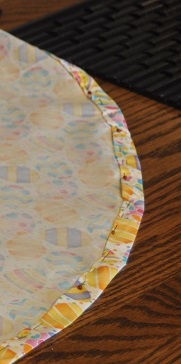
Fold the outside edge of the circle over 1/4″ and press. Then fold it over another 1/4″ and press. Stitch – this will be the bottom hem.
With the serger, finish off all four edges of the waistband fabric. Finish the short ends of the headband. The headband, fold in half lengthwise with the rights sides together and serge the long sides together to make a tube – which then has to be turned the right way around. Attach a safety pin to the 1″ wide elastic band and feed it through the strip. Sew the two ends of the elastic together, fold the ends of the fabric under and insert one side of the tube into the other side and stitch the two sides together. Voila, headband.
Pin the 5″ wide strip to the outside of the skirt, wrong sides together. I use the serger to sew these together – it finishes the top edge of the circle.

Sew the two short ends of the rectangle together. Sew the short ends of the 2″ wide elastic band together. Pull the skirt band through the elastic and pull the skirt band around the elastic. Fold the waistband over to the circle top is sandwiched between the two long edges of the waistband and start sewing. As you get toward the end of the circle, you have to gather the already-sewn waistband casing along the elastic. Done!
