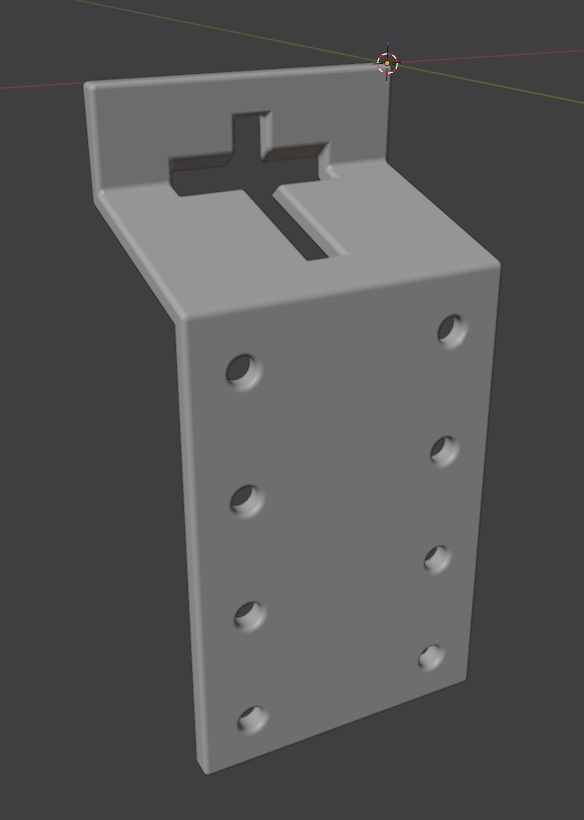
We spent a lot of the day trying to modify 3D models that we found online to work as a sign holder. Something like the bent metal plates you can buy at the tractor store. Since these are simple polygons, I thought it might be easier to script the build (plus making changes to the dimensions would just require tweaking variables).
import bpy
import bmesh
import math
from mathutils import Vector

# Clear all existing objects
for obj in list(bpy.data.objects):
    bpy.data.objects.remove(obj, do_unlink=True)

# -----------------------------
# Scene units (mm)
# -----------------------------
scene = bpy.context.scene
scene.unit_settings.system = 'METRIC'
scene.unit_settings.scale_length = 0.001  # 1 Blender unit = 1 mm

INCH = 25.4
def inch(x): return x * INCH

# -----------------------------
# PARAMETERS (mm)
# -----------------------------
bracket_thickness = inch(0.25)   # sheet thickness
bracket_width = inch(3)   # bracket width (across the post)

# Leg lengths (side profile)
bracket_top_length = inch(1)        # bracket segment 1 length
bracket_middle_length = inch(2)     # bracket segment 2 length
bracket_bottom_length = inch(4.5)   # bracket segment 3 length

# Bend included angles
bend1_angle_included = 105.0   # top flange
bend2_angle_included = 255.0   # web -> long leg

# If the long leg goes the wrong direction, flip this
flip_second_bend = True

# -----------------------------
# Punch hole
# -----------------------------
do_punch = True

# T-post size references
tpost_horizontal_hole_height = inch(0.25)
tpost_horizontal_hole_width = inch(1.5)
tpost_vertical_hole_height = inch(2)
tpost_vertical_hole_width = inch(0.25)
punch_clearance = 1.0 # clearance added around each rectangle (mm)

# Position of t-post before rotation (Z from p0 end, and X across width)
punch_center_z = inch(1)
punch_center_x = bracket_width / 2

# Vertical placement on top flange (Y=0 plane)
punch_center_y = -inch(0.5)

# -----------------------------
# Optional bevel to make edges25ook more formed
# -----------------------------
do_bevel = True

bevel_width = inch(0.05)
bevel_segments = 25

# -----------------------------
# Cleanup
# -----------------------------
#for n in ["BracketShape", "PunchBar", "PunchStem", "HoleRight1", "HoleRight2", "HoleRight3", "HoleRight4", "HoleLeft1", "HoleRLeft2", "HoleLeft3", "HoleLeft4"]:
#    o = bpy.data.objects.get(n)
#    if o:
#        bpy.data.objects.remove(o, do_unlink=True)

# -----------------------------
# Helpers (YZ plane directions)
# Define 0° as +Z. +90° is +Y. -90° is -Y.
# -----------------------------
def unit_from_angle(deg_from_posZ):
    a = math.radians(deg_from_posZ)
    return Vector((0.0, math.sin(a), math.cos(a)))

def boolean_diff(target, cutter):
    mod = target.modifiers.new(name=f"BOOL_{cutter.name}", type="BOOLEAN")
    mod.operation = 'DIFFERENCE'
    mod.solver = 'EXACT'
    mod.object = cutter
    bpy.context.view_layer.objects.active = target
    bpy.ops.object.modifier_apply(modifier=mod.name)
    cutter.hide_set(True)

def add_cube(name, size_xyz, location_xyz, rotation_xyz):
    bpy.ops.mesh.primitive_cube_add(size=1, location=location_xyz, rotation=rotation_xyz)
    obj = bpy.context.active_object
    obj.name = name
    obj.scale = (size_xyz[0], size_xyz[1], size_xyz[2])
    bpy.ops.object.transform_apply()
    return obj

def add_cylinder(name, radius, length, location_xyz, rotation_xyz):
    bpy.ops.mesh.primitive_cylinder_add(radius=radius, depth=length, location=location_xyz, rotation=rotation_xyz)
    obj = bpy.context.active_object
    obj.name = name
    bpy.ops.object.transform_apply()
    return obj

# Convert included bend angles to turn angles
angle_top = 180.0 - bend1_angle_included
angle_bottom = 180.0 - bend2_angle_included

# Start along +Z (top flange)
theta0 = 0.0
d0 = unit_from_angle(theta0)

# After bend1, go "down" (toward -Y) by turning negative
theta1 = theta0 - angle_top
d1 = unit_from_angle(theta1)

# After bend2, go toward +Z again (or flip if needed)
theta2 = theta1 + (angle_bottom if not flip_second_bend else - angle_bottom)
d2 = unit_from_angle(theta2)

# Profile points (center surface)
p0 = Vector((0.0, 0.0, 0.0))      # free end of top flange
p1 = p0 + d0 * bracket_top_length       # bend1 line
p2 = p1 + d1 * bracket_middle_length    # bend2 line
p3 = p2 + d2 * bracket_bottom_length    # end of long leg

# -----------------------------
# Build a single connected sheet surface:
# Create two polylines separated in X, then make quads between them.
# -----------------------------
mesh = bpy.data.meshes.new("BracketShapeMesh")
bracket = bpy.data.objects.new("BracketShape", mesh)
bpy.context.collection.objects.link(bracket)
bpy.context.view_layer.objects.active = bracket
bracket.select_set(True)

bm = bmesh.new()

x0, x1 = 0.0, bracket_width

# Left side (x0)
v0a = bm.verts.new((x0, p0.y, p0.z))
v1a = bm.verts.new((x0, p1.y, p1.z))
v2a = bm.verts.new((x0, p2.y, p2.z))
v3a = bm.verts.new((x0, p3.y, p3.z))

# Right side (x1)
v0b = bm.verts.new((x1, p0.y, p0.z))
v1b = bm.verts.new((x1, p1.y, p1.z))
v2b = bm.verts.new((x1, p2.y, p2.z))
v3b = bm.verts.new((x1, p3.y, p3.z))

# Faces (one per segment)
bm.faces.new((v0a, v0b, v1b, v1a))  # top flange
bm.faces.new((v1a, v1b, v2b, v2a))  # web
bm.faces.new((v2a, v2b, v3b, v3a))  # long leg

bm.normal_update()
bm.to_mesh(mesh)
bm.free()

# -----------------------------
# Solidify to thickness (sheet metal look)
# -----------------------------
solid = bracket.modifiers.new("Solidify", type="SOLIDIFY")
solid.thickness = bracket_thickness
solid.offset = 0.0
bpy.ops.object.modifier_apply(modifier=solid.name)

# -----------------------------
# Punch the lowercase "t" on the top flange
# (Top flange is flat at Y=0; punch straight through Y)
# -----------------------------
if do_punch:
    tpost_length_y = bracket_thickness * 5  # ensure it fully cuts through

    # Crossbar rectangle
    horizontal_hole = add_cube(
        "PunchBar",
        size_xyz=(tpost_horizontal_hole_width + 2 * punch_clearance, tpost_length_y, tpost_horizontal_hole_height + 2 * punch_clearance),
        location_xyz=(punch_center_x, 13 + punch_center_y, punch_center_z),
        rotation_xyz=(math.radians(90 - bend1_angle_included / 2), math.radians(0), math.radians(0))
    )

    # Stem rectangle (placed under the bar like a lowercase "t")
    vertical_hole = add_cube(
        "PunchStem",
        size_xyz=(tpost_vertical_hole_width + 2 * punch_clearance, tpost_length_y, tpost_vertical_hole_height + 2 * punch_clearance),
        location_xyz=(punch_center_x, punch_center_y, punch_center_z),
        rotation_xyz=(math.radians(90), math.radians(0), math.radians(0))
        #rotation_xyz=(math.radians(90 - bend1_angle_included / 2), math.radians(0), math.radians(0))
    )
    boolean_diff(bracket, vertical_hole)
    boolean_diff(bracket, horizontal_hole)


for hole in range(4):
    right_hole = add_cylinder(
        "HoleRight{}".format(hole),
        radius=inch(0.125),
        length=100,
        location_xyz=(inch(0.5), -inch(2), inch(2) + inch(1.175) * hole),
        rotation_xyz=(math.radians(90), 0, 0)
    )
    left_hole = add_cylinder(
        "HoleLeft{}".format(hole),
        radius=inch(0.125),
        length=100,
        location_xyz=(inch(2.5), -inch(2), inch(2) + inch(1.175) * hole),
        rotation_xyz=(math.radians(90), 0, 0)
    )
    boolean_diff(bracket, right_hole)
    boolean_diff(bracket, left_hole)

# -----------------------------
# Optional bevel
# -----------------------------
if do_bevel:
    bev = bracket.modifiers.new("Bevel", type="BEVEL")
    bev.width = bevel_width
    bev.segments = bevel_segments
    bev.limit_method = 'ANGLE'
    #bev.angle_limit = math.radians(35)
    bev.use_clamp_overlap = False
    bpy.context.view_layer.objects.active = bracket
    bpy.ops.object.modifier_apply(modifier=bev.name)