
Un-killable Process

Scott had a Dolphin instance veg out on him. Not much for it other than killing the process. Except it didn’t kill. Now SIGTERM (15) I don’t expect to kill a vegged out process, but SIGKILL (9)? I’ve never seen that fail. A little research later, and I’ve discovered “uninterruptible sleep”.  Which, at 11PM is starting to sound really good to me. But not something I associate with computer programs. Essentially, processes that are waiting on I/O very briefly pop into this state and pop out of the state when the I/O operation completes. Code needs to have timeouts to prevent the application from getting stuck waiting for I/O. And, evidently, Scott has discovered a scenario in which Dolphin does not have a timeout.

How can you tell that your process is stuck in uninterruptible sleep? Use “ps u” (or “ps aux” for all processes) and check the “STAT” column.

From “man ps”:

PROCESS STATE CODES
Here are the different values that the s, stat and state output
specifiers (header "STAT" or "S") will display to describe the state of
a process:

D uninterruptible sleep (usually IO)
I Idle kernel thread
R running or runnable (on run queue)
S interruptible sleep (waiting for an event to complete)
T stopped by job control signal
t stopped by debugger during the tracing
W paging (not valid since the 2.6.xx kernel)
X dead (should never be seen)
Z defunct ("zombie") process, terminated but not reaped by its parent

For BSD formats and when the stat keyword is used, additional
characters may be displayed:

< high-priority (not nice to other users)
N low-priority (nice to other users)
L has pages locked into memory (for real-time and custom IO)
s is a session leader
l is multi-threaded (using CLONE_THREAD, like NPTL pthreads do)
+ is in the foreground process group

Rebooting clears the process (or sorting whatever is blocking the I/O operation). But there are processes that “kill -9” won’t terminate.
Straws as a Marketing Stunt

As a campaign/marketing stunt, the Trump campaign’s plastic straws are brilliant. It is a solid component of the “troll the liberals” campaign plank. Garnered a lot of attention (not *good* attention, but that seemingly doesn’t matter). Sure, major news outlet aren’t exactly saying “go shop the Trump reelection store!!!”, but media outlets are still providing free advertising for Trump.

Recreating Grub Bootloader After the Windows Install Wipes It

Setting up the dual-boot Windows/Fedora system was straight-forward on my laptop. I installed Windows, then installed Linux and grub mkconfig found Windows and included it in the menu. Scott already had Fedora, and we needed to repair his Windows installation. Which, of course, blew away grub. Easy enough to get back, provided you’ve got a Live USB installation from which to boot.

Boot the Live media and use fdisk to find the Linux partition (in our installations, /boot is contained within the root partition).

[root@fedora02 ~]# fdisk -l
Disk /dev/sda: 10 GiB, 10737418240 bytes, 20971520 sectors
Units: sectors of 1 * 512 = 512 bytes
Sector size (logical/physical): 512 bytes / 4096 bytes
I/O size (minimum/optimal): 4096 bytes / 4096 bytes
Disklabel type: dos
Disk identifier: 0xd847fbc2

Device Boot Start End Sectors Size Id Type
/dev/sda1 * 2048 1026047 1024000 500M 83 Linux
/dev/sda2 1026048 20971519 19945472 9.5G 8e Linux LVM

Mount that partition somewhere:

mkdir /mnt/mycomputer
mount /dev/sda2 /mnt/mycomputer

Add bind mounts so /dev and /proc are in there

mount –bind /dev /mnt/mycomputer/dev
mount –bind /proc /mnt/mycomputer/proc

Chroot yourself into the mount point

chroot /mnt/mycomputer

Now you can reinstall grub. You don’t want the partition (e.g. /dev/sda2) but the disk. The following commands install the grub2 bootloader and reboot.

grub2-install /dev/sda
reboot

If you forget to pay attention on boot and thus inadvertently end up in the default operating system (<G>), edit /etc/default/grub and increase “GRUB_TIMEOUT=5”. Build the grub config — this should identify your Windows partition and include it in the menu

grub2-mkconfig -o /boot/grub2/grub.cfg

Reboot again, and you’ll be able to select between Windows and Linux.

Using grub rescue to boot machine and repair MBR

Using grub rescue to boot machine and repair MBR

Use “ls” to find your partition list:
ls
(hd0) (hd0,msdos3) (hd0,msdos2) (hd0,msdos1)

Check the content of each to find your Linux partition:
ls (hd0,msdos3)/
ls (hd0,msdos2)/
ls (hd0,msdos1)/

You want the one with the /boot folder. In our case, this is (hd0,msdos3). The following commands will boot your Linux OS.

set prefix=(hd0,msdos3)/boot/grub2
set root=(hd0,msdos3)
insmod normal
normal

<root password for maintenance>

Use “df” or “mount” to figure out which disk holds the Linux partition. In our case, it is /dev/sdb. You don’t want the partition (e.g. /dev/sdb2) but the disk. The following commands install the grub2 bootloader and build a config file.

grub2-install /dev/sdb
grub2-mkconfig -o /boot/grub2/grub.cfg

Embroidery Thread Storage

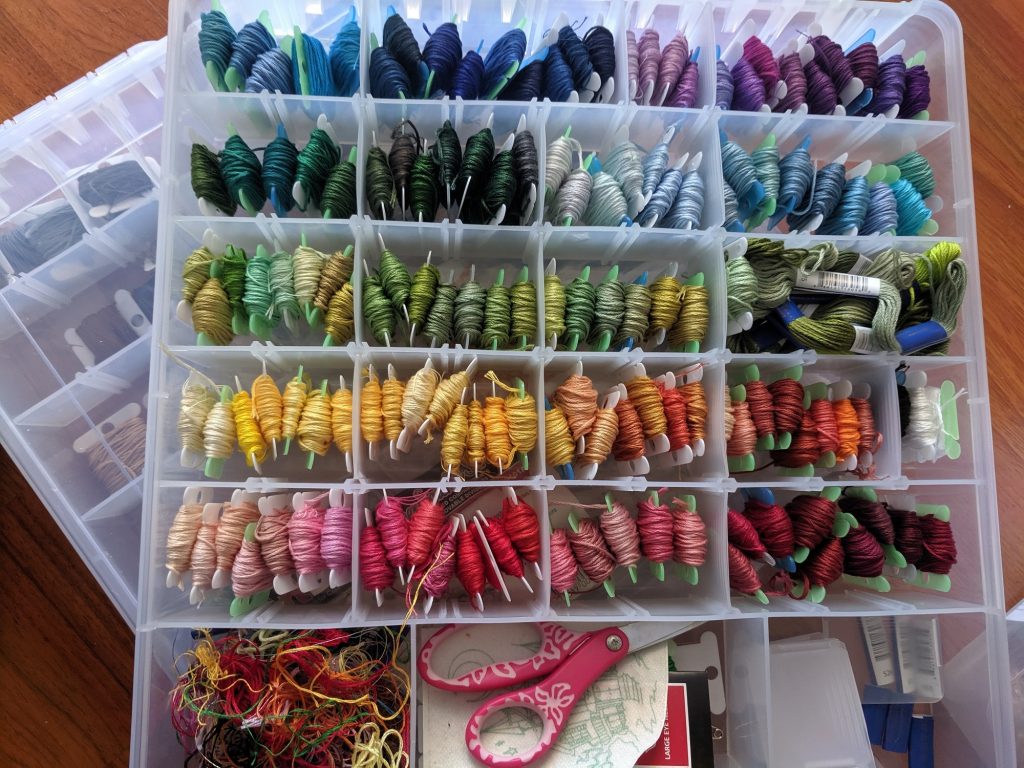
Two years ago, I picked up a bunch of ArtBin 9101AB boxes for 9$ each in a pre-Christmas sale. They stack nicely, and I use them to store zippers, fold over elastic, sewing feet, beads … all sorts of craft supplies. I’m trying to use them to store my embroidery thread. I have a lot — a whole rainbow of colors, plus another box with grays, browns, and ‘special’ thread (metallic, glow in the dark). But the little bobbin cards aren’t quite big enough. It’s still an improvement over random skeins of thread, and unused portions can be wrapped around the bobbin card to ensure you know exactly which light blue that bit is. Hopefully I’ll come up with something that keeps these things upright … other than stuffing the box so there’s nowhere for them to move 😀

Linux – Finding “Missing” Disk Space

You can have ‘stuff’ in a folder, mount a partition to that folder, and have disk space used for which you cannot account. Using a tool like df, you will see that 10GB of your 10GB disk is used, but using du the individual folders only account for 5GB.

Rather than randomly umounting partitions to see if there’s anything in the mount point folder, you can bind mount root to another location and check the disk utilization on the new mount.


[root@fedora123 ~]# mount -o bind / /mnt/fakeout/
[root@fedora123 ~]# du -sh `ls /mnt/fakeout | grep -v mnt`
0 bin
0 boot
280K ca
8.0K cacert.pem
4.0K careq.pem
0 certs
0 crl
0 dev
44M etc
52K home
0 index.txt
0 lib
0 lib64
0 media
0 newcerts
0 openhab
724K opt
4.0K private
0 proc
847M root
0 run
0 sbin
227M srv
0 sys
4.0K tmp
3.0G usr
4.0K var
[root@fedora123 ~]# umount fakeout

GPO Changes Not Reflected On Computer

A year or three ago, we had set up a group policy to display logon information in the Windows welcome screen — last logon time, information about any bad passwords since your last successful logon. It’s nice, but you are unable to log in if the information is unavailable. So we disabled the setting (just clearing a GPO setting doesn’t always remove the config from anywhere it’s already set … you’ve got to change to the desired setting). Aaaaand … one server still shows the logon info. Or, more accurately, fails to display it and prevents the domain account from logging on. Luckily it’s a member computer and we can just log in with local accounts.

I thought about just editing the local computer policy (which would have priority anyway) to disable the logon info, but the computer policy could not be opened. It threw a strange access denied error. I could edit the local user policy. Just not the computer policy.

It seems that the local computer policy got corrupted. After deleting registry.pol from c:\Windows\System32\GroupPolicy\Machine … I am able to modify the local computer security policy. GPO settings from the domain are also applied as expected. WooHoo! I can sign in using domain IDs again!

New Embroidery Project

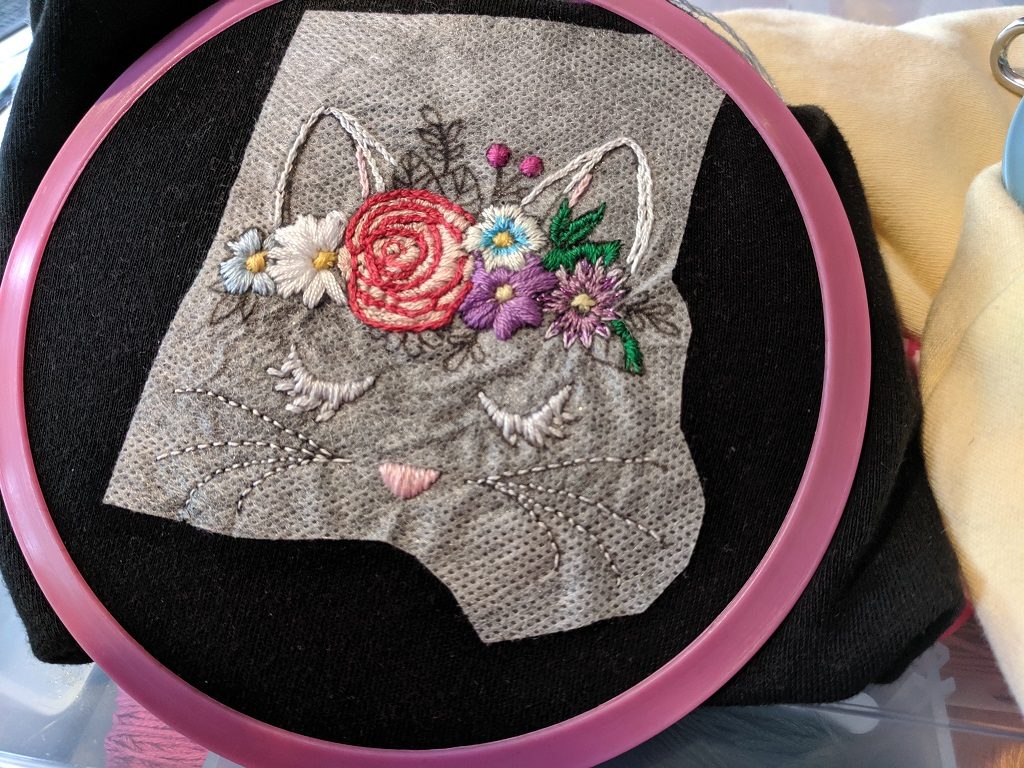
I finally got larger blank t-shirts for Anya. Anya and I will spend an hour or two in the evening relaxing and embroidering the shirts. About nine shirt-sized images fit on a 8.5″x11″ sheet of dissolving, printable transfer paper. I’ll create a single image and arrange all of the embroidery patterns to fill the page (needs to be black lines on a white background as the printout is fuzzy, and color or gray-scale makes a big mess). Cut out one image, stick it onto a shirt, add a hoop (I love Darice’s spring tension hoops!), and go.

I taught Anya to back-stitching along lines last year, and I taught her how to make a satin stitch today. She’s working on a cute little owl. I’m working on this hand embroidery pattern from Urban Threads. Should be finished tomorrow too!