With contestants who think lying about harassment is a good game strategy, and a guy finally removed for unwanted touching … I wonder if this is the end of Survivor. Will next season feature an alliance that outright lies to eliminate competition at key moments in the game? Gain a majority by eliminating a player on the other side.
Author: Lisa
Apache — Switching to PHP-FPM
A few system updates ago, PHP fell over completely because of some multi-processing module. The quick fix was to change the multi-processing module and avoid having to figure out what changed and how to use php-fpm. Part of moving my VM’s to the new server, though, is cleaning up anything I’ve patched together as a quick fix. And, supposedly, php-fpm is a lot faster than the old-school Apache handler. Switching was a lot less involved than I had expected.
Install php-fpm:
dnf install php-fpm
Edit 00-mpm.conf
My quick fix was to switch to a non-default multi-processing module. That change is reverted to re-enable the ‘event’ module
vim /etc/httpd/conf.modules.d/00-mpm.conf
Configure Apache PHP Module
Verify the socket name used in /etc/php-fpm.d/ — Fedora is configured from /etc/php-fpm.d/www.conf with a socket at /var/run/php-fpm/www.sock
cp /etc/httpd/conf.modules.d/15-php.conf /etc/httpd/conf.modules.d/15-php.conf.orig
vi /etc/httpd/conf.modules.d/15-php.conf

# Handle files with .php extension using PHP interpreter

# Proxy declaration
<Proxy "unix:/var/run/php-fpm/www.sock|fcgi://php-fpm">
    	ProxySet disablereuse=off
</Proxy>

# Redirect to the proxy
<FilesMatch \.php$>
	SetHandler proxy:fcgi://php-fpm
</FilesMatch>

#
# Allow php to handle Multiviews
#
AddType text/html .php

#
# Add index.php to the list of files that will be served as directory
# indexes.
#
DirectoryIndex index.php
Enable php-fpm to auto-start, start php-fpm, and restart Apache
systemctl enable php-fpm
systemctl start php-fpm
systemctl restart httpd
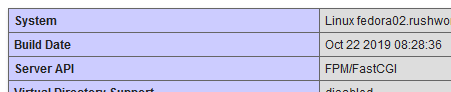
Voila — phpinfo() confirms that I am using FPM/FastCGI
We’ll see if this actually does anything to improve performance!
External Access to libvirt VMs
Instead of trying to map individual ports over to guest OS’s, I am just routing traffic to the VM bridge from the host.
Testing to ensure it works:
systemctl start firewalld
firewall-cmd –direct –passthrough ipv4 -I FORWARD -i br5 -j ACCEPT
firewall-cmd –direct –passthrough ipv4 -I FORWARD -o br5 -j ACCEPT
firewall-cmd –reload
Permanent setup:
systemctl enable firewalld
firewall-cmd –permanent –direct –passthrough ipv4 -I FORWARD -i br5 -j ACCEPT
firewall-cmd –permanent –direct –passthrough ipv4 -I FORWARD -o br5 -j ACCEPT
firewall-cmd –reload
Then I just added a static route for the network defined on br5 to the VM host.
Very Meta
The Ohio House wants to ban bans on plastic bags? The party of less government … Unless you aren’t doing what I want you to do. Then we need a law! Obviously a *state* law because the Feds cannot possibly come up with a law that addresses the needs of such a diverse group of people. Sigh!
Migrating from Hyper-V to libvirt
We finally got a new server, and I’m starting to migrate our servers to the new box. We currently have a Windows virtualization platform (Hyper-V) — Windows Data Center edition was supposed to provide unlimited licenses for standard servers running on the host, so it seemed like a great deal. Except “all of the Windows servers” turned out to be, well, one. So we decided to use Fedora on the host. Worst case, that would mean re-installing a few servers. But I wanted to try converting the existing Hyper-V VMs.
Install libvirt and associated packages:
dnf -y install bridge-utils libvirt virt-install qemu-kvm virt-top libguestfs-tools qemu-img virt-manager
Start libvirtd and set it to auto-start on boot:
systemctl start libvirtd
systemctl enable libvirtd
Create an XML file with the definition for a new bridge:
[root@localhost ~]# cat br5.xml
<network>
<name>br5</name>
<forward mode=’nat’>
<nat>
<port start=’1024′ end=’65535’/>
</nat>
</forward>
<bridge name=’br5′ stp=’on’ delay=’0’/>
<ip address=’10.1.2.1′ netmask=’255.255.255.0′>
<dhcp>
<range start=’10.1.2.200′ end=’10.1.2.250’/>
</dhcp>
</ip>
</network>
Build a new bridge from this definition and set it to auto-start on boot:
[root@localhost ~]# virsh net-define br5.xml
Network br10 defined from br5.xml
[root@localhost ~]# virsh net-autostart br5
Network br5 marked as autostarted
Verify the network is running and set to auto-start
[root@localhost ~]# virsh net-list –all
Name State Autostart Persistent
———————————————-
br5 active yes yes
View the IP address associated with the bridge:
[root@localhost ~]# ip addr show dev br5
5: br5: <NO-CARRIER,BROADCAST,MULTICAST,UP> mtu 1500 qdisc noqueue state DOWN group default qlen 1000
link/ether 52:54:00:33:3f:0c brd ff:ff:ff:ff:ff:ff
inet 10.1.2.1/24 brd 10.1.2.255 scope global br10
valid_lft forever preferred_lft forever
Copy the VHDX from Hyper-V to the Linux host and convert it to a qcow2 image:
qemu-img convert -O qcow2 fedora02.vhdx fedora02.qcow2
If needed, sysprep to clean up system SSH host keys, persistent network MAC configuration, and removing user accounts.
virt-sysprep -a fedora02.qcow2
When finished, use virt-manager to create a host by importing an existing HDD. Provided the drive type remains the same (SATA, in my case), the server boots right up.
MS Teams on Linux
RPM and DEB packages appeared on the Teams download site —https://teams.microsoft.com/downloads#allDevicesSection — I haven’t installed it yet, but I’ll probably get it installed this evening to check it out.
Strange Windows 10 / MS Paint Bug
My arrow keys were moving my mouse pointer. And, unlike all of the search results which said I had turned on some ease-of-use feature …
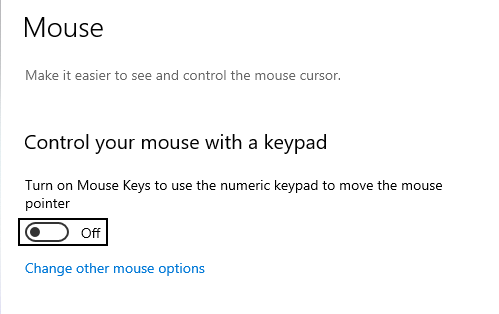
It seems like there is an odd bug between Windows 10 build 1903 and MS Paint. I had a pbrush window open and had selected some of the image (something I was pasting into a usage document). Somehow the “arrow keys move this selection around in pbrush” translated into the arrow keys moving my mouse pointer around everywhere else. Simply closing pbrush sorted the problem.
It’s not something I can reproduce at will — opening pbrush, pasting in whatever screen shot I’ve got in my clipboard, selecting and grabbing a section of it … and the arrow keys are not moving the mouse pointer. But some combination of this process has, twice today, caused the arrow keys to move the mouse pointer. At least it’s an easy fix 🙂
Git: Using Soft Reset To Clean Up Un-pushed Commits
I missed a file when I was cleaning up debugging lines. I made the change and included it in a second commit, but I’d rather not have two commits for the same purpose. I hadn’t pushed my changes yet, so these commits only exist on my workstation … which means I can reset and bundle the changes into a single commit.

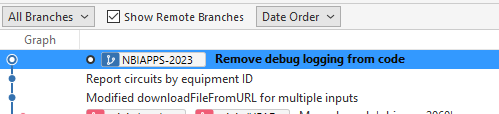
Find commit number that is one before the duplicate debug logging cleanup — this is the point to which you want to reset. In my case, it is the commit start with b443348c

Reset there with “–soft” — this doesn’t change anything on the file system (i.e. I don’t have to clean up those debug lines again) but puts the changes back into the staging area.

Now those files are staged again, so I can make a single commit for removing debug logging from my code.
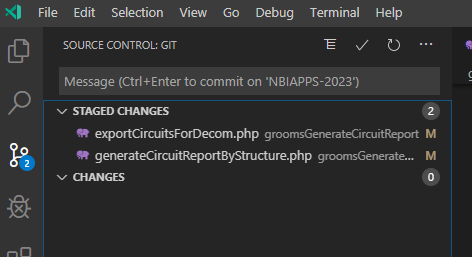
Voila! I can push these changes and not clutter our history with my error.
No Durians
We stopped by CAM International Market on Saturday to see if they’ve got bat nuts, find fruit I don’t find at the local supermarket, and pick up a few expensive-elsewhere items (sesame oil!). Scott spotted a large, pokey looking fruit and asked if we should get one of those. Durian, the sign said … and I had to stop for a second because I don’t think I’ve had those before. And then I remembered where I’d heard the name …

The Singapore subway banned them because the odor was so offensive. And some people loved the things. We did not get the big durian fruit. Or the smaller vacuum sealed pack of durian flesh. He spotted durian-stuff a few more times and kept asking if we should try that. Finally, we happened across some mochi balls with durian ice cream. If you’re going to eat something with a stench awful enough that a subway system would bother banning it … a bit of it in ice cream is probably the way to go, so yeah … we’ll try it. There were four balls, just enough for each of us to have one.
I diced up a few persimmons — something that I knew was sweet and tasty — as a chaser. One ball out of the package in a bowl, and it smelled floral with a hint of not-so-good onions to me. But my nose doesn’t pick up a lot of chemicals and I figured, honestly, I’d be among those who don’t notice the smell. Scott tried a bite. He gave Anya a bite (and why didn’t we think to record this? She make an incredible YUCK face before and after trying it). I tried a bite. It was not good. The flavor was very onion-y with a sweetness like caramelized onions. But onion and ice cream isn’t really something that goes together in my mind. Maybe durian with roasted pork, but dessert? Nope. And then the half-a-ball sat in its dish. It got stinkier as it warmed up. Until it was voted off the island and into the city sewers (sorry gators!).
None of this prepared me for the horror of durian burps. A terrible combination of sewage and onions coming back to haunt me. Or sitting next to someone with a durian burp and thinking the stench has somehow lodged itself in my nasal passages. It was a good twelve hours before I wasn’t experiencing durian again.
Which makes me wonder … What in the world does a durian plantation smell like? I have fond memories of driving along the Nile at sunset and smelling sugar cane on the air. Even if the smell is significantly reduced in the whole fruit, a whole plantation of the things baking in the sun?!? And what does this stuff smell like if it’s gone bad? Does it rot and smell better? Or is it sewage and gym socks without the floral undertone?
But it was an entertaining experience. We’ve all had our lifetime supply of durian. And there are still three of these things in the freezer 🙂
Did you know you can control who can present during a Teams Meeting?
Did you know you can control who can present during a Teams Meeting? As of Dec 2019, you can!
There were a few cool Teams features that, when used inappropriately, disrupt the meeting. Anyone can mute other attendees — great when I notice someone is taking another call and can mute them; not great if I accidentally mute the presenter. Anyone can share their screen — great when we’re taking turns showing something and don’t need to transfer control; not great when you accidentally share your screen in the middle of someone’s presentation. And this occurs during meetings among respectful, professional business associates. The amount of control individual meeting participants get invite goofing off (while you can tell who just took over presenting, you cannot tell who just muted you for the seventh time).
Microsoft has introduced “roles” for meetings. As the meeting organizer, you can establish who has what role. By default (i.e. when you don’t define any roles), everyone can do everything. But, after you create the meeting, you can edit it and select “Meeting Options”
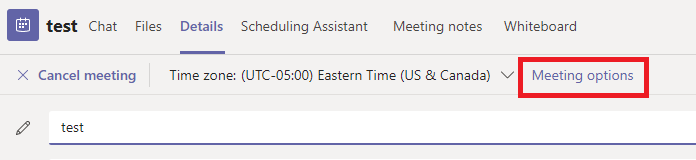
Two options will be presented — you can control who can bypass the lobby (avoid having external parties waiting if you anticipate their attendance) and define who can present. The terminology is a bit odd here, but this is the selection that defines who has what roles within a meeting.
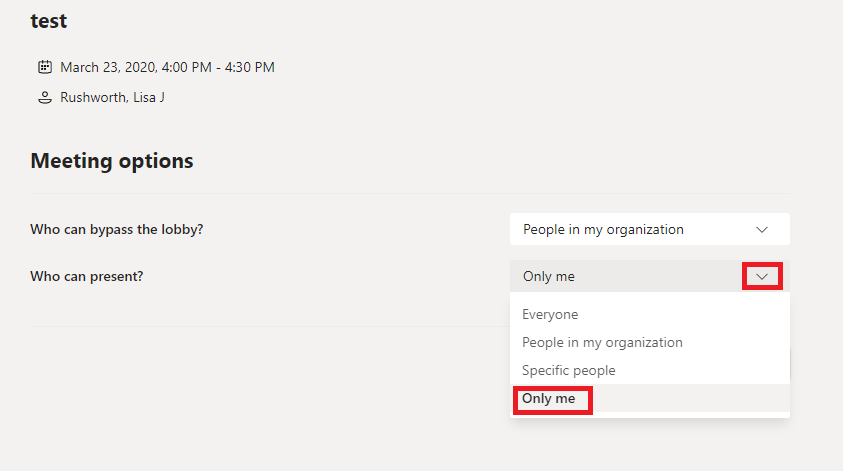
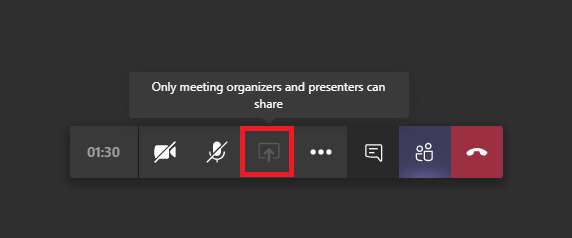
As the person who scheduled the meeting, you are the organizer — you can elect to only allow yourself to present. If you select to allow “Specific people” or “People in my organization” to present, they are assigned the “presenter” role. Everyone else is an “attendee”. What can a presenter or attendee do? Consult the MS documentation for a complete list. The big ones, though … an attendee cannot share their screen. The option is grayed out, and they’ll be advised that only organizers and presenters can share.
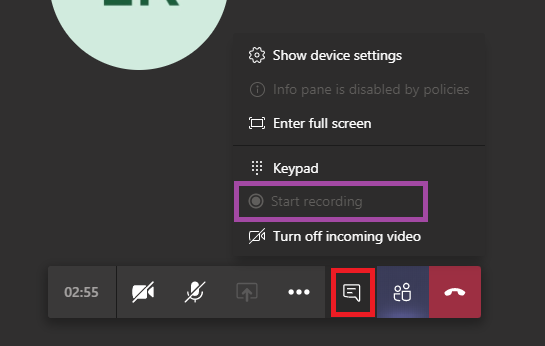
Attendees cannot start or stop recording — the option, again, is grayed out.
And attendees cannot mute or unmute anyone through the participant listing. This means they cannot mute someone else — the microphone icon will disappear when they put their mouse over it. But it also means they cannot mute or unmute themselves here. They will need to use the meeting control bar to mute or unmute.
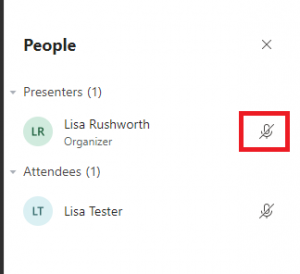
What if you’ve restricted someone as an attendee and need them to share their screen? You can modify their role in the participant listing — mouse over their listing and use the ellipsis to select “More options” and select “Make presenter” (or, if you wish to demote a presenter to attendee status, select “Make attendee”).