Tag: dnf5

Fedora 43 to 44 upgrade: dnf5 plugin load failure after upgrade

After completing an in-place upgrade from Fedora 43 to Fedora 44, dnf5 failed to run with this error:

[lisa@fedora05 ~]# dnf5 update
Cannot load dnf5 plugin: /usr/lib64/dnf5/plugins/automatic_cmd_plugin.so
Cannot load shared library “/usr/lib64/dnf5/plugins/automatic_cmd_plugin.so”: libdnf5-cli.so.2: cannot open shared object file: No such file or directory

What happened

The Fedora 44 upgrade completed, and the installed dnf5 packages were all current Fedora 44 versions. However, there was a leftover plugin file still sitting in /usr/lib64/dnf5/plugins/automatic_cmd_plugin.so.

That file was not owned by any RPM package and had been built against an older library, libdnf5-cli.so.2.

But Fedora 44 had /usr/lib64/libdnf5-cli.so.3.

dnf5 was trying to load a stale plugin from before the upgrade.

How I verified it

These commands showed the problem:

ls -l /usr/lib64/libdnf5-cli.so*
rpm -qf /usr/lib64/dnf5/plugins/automatic_cmd_plugin.so
ldd /usr/lib64/dnf5/plugins/automatic_cmd_plugin.so

Results:

  • libdnf5-cli.so.3 existed
  • automatic_cmd_plugin.so was not owned by any package
  • ldd showed it was looking for libdnf5-cli.so.2

Fix

Remove the orphaned plugin file:

rm /usr/lib64/dnf5/plugins/automatic_cmd_plugin.so
ldconfig
dnf5 update

After deleting the stale plugin, dnf5 worked normally again.

Root cause

This appears to be a leftover orphaned dnf5 plugin from before the major version upgrade. Even though the main dnf5 and libdnf5 packages were updated correctly, dnf5 still tried to load the old .so file it found in the plugins directory.
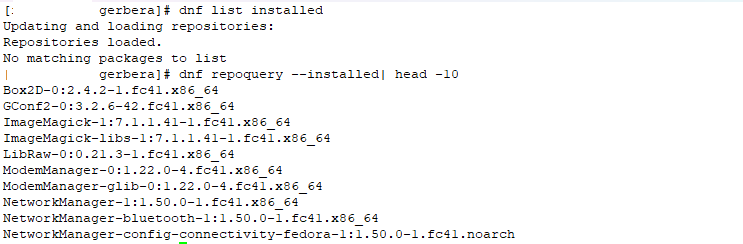
Fedora 41 – Using DNF to List Installed Packages

We upgraded all of our internal servers to Fedora 41 after a power outage yesterday — had a number of issues to resolve (the liblockdev legacy config reverted so OpenHAB no longer could use USB serial devices, the physical server was swapping 11GB of data even though it had 81GB of memory free, and our Gerbera installation requires some libspdlog.so.1.12 which was updated to version 1.14 with the Fedora upgrade.

The last issue was more challenging to figure out because evidently DNF is now DNF5 and instead of throwing an error like “hey, new version dude! Use the new syntax” when you use an old command to list what is installed … it just says “No matching packages to list”. Like there are no packages installed? Since I’m using bash, openssh, etc … that’s not true.

Luckily, the new syntax works just fine. dnf repoquery –installed

Also:

dnf5 repoquery –available
dnf5 repoquery –userinstalled

DNF – Listing Contents of Package Prior to Installation

Voila! Well, install dnf-utils and then

[lisa@linux03 lisa]# repoquery –list gerbera
Last metadata expiration check: 0:00:48 ago on Mon 27 Dec 2024 12:04:05 PM EST.
/etc/gerbera
/etc/gerbera/config.xml
/etc/gerbera/gerbera.db
/etc/gerbera/gerbera.html
/etc/logrotate.d
/etc/logrotate.d/gerbera
/usr/bin/gerbera
/usr/lib/.build-id
/usr/lib/.build-id/8e
/usr/lib/.build-id/8e/cba8f3a7f9db93d01a462f31a8270f1c8ff975
/usr/lib/systemd/system/gerbera.service
/usr/lib/sysusers.d/gerbera.conf
/usr/share/doc/gerbera
/usr/share/doc/gerbera/AUTHORS
/usr/share/doc/gerbera/CONTRIBUTING.md
/usr/share/doc/gerbera/ChangeLog.md
/usr/share/licenses/gerbera
/usr/share/licenses/gerbera/LICENSE.md
/usr/share/man/man1/gerbera.1.gz
/var/log/gerbera