This example uses Kerberos for SSO authentication using Docker-ized NGINX. To instantiate the sandbox container, I am mapping the conf.d folder into the container and publishing ports 80 and 443
docker run -dit --name authproxy -v /usr/nginx/conf.d:/etc/nginx/conf.d -p 80:80 -p 443:443 -d centos:latest
Shell into the container, install Kerberos, and configure it to use your domain (in this example, it is my home domain.
docker exec -it authproxy bash
# Fix the repos – this is a docker thing, evidently …
cd /etc/yum.repos.d/
sed -i 's/mirrorlist/#mirrorlist/g' /etc/yum.repos.d/CentOS-*
sed -i 's|#baseurl=http://mirror.centos.org|baseurl=http://vault.centos.org|g' /etc/yum.repos.d/CentOS-*
# And update everything just because
dnf update
# Install required stuff
dnf install vim wget git gcc make pcre-devel zlib-devel krb5-devel
Install NGINX from source and include the spnego-http-auth-nginx-module module
wget http://nginx.org/download/nginx-1.21.6.tar.gz
gunzip nginx-1.21.6.tar.gz
tar vxf nginx-1.21.6.tar
cd nginx-1.21.6/
git clone https://github.com/stnoonan/spnego-http-auth-nginx-module.git
dnf install gcc make pcre-devel zlib-devel krb5-devel
./configure --add-module=spnego-http-auth-nginx-module
make
make install
Configure Kerberos on the server to use your domain:
root@aadac0aa21d5:/# cat /etc/krb5.conf
includedir /etc/krb5.conf.d/
[logging]
default = FILE:/var/log/krb5libs.log
kdc = FILE:/var/log/krb5kdc.log
admin_server = FILE:/var/log/kadmind.log
[libdefaults]
dns_lookup_realm = false
ticket_lifetime = 24h
renew_lifetime = 7d
forwardable = true
rdns = false
default_realm = EXAMPLE.COM
# allow_weak_crypto = true
# default_tgs_enctypes = arcfour-hmac-md5 des-cbc-crc des-cbc-md5
# default_tkt_enctypes = arcfour-hmac-md5 des-cbc-crc des-cbc-md5
default_ccache_name = KEYRING:persistent:%{uid}
[realms]
EXAMPLE.COM= {
   kdc = DC01.EXAMPLE.COM
   admin_server = DC01.EXAMPLE.COM
}
Create a service account in AD & obtain a keytab file:
ktpass /out nginx.keytab /princ HTTP/docker.example.com@example.com -SetUPN /mapuser nginx /crypto AES256-SHA1 /ptype KRB5_NT_PRINCIPAL /pass Th2s1sth3Pa=s -SetPass /target dc01.example.com
Transfer the keytab file to the NGINX server. Add the following to the server{} section or location{} section to require authentication:
auth_gss on;
auth_gss_keytab /path/to/nginx/conf/nginx.keytab;
auth_gss_delegate_credentials on;
You will also need to insert header information into the nginx config:
proxy_pass http://www.example.com/authtest/;
proxy_set_header Host "www.example.com"; # I need this to match the host header on my server, usually can use data from $host
proxy_set_header X-Original-URI $request_uri; # Forward along request URI
proxy_set_header X-Real-IP $remote_addr; # pass on real client's IP
proxy_set_header X-Forwarded-For "LJRAuthPrxyTest";
proxy_set_header X-Forwarded-Proto $scheme;
proxy_set_header Authorization $http_authorization;
proxy_pass_header Authorization;
proxy_set_header X-WEBAUTH-USER $remote_user;
proxy_read_timeout 900;
Run NGINX: /usr/local/nginx/sbin/nginx
In and of itself, this is the equivalent of requiring authentication – any user – to access a site. The trick with an auth proxy is that the server must trust the header data you inserted – in this case, I have custom PHP code that looks for X-ForwardedFor to be “LJRAuthPrxyTest” and, if it sees that string, reads X-WEBAUTH-USER for the user’s logon name.
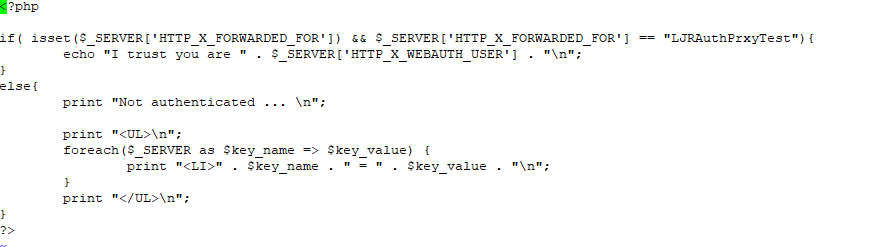
In my example, the Apache site is configured to only accept connections from my NGINX instance:
<RequireAll>
     Require ip 10.1.3.5
</RequireAll>
This prevents someone from playing around with header insertion and spoofing authentication.
Some applications allow auth proxying, and the server documentation will provide guidance on what header values need to be used.