Producer
package com.example;

import org.apache.kafka.clients.producer.KafkaProducer;
import org.apache.kafka.clients.producer.ProducerRecord;
import org.apache.kafka.clients.producer.ProducerConfig;
import org.apache.kafka.common.serialization.StringSerializer;

import java.io.InputStream;
import java.time.LocalDateTime;
import java.time.format.DateTimeFormatter;
import java.util.Properties;

public class SimpleKafkaProducer {

    public static void main(String[] args) {
        if (args.length < 2) {
            System.err.println("Please provide Kafka server and port. Usage: SimpleKafkaProducer <kafka-server> <port>");
            System.exit(1);
        }

        String kafkaHost = args[0];
        String kafkaPort = args[1];
        String kafkaServer = kafkaHost + ":" + kafkaPort;
        String topicName = "LJRJavaTest";
        String truststorePassword = "truststore-password";

        Properties props = new Properties();
        props.put(ProducerConfig.BOOTSTRAP_SERVERS_CONFIG, kafkaServer);
        props.put(ProducerConfig.KEY_SERIALIZER_CLASS_CONFIG, StringSerializer.class.getName());
        props.put(ProducerConfig.VALUE_SERIALIZER_CLASS_CONFIG, StringSerializer.class.getName());

        // Load truststore from resources
        try (InputStream truststoreStream = SimpleKafkaProducer.class.getResourceAsStream("/kafka.client.truststore.jks")) {
            if (truststoreStream == null) {
                throw new RuntimeException("Truststore not found in resources");
            }

            // Create a temporary file to hold the truststore
            java.nio.file.Path tempTruststore = java.nio.file.Files.createTempFile("kafka.client.truststore", ".jks");
            java.nio.file.Files.copy(truststoreStream, tempTruststore, java.nio.file.StandardCopyOption.REPLACE_EXISTING);

            props.put("security.protocol", "SSL");
            props.put("ssl.truststore.location", tempTruststore.toString());
            props.put("ssl.truststore.password", truststorePassword);

            KafkaProducer<String, String> producer = new KafkaProducer<>(props);

            // Define the date-time formatter
            DateTimeFormatter formatter = DateTimeFormatter.ofPattern("yyyyMMdd 'at' HH:mm:ss");

            try {
                for (int i = 0; i < 10; i++) {
                    String key = "Key-" + i;

                    // Get the current timestamp
                    String timestamp = LocalDateTime.now().format(formatter);

                    // Include the timestamp, Kafka host, and port in the message value
                    String value = String.format("Message-%d (Test from %s on server %s:%s)", i, timestamp, kafkaHost, kafkaPort);

                    ProducerRecord<String, String> record = new ProducerRecord<>(topicName, key, value);
                    producer.send(record);
                    System.out.println("Sent message: (" + key + ", " + value + ")");
                }
            } catch (Exception e) {
                e.printStackTrace();
            } finally {
                producer.close();
            }
        } catch (Exception e) {
            e.printStackTrace();
        }
    }
}
Consumer
package com.example;

import org.apache.kafka.clients.consumer.ConsumerConfig;
import org.apache.kafka.clients.consumer.ConsumerRecords;
import org.apache.kafka.clients.consumer.KafkaConsumer;
import org.apache.kafka.clients.consumer.ConsumerRecord;
import org.apache.kafka.common.serialization.StringDeserializer;

import java.io.InputStream;
import java.time.Duration;
import java.util.Collections;
import java.util.Properties;

public class SimpleKafkaConsumer {

    public static void main(String[] args) {
        if (args.length < 2) {
            System.err.println("Please provide Kafka server and port. Usage: SimpleKafkaConsumer <kafka-server> <port>");
            System.exit(1);
        }

        String kafkaServer = args[0] + ":" + args[1];
        String topicName = "LJRJavaTest";
        String groupId = "test-consumer-group";
        String truststorePassword = "truststore-password";

        Properties props = new Properties();
        props.put(ConsumerConfig.BOOTSTRAP_SERVERS_CONFIG, kafkaServer);
        props.put(ConsumerConfig.GROUP_ID_CONFIG, groupId);
        props.put(ConsumerConfig.KEY_DESERIALIZER_CLASS_CONFIG, StringDeserializer.class.getName());
        props.put(ConsumerConfig.VALUE_DESERIALIZER_CLASS_CONFIG, StringDeserializer.class.getName());
        props.put(ConsumerConfig.AUTO_OFFSET_RESET_CONFIG, "earliest");

        // Load truststore from resources
        try (InputStream truststoreStream = SimpleKafkaConsumer.class.getResourceAsStream("/kafka.client.truststore.jks")) {
            if (truststoreStream == null) {
                throw new RuntimeException("Truststore not found in resources");
            }

            // Create a temporary file to hold the truststore
            java.nio.file.Path tempTruststore = java.nio.file.Files.createTempFile("kafka.client.truststore", ".jks");
            java.nio.file.Files.copy(truststoreStream, tempTruststore, java.nio.file.StandardCopyOption.REPLACE_EXISTING);

            props.put("security.protocol", "SSL");
            props.put("ssl.truststore.location", tempTruststore.toString());
            props.put("ssl.truststore.password", truststorePassword);

            KafkaConsumer<String, String> consumer = new KafkaConsumer<>(props);
            consumer.subscribe(Collections.singletonList(topicName));

            try {
                while (true) {
                    ConsumerRecords<String, String> records = consumer.poll(Duration.ofMillis(100));
                    for (ConsumerRecord<String, String> record : records) {
                        System.out.printf("Consumed message: (key: %s, value: %s, offset: %d, partition: %d)%n",
                                record.key(), record.value(), record.offset(), record.partition());
                    }
                }
            } catch (Exception e) {
                e.printStackTrace();
            } finally {
                consumer.close();
            }
        } catch (Exception e) {
            e.printStackTrace();
        }
    }
}
Keystore for Trusts
The cert on my Kafka server is signed by a CA that has both a root and intermediary signing certificate. To trust the chain, I need to populate rootCA.crt and intermediateCA.crt files with the correct base64 encoded public key and import both files into a new trust store:
keytool -importcert -file rootCA.crt -keystore kafka.client.truststore.jks -alias rootCA -storepass truststore-password

keytool -importcert -file intermediateCA.crt -keystore kafka.client.truststore.jks -alias intermediateCA -storepass truststore-password
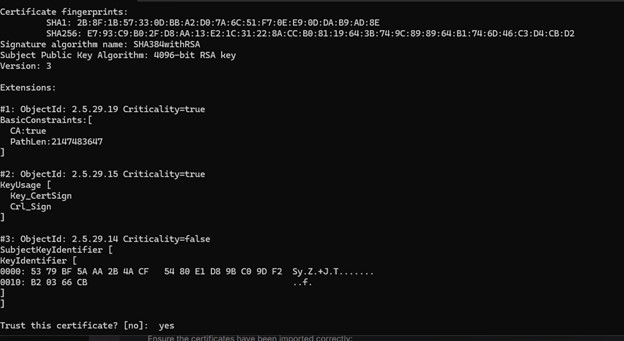
Then list certs in the trust store to verify the import was successful:
keytool -list -keystore kafka.client.truststore.jks -storepass truststore-password
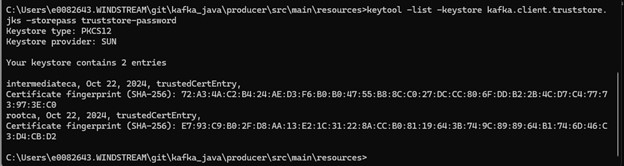
And place the jks keystore with the CA certs in project:
C:.
│   pom.xml
│
├───src
│   └───main
│       ├───java
│       │   └───com
│       │       └───example
│       │               SimpleKafkaProducer.java
│       │
│       └───resources
│               kafka.client.truststore.jks
Build and Run
Create a pom.xml for the build
<project xmlns="http://maven.apache.org/POM/4.0.0"
         xmlns:xsi="http://www.w3.org/2001/XMLSchema-instance"
         xsi:schemaLocation="http://maven.apache.org/POM/4.0.0 http://maven.apache.org/xsd/maven-4.0.0.xsd">
    <modelVersion>4.0.0</modelVersion>

    <groupId>com.example</groupId>
    <artifactId>kafka-producer-example</artifactId>
    <version>1.0-SNAPSHOT</version>

    <properties>
        <maven.compiler.source>1.8</maven.compiler.source>
        <maven.compiler.target>1.8</maven.compiler.target>
    </properties>

    <dependencies>
        <!-- Kafka client dependency -->
        <dependency>
            <groupId>org.apache.kafka</groupId>
            <artifactId>kafka-clients</artifactId>
            <version>3.0.0</version>
        </dependency>
    </dependencies>

    <build>
        <plugins>
            <!-- Compiler plugin to ensure Java 8 compatibility -->
            <plugin>
                <groupId>org.apache.maven.plugins</groupId>
                <artifactId>maven-compiler-plugin</artifactId>
                <version>3.8.1</version>
                <configuration>
                    <source>1.8</source>
                    <target>1.8</target>
                </configuration>
            </plugin>
            <!-- Exec Maven Plugin to run the Java class -->
            <plugin>
                <groupId>org.codehaus.mojo</groupId>
                <artifactId>exec-maven-plugin</artifactId>
                <version>3.0.0</version>
                <configuration>
                    <mainClass>com.example.SimpleKafkaProducer</mainClass>
                </configuration>
            </plugin>
        </plugins>
    </build>
</project>
Build using `mvn clean package`
Run the producer using ` mvn exec:java -Dexec.mainClass=”com.example.SimpleKafkaProducer” -Dexec.args=”kafkahost.example.net 9095″`
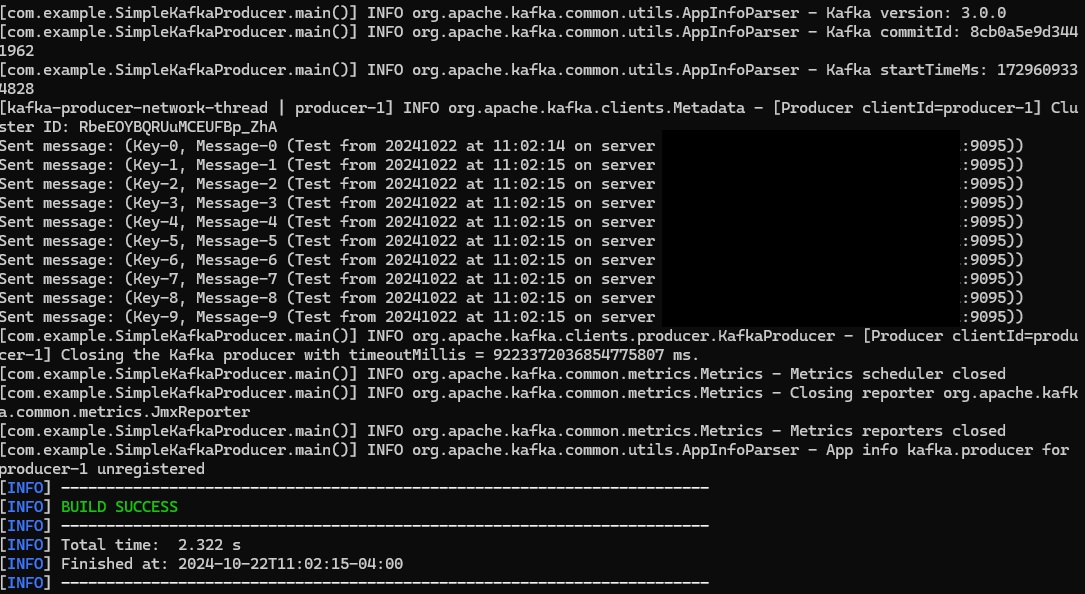
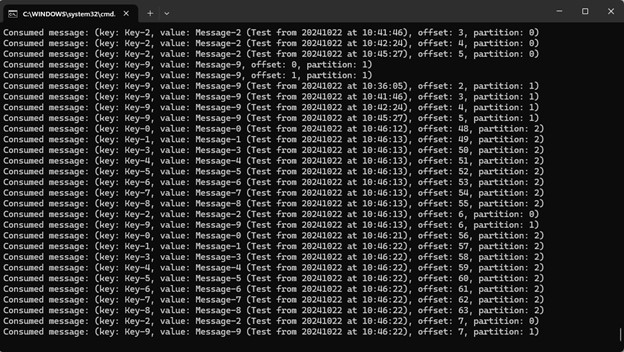
Run the consumer using ` mvn exec:java -Dexec.mainClass=”com.example.SimpleKafkaConsumer” -Dexec.args=”kafkahost.example.net 9095″`