This is amazing — and every one I’ve looked at so far includes a download option … https://3d.si.edu/explore
Category: Technology
Token Usage Efficiency
Whenever I hear people start to talk about efficient token usage — the same people who, a year ago, were USE IT, USE IT, USE IT!!!! Don’t think about where AI is appropriate and where it isn’t! who are now decreeing that all AI usage should be well thought out to see if it even needs AI, done in the most efficient manner possible, etc — I think about early mobile phones. Specifically the big bag that went in a car. I knew so many people who got one and would call from the driveway or garage to say “hey, honey, guess where I’m calling from!” Which was less funny the nineteenth time the answer was “just pulled into the driveway” or “the garage!!!”.
And then they got their first bill. Now, folks buying the bag phone generally weren’t ruined by a one-off thousand dollar airtime bill. But they were shocked by it (and stopped calling from the garage).
The past year has been the “guess where I’m calling from!” Stage of AI. And I think someone just saw the bill!
An example we used to use in programming class — the question is “2+3”. Writing 5 is the “scored 100%” answer. You were never asked to write a program. Now, if someone writes a program (which is an inefficient way to solve the problem) and takes user input … they’ll get a good score too. Hard code the 2 and 3 at the top as variables used subsequently (i.e. identify the probability that the next time this code is used, you may want to add 7 and 284), that’s OK too.
The guy who writes this? 75% – mediocre work.
#include <iostream>
int main() {
     std::cout << 2 + 3 << '\n';
     return 0;
}
Well, maybe lower for failure to document the code. I’ve been asking an analogous question about AI since it first hit mainstream. The Ducks, Google, etc all have AI enhanced answers to web searches. Sometimes it’s enlightening, enriching, and useful … but it’s often the high resource approach to answering a straight forward question. It would make a lot more sense to have the “enhance your answer with AI!!!” button at the top and only incur the usage when the top couple of web results don’t already answer the question.
Does it make sense to have an AI agent generate a weekly report? No! Ask for a script that will generate the report (a one-time expense) and schedule execution of that script. The results don’t change (well, if the source data changes the script may need to be updated to continue working). Does it make sense to have an AI count the number of times “ThisString” occurs in your spreadsheet data? No! Use countif() and the spreadsheet can do this for you.
Flatpak – Escaping the Sandbox
We’ve been running Cura from a flatpak because the rpm distributed version was out of date. The big drawback, though, is that this flatpak could not see the files from network mounts. The mount is fine – in fstab, same user account can interact with those files in other applications. Just not this flatpak thing.
Turns out that’s normal – flatpaks operate in a sort of sandbox. You just have to tell it to let an individual flatpak access the location where the network mounts are. In this case, the /mnt path:
flatpack override com.ultimaker.cura --filesystem=/mnt
Extracting Base 64 Encoded Certificate Files with OpenSSL CLI
Quick command to get the base-64 encoded certificate — useful for establishing trust with AD DS domain controllers
openssl s_client -connect dc5.example.com:636 -showcerts </dev/null 2>/dev/null | awk ‘BEGIN{c=0} /BEGIN CERTIFICATE/{c++} c==1{print} /END CERTIFICATE/ && c==1{exit}’
MiniPlasma Mitigation
Microsoft Windows Cloud Files Mini Filter Driver Elevation of Privilege Vulnerability (alternately referred to as MiniPlasma) is one of those findings that is a little confusing. The vulnerability appears tied to an issue Microsoft originally addressed in 2020, which raises the obvious question: if it was already patched, why is it relevant again now?
The original fix may have closed a specific exploitation path without fully eliminating the underlying bug class. The remediation may have been incomplete. Or a later code change may have reintroduced a previously fixed condition. Without updated vendor detail, it is hard to say exactly which of those happened; but the operational conclusion is the same: a system can still be exposed today even if the original 2020 patch was installed.
For environments looking for a practical mitigation, the good news is that many servers do not need Windows Cloud Files functionality at all. The vulnerable component is the Cloud Files Mini Filter Driver (CldFlt), which supports placeholder and hydration behavior used by features such as OneDrive Files On-Demand and other CfAPI-based integrations.
That makes CldFlt a viable mitigation target. If the filter is loaded but not attached to any volumes, there is a good chance it can be safely unloaded and disabled. This does not remove the driver from disk, but it does remove the active kernel attack surface associated with the running minifilter. Since this is an elevation-of-privilege issue, that distinction matters: the goal is not to claim the file no longer exists, but to prevent the vulnerable driver from being active in the system.
The following process checks whether any volumes are associated with CldFlt, temporarily unloads the filter, verifies that the system continues functioning normally, and then disables the driver persistently.
REM Check instances on CldFlt — if 0, proceed with testing disablement
fltmc filters
REM Example output:
REM Filter Name Num Instances Altitude Frame
REM —————————— ————- ———— —–
REM bindflt 0 409800 0
REM MsSecFlt 9 385600 0
REM CSAgent 9 321410.78870 0
REM storqosflt 0 244000 0
REM wcifs 0 189900 0
REM CldFlt 0 180451 0
REM FileCrypt 0 141100 0
REM UnionFS 0 130850 0
REM npsvctrig 1 46000 0
REM Wof 1 40700 0
REM Unload cldflt
fltmc unload cldflt
REM Verify stopped
sc query cldflt
REM Verify no longer in filters list
fltmc filters
REM Verify applications and expected file operations still work normally
REM If everything looks good, disable persistent startup
sc config cldflt start= disabled
Fedora 43 to 44 upgrade: dnf5 plugin load failure after upgrade
After completing an in-place upgrade from Fedora 43 to Fedora 44, dnf5 failed to run with this error:
[lisa@fedora05 ~]# dnf5 update
Cannot load dnf5 plugin: /usr/lib64/dnf5/plugins/automatic_cmd_plugin.so
Cannot load shared library “/usr/lib64/dnf5/plugins/automatic_cmd_plugin.so”: libdnf5-cli.so.2: cannot open shared object file: No such file or directory
What happened
The Fedora 44 upgrade completed, and the installed dnf5 packages were all current Fedora 44 versions. However, there was a leftover plugin file still sitting in /usr/lib64/dnf5/plugins/automatic_cmd_plugin.so.
That file was not owned by any RPM package and had been built against an older library, libdnf5-cli.so.2.
But Fedora 44 had /usr/lib64/libdnf5-cli.so.3.
dnf5 was trying to load a stale plugin from before the upgrade.
How I verified it
These commands showed the problem:
ls -l /usr/lib64/libdnf5-cli.so*
rpm -qf /usr/lib64/dnf5/plugins/automatic_cmd_plugin.so
ldd /usr/lib64/dnf5/plugins/automatic_cmd_plugin.so
Results:
libdnf5-cli.so.3existedautomatic_cmd_plugin.sowas not owned by any packagelddshowed it was looking forlibdnf5-cli.so.2
Fix
Remove the orphaned plugin file:
rm /usr/lib64/dnf5/plugins/automatic_cmd_plugin.so
ldconfig
dnf5 update
After deleting the stale plugin, dnf5 worked normally again.
Root cause
This appears to be a leftover orphaned dnf5 plugin from before the major version upgrade. Even though the main dnf5 and libdnf5 packages were updated correctly, dnf5 still tried to load the old .so file it found in the plugins directory.
Kafbat – OAUTH With RBAC
I encountered a challenge with a Kafka management tool — it supports SSO, and I was able to get an OAUTH connection set up to control what users could see when logging in through the UI, but the API component didn’t extract information from the bearer token and there was nothing in the rbac mapping to allow the bearer-token client ID to access anything.
Updates to allow the /api components to be authenticated by simple bearer tokens and a client ID mapped into a role are at https://github.com/ljr55555/kafka-ui
AuthorizationController.java was updated to properly support non-browser, machine-principal auth.
Added/fixed:
- avoids null failure when
authentication.getName()is missing - resolves principal name from alternate attributes such as:
client_idsubusername
- updated displayed permissions logic so
/api/authorizationuses the same effective RBAC matching idea as the backend
Result
/api/authorization now works for bearer-token API callers and shows:
- username = client ID
- populated permissions list
AccessControlService.java
Added support for API bearer-token principals
Previously, getUser() only worked when the authenticated principal was a RbacUser, which covered the browser/user flow.
Now it can also derive an AuthenticatedUser from opaque-token authenticated principals by extracting:
- principal name
- group-like values from attributes/authorities if present
Updated role matching logic
Previously, role matching was only role name matches one of user.groups(). Now it also supports role name matches user.principal(). That enables RBAC binding directly to the API client ID.
Result
RBAC now works for:
- normal browser users via groups
- API bearer-token callers via client principal name
DynamicConfigMapper.java
Fixed a mapper bug.
Before
The method mapping resource server config created a populated OAuth2ResourceServerProperties result object but always returned null.
After
It now returns result.
Result
Dynamic/config mapping for resource-server settings no longer silently discards the mapped object.
Build/package note
To preserve the browser UI, the jar needs to be built with frontend included — which you know if you read the doc … or you take my route, start it all up, test the API successfully, and then get baffled that the user UI throws
bash./gradlew clean assemble -Pinclude-frontend=true
application.yml
server:
  port: 8443
  ssl:
    enabled: true
    key-store: file:/etc/kafkaui/certs/kafbat.rushworth.us.p12
    key-store-password: ${KEYSTORE_PASSWORD}
    key-store-type: PKCS12
    key-alias: kafbat

auth:
  type: OAUTH2
  oauth2:
    client:
      pingfed:
        client-id: ${OAUTH_CLIENT_ID}
        client-secret: ${OAUTH_CLIENT_SECRET}
        scope:
          - openid
          - profile
          - email
        client-name: oauthclient
        provider: oauthclient
        redirect-uri: https://kafbat.rushworth.us:8443/login/oauth2/code/oauthclient
        authorization-grant-type: authorization_code
        issuer-uri: https://login.example.com
        jwk-set-uri: https://login.example.com/pf/JWKS
        authorization-uri: https://login.example.com/as/authorization.oauth2
        token-uri: https://login.example.com/as/token.oauth2
        user-info-uri: https://login.example.com/idp/userinfo.openid
        user-name-attribute: username
        custom-params:
          type: oauth
          roles-field: memberOf

    resource-server:
      opaque-token:
        client-id: ${OAUTH_CLIENT_ID}
        client-secret: ${OAUTH_CLIENT_SECRET}
        introspection-uri: https://login.example.com/as/introspect.oauth2

kafka:
  clusters:
    - name: test
      bootstrapServers: ${KAFKA_BOOTSTRAP_SERVERS}
roles.yml
rbac:
  roles:
    - name: "admins"
      clusters:
        - test
      subjects:
        - provider: oauth
          type: role
          value: "CN=KafbatAdmins,OU=SecurityGroups,DC=example,DC=com"
      permissions:
        - resource: applicationconfig
          actions: all

        - resource: clusterconfig
          actions: all

        - resource: topic
          value: ".*"
          actions: all

        - resource: consumer
          value: ".*"
          actions: all

        - resource: schema
          value: ".*"
          actions: all

        - resource: connect
          value: ".*"
          actions: all

        - resource: ksql
          actions: all

        - resource: acl
          actions: [ view ]

    - name: "${OAUTH_CLIENT_ID}"
      clusters:
        - test
      subjects:
        - provider: oauth
          type: user
          value: "${OAUTH_CLIENT_ID}"
      permissions:
        - resource: applicationconfig
          actions: all

        - resource: clusterconfig
          actions: all

        - resource: topic
          value: ".*"
          actions: all

        - resource: consumer
          value: ".*"
          actions: all

        - resource: schema
          value: ".*"

        - resource: connect
          value: ".*"
          actions: all

        - resource: ksql
          actions: all

        - resource: acl
          actions: [ view ]
docker-compose.yml
services:
  redpanda:
    image: redpandadata/redpanda:v25.1.2
    container_name: redpanda
    command:
      - redpanda
      - start
      - --overprovisioned
      - --smp=1
      - --memory=1G
      - --reserve-memory=0M
      - --node-id=0
      - --check=false
      - --kafka-addr=PLAINTEXT://0.0.0.0:9092
      - --advertise-kafka-addr=PLAINTEXT://redpanda:9092
    ports:
      - "9092:9092"

  kafbat-ui:
    image: ghcr.io/kafbat/kafka-ui:latest
    container_name: kafbat-ui
    restart: unless-stopped
    depends_on:
      - redpanda
    ports:
      - "8443:8443"
    volumes:
      - ./config/application.yml:/etc/kafkaui/application.yml:ro
      - ./config/roles.yml:/etc/kafkaui/roles.yml:ro
      - ./certs:/etc/kafkaui/certs:ro
    environment:
      SPRING_CONFIG_LOCATION: file:/etc/kafkaui/application.yml
      SPRING_CONFIG_ADDITIONAL_LOCATION: file:/etc/kafkaui/roles.yml
      KEYSTORE_PASSWORD: REDACTED
      OAUTH_CLIENT_ID: REDACTED
      OAUTH_CLIENT_SECRET: REDACTED
      KAFKA_BOOTSTRAP_SERVERS: redpanda:9092
Docker for Java Builds
Instead of flipping back and forth between java versions for various builds, you can just use a docker container for the proper Java version to run the build.
[lisa@docker kafka-ui]# docker run --rm -it   --user $(id -u):$(id -g)   -v "$PWD":/workspace   -w /workspace   eclipse-temurin:25   bash -lc './gradlew clean build'
Downloading https://services.gradle.org/distributions/gradle-9.2.0-bin.zip
............10%.............20%.............30%.............40%.............50%.............60%.............70%.............80%.............90%.............100%

Welcome to Gradle 9.2.0!

Here are the highlights of this release:
 - Windows ARM support
 - Improved publishing APIs
 - Better guidance for dependency verification failures

For more details see https://docs.gradle.org/9.2.0/release-notes.html

Starting a Gradle Daemon (subsequent builds will be faster)
<=============> 100% CONFIGURING [1m 46s]
> Resolve dependencies of :api:detachedConfiguration273
Tuya Bulbs and Broadcast Traffic
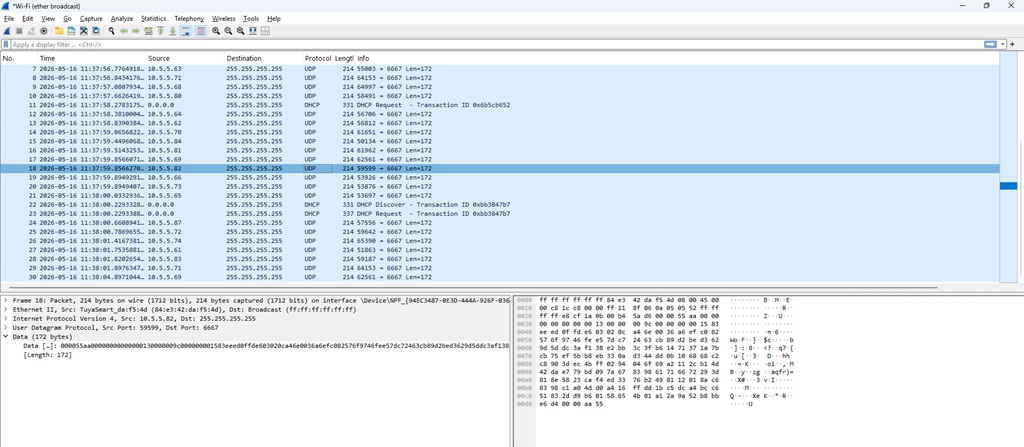
Looking at network slowness, I noticed a lot of overrun errors and an inexplicable amount of broadcast traffic. Running a sniffer trace … these tuya bulbs announce themselves in a constant loop. We’ll add a network filter for now, but some other firmware on these bulbs would be great!
Using polkit to allow non-priv user to restart service
As I work through automating certificate installation, most applications have a “service account” user that has write access to the SSL certificate files. However, that user does not generally have permission to restart the application service.
We could get the ID added to sudoers with specific rights to manage the service … but it seemed more straightforward to use Polkit for very granular control permitting the service account to run specific verbs with systemctl.
The following rule allows the “tomcatadmin” user to run systemctl start, stop, or restart with the apache-tomcat.service unit.
cat > /etc/polkit-1/rules.d/60-apache-tomcat-tomcatadmin.rules <<'EOF'
polkit.addRule(function(action, subject) {
    if (action.id == "org.freedesktop.systemd1.manage-units") {
        var unit = action.lookup("unit");
        var verb = action.lookup("verb");

        if (subject.user == "tomcatadmin" &&
            unit == "apache-tomcat.service" &&
            (verb == "start" || verb == "stop" || verb == "restart")) {
            return polkit.Result.YES;
        }
    }
});
EOF